
*Last updated June 2026. Re-verified every tool's pricing, refreshed each review with 2026 features, and rebuilt the comparison into a use-case table.
There are over 40 cold email outreach tools on the market right now, and most comparison articles make the choice harder instead of easier. They rank a shortlist loosely and leave you with the same problem you started with: which one actually fits how you work.
I've been running email outreach campaigns since 2015. I also work at Hunter, which makes one of the tools on this list, so I'll be straight about where it wins and where it loses. Everything else here I tested myself, checked against verified reviews on G2, Capterra, and Trustpilot, and ran past people who use these tools every day.
Not every tool here will be right for you. A solo founder sending 30 emails a week needs a different setup than an agency running 200,000 emails a month across 40 client accounts. Start with the comparison table below to find your match, then read only the reviews that matter to you.
Email outreach tools compared by use case
If you are… | Top pick | Realistic cost to run | Free to try |
|---|---|---|---|
After an all-in-one with a real free plan | Free to start; paid from $49/mo (warm-up is a per-inbox add-on) | Free plan | |
An agency that wants to launch fast | $47/mo sending only; ~$94–194/mo for the full stack (data + CRM + AI) | 14-day trial | |
An agency sending at serious scale | $39/mo entry; ~$94–174/mo at scale, plus deliverability add-ons | 14-day trial | |
On a budget but need unlimited inboxes | $25/mo entry; ~$69+/mo once you add the database and team features | 7-day trial | |
An in-house sales team that lives in its CRM | $89/user/mo, realistically ~$150+/user once you add LinkedIn and calling | 14-day trial | |
Betting on personalization as your edge | $79/seat email; ~$109/seat multichannel, plus add-ons (extra inboxes $9 each) | 14-day trial | |
After a tool you set up and forget | From ~$24/mo (500 prospects); scales with volume, no per-seat fees | 7-day trial | |
A tinkerer who tunes deliverability by hand | $49/mo entry; $99/mo for the real team tier (unlimited senders) | 14-day trial | |
A Gmail user who won’t leave the inbox | Free to test; $29.95/mo Standard, $39.95/mo Premium (sequences + API) | Free plan | |
An established team that wants one dependable tool | $59/user/mo for the usable tier; no free trial, billed upfront | None |
Comparison methodology
I picked the tools based on the following:
- My own experience with cold email software (we have a cumulated seven years of experience in cold emailing in the team),
- Internal user interviews we ran in the past 12 months (it's part of my job to keep track of cold email trends, and we use user feedback to stay updated),
- The tools that I see mentioned the most in private cold emailing communities such as the "SaaS Yacht Club" (WhatsApp group created by Jesse Ouelette), and the "Cold Email Closers" and "Cold Email & LinkedIn Outreach for your agency" Facebook groups.
To get a clear overview of the strengths and weaknesses of each software, I followed this methodology:
- I tested all these tools myself.
- Because we also value other users' opinions, I analyzed verified reviews on G2.com, Capterra, GetApp, and Trustpilot to complement my analysis.
- I asked cold email experts to step in and provide their thoughts on the tool they use the most.
Hunter Sequences
Best for: SMBs, in-house sales teams, and anyone who wants to find contacts, verify them, and send sequences without switching between three different tools.
Company background
We launched Hunter Sequences in 2019 to complement our other tools for email outreach (the Email Finder and the Email Verifier). Sequences were designed for teams that want an easy-to-use cold email tool, whether they’re new to cold email or have more experience.

Strengths
- Generous free plan with real sending capability: Anyone with a Hunter account can connect one Gmail or Outlook inbox and start sending immediately. The free plan includes up to 5 follow-up steps per sequence, open tracking, personalization, and access to 200+ cold email templates. No credit card needed.
- AI writing assistant: The AI assistant drafts and rewrites email copy directly inside the sequence editor. Because it's built for outreach rather than general writing, the output tends to need less editing than what you'd get from a generic AI tool. You can use it to draft from scratch, improve tone, adjust clarity, or restructure copy for better replies. Paid plans only.
- A/B testing: Test multiple subject lines or email body variants within the same sequence. Hunter automatically splits recipients between variants, tracks which performs best, and surfaces the winner in your reporting so you can apply it to future sends. Paid plans only.
- Email account rotation: Connect multiple inboxes and spread sending volume across them automatically. Individual accounts stay well below their daily limits, which protects sender reputation and lets you scale total sending capacity without risking any single domain. Paid plans only.
- Inbox Protection (email warm-up): Inbox Protection builds your sender reputation progressively over 30 days through real email engagement, then shifts into maintenance mode. It's a paid add-on billed per email account, not bundled into the base plan, so factor that into your cost estimate.
- Everything runs in one place: Find contacts with Discover, verify them, then launch sequences directly from the same dashboard. For teams currently juggling a prospecting tool, a verification tool, and a sending tool separately, this alone simplifies the workflow considerably.
- Hunter also handles the smaller stuff that adds up: email verification runs before sequences launch so invalid addresses are never scheduled, reply detection stops follow-ups the moment someone responds, out-of-office replies get tagged in the inbox automatically, and follow-ups thread directly under the original email. All of it works without any extra setup.
- CRM integrations: Native two-way sync with HubSpot. Salesforce, Pipedrive, and Zoho are supported too. Zapier covers 5,000+ endpoints for anything else, and the API is reliable for custom integrations.
- No limits on emails sent or active leads: Hunter Sequences doesn't cap how many emails you send or how many active leads you run at once. Worth verifying before you commit to any tool in this category.
Weaknesses
- Hunter Sequences is built for senders that bet on quality, not quantity, which is why some volume-focused features like spintax are intentionally not included.
- Inbox Protection is a paid add-on, not included in the base plan. If warm-up is a requirement, budget for it separately.
Pricing

The free plan covers one connected inbox, open tracking, personalization, templates, and up to 500 recipients per campaign. Paid plans start at $49/month and add A/B testing, AI writing, inbox rotation, link tracking, advanced reporting, SMTP connections, and custom tracking domains. Inbox Protection and managed email accounts are billed separately as add-ons.
Demo
My opinion
It's hard to be objective here, so take it with a pinch of salt. But the 2026 updates closed the gaps that used to hold Sequences back. A/B testing and the AI writing assistant mean it now competes on features, not just ease of use, and you can buy domains and sending-ready inboxes right inside the platform, which removes the part of cold email setup most people dread. The free plan still does real work too, with email finder and verification credits included, so you can prospect, verify, and send without stitching three tools together. If you want something you can learn in an afternoon and won't outgrow in six months, it's the one I'd start with.
The expert’s opinion
I’ve been using Hunter Sequences for two years now and have relied on it extensively to get new backlink opportunities. The product is easy to use, yet powerful. The two things I like the most are the Engagement screen, which helps me identify the warmest leads in a few clicks, and the Inbox which lets me find all our replies on a single screen. I’d recommend Hunter Sequences to any person who wants to send cold emails, whether you’re starting out or you’re already looking to scale your cold email strategy.

Saleshandy
Best for: High-volume senders and agencies that want unlimited inboxes, a verified lead database, and deliverability suite in one place. With domains, warm-up, and an 852M+ contact database built in, it's a real one-stop shop. Overkill if you already own a prospecting stack and just need a sequencing tool.
Company background
Dhruv Patel and Piyush Patel founded Saleshandy in 2015 and bootstrapped it the whole way. It started as a simple email tracking tool and grew into what they now call a complete outbound platform. You can buy domains and inboxes inside the tool, find leads from their contact database, run sequences across email, calls, LinkedIn, and WhatsApp, and manage replies in a built-in CRM. It's built for B2B sales teams and agencies that want the whole outbound workflow under one login.

Strengths
- Unlimited email accounts on every plan, so you're not charged per inbox (the main reason high-volume senders and agencies pick it)
- Warm-up is now built in and runs automatically in the background, with no third-party tool needed
- Email infrastructure inside the platform: buy domains and sending-ready mailboxes with SPF, DKIM, and DMARC pre-configured in about ten minutes
- A contact B2B database (Lead Finder) covering 42M+ companies with 50+ buying signals and 75+ filters, with every email verified before sending
- AI Sequence Copilot drafts a full sequence from your website and prospect list, subject lines and personalized openers included
- Five-channel sequences across email, calls, LinkedIn, WhatsApp, and tasks, with automatic channel-switching if a prospect goes quiet
- Spintax and A/B testing, a unified inbox, and a built-in CRM with a deal pipeline
- 2-way CRM sync with HubSpot, Pipedrive, and Zoho
Weaknesses
- It's become a sprawling all-in-one, and the newer channels (LinkedIn, WhatsApp) and the dialer aren't as battle-tested as dedicated tools
- The headline price only covers sending. The lead database, email verification, the dialer, and bought inboxes are paid add-ons, so the real cost climbs past the $25 entry fast
- Support is based in India, so teams in US or EU timezones can hit a lag on live help
Pricing
Saleshandy runs on four outreach plans, and every one of them includes unlimited email accounts and unlimited warm-up, so you're not paying per inbox the way you do with Mailshake or Lemlist. Starter is $25/month billed annually ($36 month-to-month) and covers 2,000 active prospects and 6,000 emails. Pro, the plan most teams land on, is $69/month annually ($99 monthly) and jumps to 30,000 prospects, 150,000 emails, A/B variant testing, and a unified inbox. Scale ($139/month annually, $199 monthly) adds agency whitelabel and SSO, and Scale Plus ($209/month annually, $299 monthly) goes up to 100,000 prospects with a dedicated success manager. Annual billing saves about 30% across the board, and there's a 7-day free trial with no card required.
One thing to watch: the plan price only covers sending. The 852M+ Lead Finder database, email verification, the dialer, inbox placement testing, and done-for-you domains and mailboxes are all separate add-ons. A solo sender stays around $25/month, but a team that wants the database and managed inboxes lands closer to $100+/month once those stack up. Budget for the add-ons, not just the plan.
Demo
My opinion
I used to file Saleshandy under "cheap starting point" but that's no longer fair. They've shipped fast over the last two years: native warm-up, an inbox placement test, bought-and-configured domains, a contact database, and multichannel across five channels. For an unlimited-inbox tool at $25/month, you get a lot for your money. If you send at volume and want most of your stack in one place, it's an easy tool to recommend.
The expert’s opinion
After years of working with virtually every cold email software available, we chose to transition to a platform that's not only tailored for cold email marketing but also excels in continuously adapting to the ever-changing, hyper-dynamic landscape of cold emails. This is particularly evident in the innovative approach they adopt and the exceptional level of support they provide. We genuinely feel that they are truly rooting for us to succeed.

Salesforge
Best for: GTM teams and agencies running cold email and LinkedIn outreach at scale. A strong fit if you want multiple senders, workspaces, and users without stacking several outreach tools.
Company background
Salesforge was founded in 2023 by Frank Sondors, Dovydas Volodko, and Daniel Sanchez. The founders met through Y Combinator's founder matching platform and launched Salesforge in June 2023.
The platform is built for GTM teams and agencies running outbound across email and LinkedIn. You can connect multiple sending accounts, build multichannel sequences, personalize messages with AI, warm up mailboxes, monitor deliverability, and manage replies from one place.

Strengths
- Unlimited email accounts and unlimited LinkedIn senders, so agencies and larger teams don't have to pay for every additional sender
- Unlimited workspaces and unlimited users, which makes it easier to manage multiple clients or outbound teams
- Multichannel sequences across cold email and LinkedIn, including connection requests, messages, InMails, follows, post likes, and conditional steps
- AI personalization in 21+ languages, including localized greetings and personalized email copy
- A deliverability suite with unlimited Warmforge warm-up, email validation, Bounce Shield, sender rotation, text-only sending, sender health monitoring, and dynamic ESP matching
- Primebox brings email and LinkedIn replies into one inbox, with manual, Co-Pilot, and Auto-Pilot reply options
- A/B testing, campaign analytics, API access, webhooks, MCP, CLI, and integrations with tools including HubSpot and Pipedrive
Weaknesses
- Salesforge focuses on email and LinkedIn, so teams that want calls, SMS, or WhatsApp inside the same sequence will need another tool
- Lead data isn't included in the Salesforge subscription. Leadsforge is a separate product
- Domains and sending mailboxes aren't included either, so Google Workspace, Microsoft 365, Mailforge, Primeforge, or Infraforge add to the total cost
- There is no permanent free plan, only a 14-day trial
Pricing
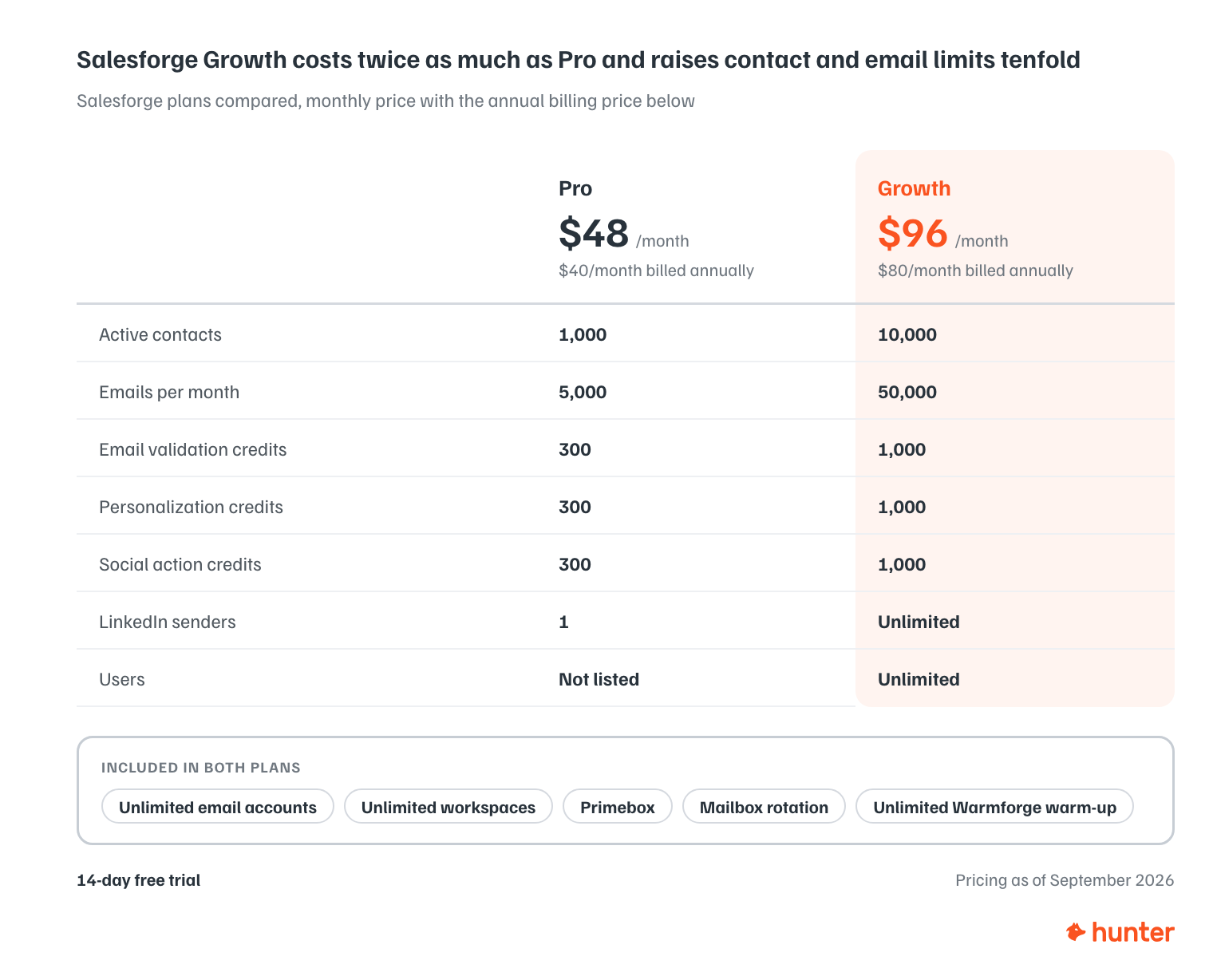
Salesforge has two main plans, and both include unlimited email accounts, unlimited workspaces, Primebox, mailbox rotation, and unlimited Warmforge warm-up.
Pro is $48/month, or $40/month billed annually. It covers 1,000 active contacts, 5,000 emails per month, 300 email validation credits, 300 personalization credits, 300 social action credits, one LinkedIn sender, unlimited email accounts, and unlimited workspaces.
Growth is $96/month, or $80/month billed annually. It increases the limits to 10,000 active contacts and 50,000 emails per month, with 1,000 email validation credits, 1,000 personalization credits, and 1,000 social action credits. It also includes unlimited LinkedIn senders, unlimited users, unlimited email accounts, and unlimited workspaces.
There's a 14-day free trial.
Instantly
Raul Kaevand and Nils Schneider started Instantly in 2021. Both were running lead generation agencies at the time and were tired of cold email tools that cost too much and weren't built for agency workflows, so they built their own. It caught on fast. Instantly is now one of the larger players in the category, with customers like HP, Sony, and Stripe, and it has expanded well past sending into lead data, AI agents, and a CRM.
Company background
Instantly is one of the most recent tools we’ve included in our comparison. Raul Kaevand started Instantly in 2021 after noticing that most cold email tools were too expensive and not adapted to the needs of lead generation agencies.

Strengths
- Modern, easy-to-use interface, still the thing users praise most
- Unlimited email accounts and unlimited warmup on the entry plan, with no per-inbox charge, which is why volume-focused agencies pick it
- ESP matching and other deliverability features aimed at the primary inbox (no longer unique to Instantly, but well executed)
- A 450M-contact B2B database with 13 filters, lookalikes, and waterfall enrichment across 5+ providers, plus job, news, tech, and funding signals
- A deep AI layer: a Copilot that finds leads, writes copy, and builds campaigns end to end, an AI Sales Agent, an AI Reply Agent, and access to five major LLMs including OpenAI and Anthropic
- A native CRM with pipeline, opportunities, and revenue tracking, plus automations that route and tag leads when they reply or book a meeting
- Responsive support, tiered from chat on the entry plan to premium live support higher up
- Their unified inbox is top-notch and helping you focus on conversations that matter and filtering out the rest (one of the best in class I had chance to test)
Weaknesses
- The platform is now split into separate products (outreach, lead data, CRM, AI agents), each priced on its own, so the real cost climbs well past the $47 sending plan once you want the full stack
- Contact upload limits are tight on the entry plan (1,000 uploaded contacts), so heavy list users hit the ceiling quickly
- Syncing to an external CRM is still one-way on the native integrations; for full two-way sync with HubSpot, Salesforce, or Pipedrive you'll need a tool like OutboundSync or Zapier
Pricing
Instantly's sending plan, Outreach Growth, starts at $47/month with unlimited email accounts and unlimited warmup. But $47 only covers sending. The 450M-contact lead database is a separate $47/month product, and if you want everything in one place, the bundles run $94/month (Starter), $194/month (Scale, their most popular), and $555/month (Agency), with about 10% off on annual billing. There's a free trial. The entry price is low if all you need is a sender. Budget more if you want the data, CRM, and AI agents too.
Demo
My opinion
Instantly took the market by surprise a few years ago with aggressive flat-rate pricing, and that's still the draw for agencies sending at volume. What's changed is scope. It's gone from a lean sending tool to a sprawling platform with AI agents, a lead database, and a CRM.
My main complaint is the upsells. There are a lot of them, and if you start on the lowest plan, you can end up with a platform that's barely usable on its own, because almost everything you'd actually reach for sits behind an upgrade or a paid add-on. Price out the plan that covers what you need before you sign up, not the headline $47. For high-volume teams that want the whole stack in one place, it's still a strong pick.
The expert’s opinion
What makes Instantly stand out is the fact that you can add an unlimited amount of email accounts. This has saved our agency thousands of dollars and increased our client results as we were able to send more volume.

Lemlist
Best for: Outreach teams where personalization is the actual edge, not just a talking point. Personalized images, videos, and liquid syntax justify the higher price if you use them. If you don't, you're overpaying.
Company background
Guillaume Moubeche and two technical co-founders launched Lemlist in 2018 with $1,000 and one sharp idea: cold emails that don't look like cold emails. The original hook was automatic image personalization, dropping a prospect's name or logo straight into an image, and it worked well enough to grow the company without outside funding. Lemlist is now the flagship of lempire, which also runs lemwarm for warm-up and a handful of other tools. They pioneered a couple of things that later went mainstream, warm-up and image personalization chief among them, and the product has since grown into a full multichannel platform.

Strengths
- Image and video personalization, dynamic landing pages, and liquid syntax, still the best in the category at making a cold email feel one-to-one
- A 450M-contact lead database built in, plus a Chrome extension that pulls leads and emails straight from LinkedIn
- Full multichannel sequences: email, LinkedIn automation (visits, invites, messages), in-app calling, and WhatsApp on the higher tier, all managed from one inbox
- Lemwarm warm-up bundled in, the tool that helped make warm-up standard practice
- AI campaign and copy generation to get a first draft down fast
- Native 2-way CRM sync with HubSpot, Salesforce, and Pipedrive
- Strong training material and an active build-in-public community around the founder
Weaknesses
- It's one of the pricier tool on this list, and the per-seat model gets expensive fast for teams
- Costs climb further through add-ons: extra sending inboxes run about $9/month each, WhatsApp is a paid add-on, and lead and enrichment credits are metered, so the real bill can land 30 to 50% above the headline
- There's a learning curve, and reviewers still describe the UI as busy and hard to navigate at first

Pricing
Lemlist has a free plan, but it's really just the Chrome extension: you can find and verify up to 100 emails or 25 phone numbers a month, with no campaign sending. Paid plans are per user. Email Pro, the email-only tier, is $79/month per seat ($63 with annual billing). Multichannel Expert, the plan most teams land on, adds LinkedIn automation, calling, and WhatsApp, and runs $109/month per seat (up from $99 in 2026), or about $87 annually. Outreach Scale is the enterprise tier, custom-quoted with a five-seat minimum. There's a 14-day free trial on the paid plans. Watch the add-ons, since extra inboxes and WhatsApp are billed on top.
Demo
My opinion
Lemlist is robust, and its advanced integrations and features have made it a go-to cold email tool. Compared with Lemlist alternatives, the tool's main current limitation is its pricing - Lemlist gets costly if you have multiple email accounts. Last but not least, you should follow their team members on LinkedIn (especially Kévin Moënne-Loccoz). They regularly share outstanding tips for cold email practitioners.
The expert’s opinion
I’ve been using Lemlist for about three years. Besides their robust cold email features, they also offer basic LinkedIn touchpoints, which is super convenient for those wanting to adopt a multichannel approach. However, my favorite feature is Liquid Syntax, which allows for crafting truly unique emails. I believe Lemlist is best suited for advanced users, but it might be a bit too complex for beginners.

MailShake
Best for: Sales teams and agencies running a full outbound operation who want a reliable multichannel tool. Worth noting: there's no free trial, which makes it a harder sell if you're still evaluating.
Company background
MailShake is a pioneer in dedicated cold email software. Started in 2015, it initially focused on providing promotional tools for content creators. Over the years, MailShake evolved into a sales engagement platform with multichannel outreach capabilities.
Strengths
- A built-in prospect database (Data Finder) with email finding and verification, so you can build lists without a separate tool
- AI email writing (SHAKEspeare) and A/B testing to draft and test campaigns faster
- True multichannel: email, LinkedIn automation, and a built-in power dialer, with a unified inbox for replies and Lead Catcher to surface your most engaged prospects
- Strong agency features like client onboarding and reporting
- Native CRM integrations with Salesforce, HubSpot, and Pipedrive (on the Email Outreach plan and up)
- A sending calendar that shows exactly when each email will go out
- Consistently praised customer support
Weaknesses
- Per-seat pricing gets expensive if you run multiple inboxes (one sending account on Starter, two on Email Outreach), and inbox rotation matters for deliverability now, so you end up buying seats
- No free trial, so you pay before you can test it, which is unusual in this category
- The interface still feels dated and a bit clunky, especially since they bolted on the dialer and task features
- Annual billing barely discounts the monthly price, so there's little reason to commit upfront
Pricing
Mailshake has three per-user plans and no free trial, so you commit before you test. Starter is $29/user/month and covers basic sequences, AI writing, unlimited warmup, and one sending inbox. Email Outreach, the plan most teams need, is $59/user/month (up from $49) and adds a second inbox, Lead Catcher, the sending calendar, and CRM integrations. Sales Engagement is $99/user/month and adds the power dialer, LinkedIn social selling, and ten inboxes. Unusually, annual billing barely beats monthly, so there's little upside to paying upfront. Budget for Data Finder credits if you plan to lean on the built-in database.
Demo
My opinion
I started using Mailshake back in 2017. The $29 entry plan and easy Gmail integration made it a simple choice at the time. I drifted away from it for a while because the product felt static. They've since added a prospect database, AI writing, a dialer, and LinkedIn, so it's a real multichannel tool now. What still gives me pause is the lack of a free trial and the per-seat pricing, which adds up the moment you need more than one or two inboxes. For a small team that's committed to it, though, it's a solid, dependable pick.
The expert’s opinion
We have been using Mailshake since Leadable was founded in July 2019. During that time, we have tested 20+ other platforms and have always decided to stay with Mailshake. In the tests we have run, we have found that it consistently performs the best from a deliverability perspective. The UI is simple, and it offers all of the required functionality, without overcomplicating things with unnecessary features. The support team is fantastic also. I would recommend it to anyone, from beginners to advanced users, looking to run outbound campaigns.

Woodpecker
Best for: Teams that want a tool they can trust and mostly forget about. Woodpecker bets on deliverability over flash, with usage-based pricing that scales with how many prospects you contact, which suits volume that moves around month to month.
Company background
Like MailShake, Woodpecker has been there since 2015. They were running their own agency and couldn't find a cold email tool that reliably landed in the inbox, so they built one. That deliverability focus is still the whole identity of the product. It has since grown from a pure sender into a fuller stack, with a built-in lead database, domain and mailbox setup, and LinkedIn outreach, but inbox placement is still what Woodpecker is known for.

Strengths
- Deliverability is the real draw, with built-in warm-up, bounce protection, domain health monitoring, and human-like sending to keep you out of spam
- Conditional sequences that branch based on what a recipient does (opens, clicks, replies), plus AI that flags how interested a prospect seems
- It has grown into a fuller stack, with a built-in lead finder, domain and mailbox setup, and free email verification
- Unlimited email accounts and unlimited team members on every plan, which is unusual and useful for agencies
- Easy to adopt, with a long reputation for reliability
- LinkedIn outreach alongside email for light multichannel
- Native CRM sync with HubSpot, Pipedrive, and Salesforce, plus a white-label agency panel
Weaknesses
- Pricing scales with the number of prospects you contact, so heavy-volume months cost more, and the add-ons stack: LinkedIn runs about $29/month per account, CRM sync is a flat add-on, and the agency panel is billed per client
- The sequence builder is functional but dated, with no drag-and-drop, which gets clunky once you're juggling a lot of campaigns
- It's still email-first; the LinkedIn side is lighter and more compliance-focused than dedicated LinkedIn tools
- Some customers complain about the rigidity of their customer support team on their Trustpilot page

Pricing
Woodpecker charges by the number of prospects you contact, not per seat or per email, and every plan includes unlimited email accounts and unlimited team members. The smallest tier (500 contacted prospects a month) runs about $24/month on annual billing, and scales up from there as your volume grows. Annual billing saves roughly 30%. There's a 7-day free trial covering 50 prospects and 600 emails. Watch the add-ons, since LinkedIn outreach (about $29/month per account), CRM sync, the agency panel, and extra warm-up slots are all billed on top. Worth confirming the exact tier prices on their pricing page, since they shift.
Demo
My opinion
Woodpecker has always been the dependable option, the tool you set up and trust to keep landing in the inbox. That hasn't changed, and it's still what they do best. What's new is that it's no longer just a sender; the lead finder, domain setup, and LinkedIn put it closer to an all-in-one. I'd still pick it for deliverability over features, and I'd keep an eye on the per-prospect pricing once your volume climbs. For a team that values reliability over bells and whistles, it's an easy one to recommend.
The expert’s opinion
I've been using Woodpecker for about three years now. It's great for so many reasons: first and most importantly, during these three years, I didn't have any major problems with the tool, which is crucial for cold email campaigns. It's very intuitive, their customer support is great, and they constantly develop their product. I would recommend Woodpecker to anyone who needs to create cold email campaigns. It should work well both for small entrepreneurs and for a giant recruitment agency.

Quickmail
Best for: Agencies and high-volume senders who need serious inbox rotation and per-inbox analytics. Deliverability is the obsession here, and it shows. It's one of the more technically capable tools in the category for teams that live and die by inbox placement.
Company background
Jérémy Chatelaine started Quickmail in 2014 (!) to scratch his own itch. Since then, the product has become a favorite among email outreach agencies, especially after they pioneered email account rotation (a way to send more emails by spreading the sending over multiple email accounts).

Strengths
- Inbox rotation, the feature Quickmail pioneered, spreads sending across multiple accounts so no single inbox gets overloaded
- Granular per-inbox analytics that pinpoint exactly which sending account is underperforming, not just a campaign-level average
- Deliverability AI that monitors sender health daily and automatically pauses or swaps inboxes that start slipping
- Free email warm-up built in through their own MailFlow, available even on the free plan
- Multichannel campaigns that mix email and LinkedIn steps in one sequence
- Unlimited team members with no per-seat fees, plus native 2-way CRM sync with HubSpot and Pipedrive
- Easy enough to use day to day, with support that reviewers consistently praiseWeaknesses
- The UI feels a bit outdated
- The warmup feature depends on a third-party partner
Weaknesses
- No built-in lead database, so you'll need a separate data source to feed it prospects
- A learning curve on the advanced deliverability features, and the bucket-based way you add prospects to campaigns isn't the most intuitive
- LinkedIn is available, but the automation side is less reliable than the email side, so treat it as a bonus rather than a core channel
Pricing
Quickmail keeps it simple with three plans and a 14-day free trial, and every plan includes unlimited email senders, unlimited LinkedIn accounts, and unlimited users. Starter is $49/month (1,000 contacts, 5,000 emails). Growth, the tier most teams land on, is $99/month and jumps to 25,000 contacts and 100,000 emails, with API access added. Agency is $299/month for 500,000 emails and multiple workspaces. Warm-up through their own MailFlow is free on every plan.
My opinion
Jeremy Chatelaine's enthusiasm for this stuff is contagious, and it shows in how deep Quickmail goes on deliverability. If you run an agency or just send a lot of cold email, the inbox rotation and per-inbox analytics are best-in-class for spotting and fixing problems before they tank a campaign. Just know it is a sender, not an all-in-one, so you'll bring your own data. I'd still recommend his podcast, "Cold Email Outreach with Jeremy and Jack," as one of the better ways to keep up with the industry.
The expert’s opinion
I’ve used Quickmail for about 18 months. My favorite thing about Quickmail is conditional email logic, allowing journey emails to change dynamically based on opens, replies, custom indicators. I also particularly appreciate their transparent roadmap and list of recent feature releases, and before they had to sunset their auto email warming was fantastic. I know Quickmail is particularly popular with agencies, but I also recommend it for individual non-experts (like founders) looking to minimize time spent on outbound emails.

Smartlead.ai
Best for: Agencies and high-volume senders who value high deliverability. Unlimited mailboxes at a flat rate make it the cheapest way to run cold email across many inboxes, so it pays off most at 30K+ emails a month. Less compelling if you're sending from one or two inboxes.
Company background
Smartlead started only in 2022 but already has lots of raving fans. That's because the founder, Vaibhav Namburi, seems to be focused on serving the needs of a very specific audience: lead generation agencies.
From my perspective, Smartlead is optimized for people who want to send as many emails as possible, so they constantly need to fight the deliverability limitations associated with bulk sending.

Strengths
- Unlimited mailboxes and unlimited lead storage at a flat rate, with automatic sender rotation, which is the real cost advantage over per-inbox tools like Instantly and Lemlist
- A deep deliverability stack: AI warm-up with a private warm-up pool, SmartDelivery placement testing, dedicated IPs and servers, and real-time reputation monitoring that adjusts on its own
- SmartSenders lets you buy pre-configured domains and mailboxes (SPF, DKIM, DMARC handled) right inside the platform
- A unified master inbox for managing every reply across mailboxes and clients
- Strong agency features: white-label, client sub-accounts, and a powerful API with webhooks
- Responsive support that reviewers consistently single out
- Newer AI layer (SmartAgents) and a SmartDialer for calls, plus integrations with Clay, HubSpot, Salesforce, Pipedrive, Slack, and Zapier
Weaknesses
- It's the sending engine, not the whole stack. You still bring your own mailboxes (or buy them as an add-on) and your own data, and the warm-up is a baseline, not a fix for unhealthy domains
- The add-ons stack up: SmartDelivery, dedicated servers, email verification, and extra white-label clients are all billed on top of the plan
- There's a real learning curve, and the feature depth can feel heavy for simple use cases
- Still email-first, so multichannel and CRM-sync depth are lighter than tools built around those workflows
Pricing
Smartlead's edge is that unlimited mailboxes come on every plan, so your cost doesn't climb with inbox count the way it does on Instantly or Lemlist. There are four tiers. Base is $39/month (2,000 contacts, 6,000 emails), and Pro is $94/month (30,000 contacts, 90,000 emails). Unlimited Smart, the most popular plan, is $174/month and gives you unlimited contact storage with 150,000 emails, while Unlimited Prime runs $379/month for 500,000 emails plus dedicated servers and bundled client workspaces. Annual billing saves 17% across the board, and there's a free trial with no card. Just budget for the add-ons, since SmartDelivery, dedicated servers, email verification, white-label, and bought mailboxes are all billed separately.
Demo
My opinion
Smartlead is a recent player, but they’re worth keeping on your radar as they’re improving quickly, and their product is surprisingly inexpensive.
The expert’s opinion
I’ve been using Smartlead.ai for eight months, and it is absolutely amazing! I am not a techie, but everything is really easy to learn and understand. And if you really need help, the team delivers the best service that I have ever experienced online! I love the AI tools and the personalization options that are getting better and better. But what I love the most is that they listen to their community, ask us what we want, and release the options we need. I recommend it to everyone who wants to get really serious about cold email. There is no better software on the Market. I am on a Mastermind with 220 Cold Emailers, and 80% use Smartlead.

Gmass
Best for: Gmail users who want cold email features without leaving their inbox. The free tier is genuinely usable, and the Google Sheets mail merge is a strong feature for simple, one-off campaigns.
Company background
Gmass was started in 2015 by Ajay Goel to allow marketers to send mass emails straight from Google Sheets and Gmail. With over 400,000 users on the Chrome Web Store, it might be the most widely used cold email tool.

Strengths
- It lives inside Gmail, so if that's where you work, you send cold emails without switching tools
- A genuinely deep feature set for the price: A/B testing, a spam checker (Spam Solver), conditional logic, auto follow-up sequences, triggered emails, and free email verification
- Inbox rotation (MultiSend) on the top tier, plus their own SMTP servers for sending past Gmail's limits
- Reporting that users consistently praise, with sharable reports on opens, clicks, and replies
- Constant updates, including newer AI features like a template builder and automatic spintax
Weaknesses
- There's a steep learning curve. Because it packs so much in, getting started takes longer than you'd expect, which our tests confirmed
- The UI and onboarding content can be confusing, especially early on
- It's built around Gmail and Google Sheets, so it's less suited to teams that don't live in that ecosystem or that need a built-in lead database
Pricing
Gmass raised prices on January 1, 2026, its third increase in ten years, and it's still one of the cheaper complete sending tools. Plans separate by features, not send volume, so every tier includes unlimited emails, contacts, and campaigns. Standard is $29.95/month ($20.75/month on annual billing). Premium is $39.95/month and adds auto follow-up sequences, API access with Zapier, and triggered emails. Professional, around $55/month, adds MultiSend inbox rotation and high-priority support. Team plans scale from 5 to 100 users, and there's a free plan for trying it out.
Demo
My opinion
Gmass makes the most sense if your priority is a cheap, capable cold email tool that works right inside Gmail. The trade-off is the learning curve. Even with years of doing this, I found it the hardest tool in this benchmark to get comfortable with, mostly because it crams so much into the Gmail interface. But if you're willing to climb the curve, few tools give you this much for the money.
The expert’s opinion
In my journey as an SEO and content manager, I've explored a variety of tools for cold emailing and outreach. Amongst them all, Gmass stood out due to its clean and straightforward interface. I've been using this tool for half a dozen years now, and its features have never ceased to impress me. What sets this tool apart is that it operates directly within Gmail. There's no need to switch between web apps; everything you need is right there in your inbox. You can track emails, access analytics, launch mass email campaigns, set up automated follow-ups, and more, all from within Gmail. Furthermore, this tool offers the ability to send up to 50 emails in a mass campaign for free each day. It's an excellent resource for both beginners and intermediate marketers looking to enhance their cold email marketing strategies.

Reply.io
Best for: In-house sales teams that run email, LinkedIn, calls, and SMS in parallel. The tightest CRM integration in this comparison, with two-way sync across HubSpot, Salesforce, Pipedrive, and more.
Company background
Reply was founded in 2014 by Oleg Bilozor to help sales teams automate their time-consuming manual tasks. Like SalesHandy, it includes many sales engagement features and doesn’t limit itself to cold email.

Strengths
- True multichannel in one sequence: LinkedIn automation, automated SMS and WhatsApp, and calls placed from inside the app, alongside email
- Jason AI, an autonomous AI SDR that sources prospects, writes and sends messages, handles replies, and books meetings, in either autopilot or copilot mode
- A 1B+ contact B2B database built in, though reviewers still flag inconsistent data quality by region
- Native 2-way CRM sync with HubSpot, Salesforce, Pipedrive, Close, and Copper, the deepest CRM integration here
- Built-in deliverability: unlimited mailboxes under fair use, automatic warm-up, and sender-reputation monitoring
- Customer support that reviewers consistently rate highly
Weaknesses
- It packs in a lot, so the sequence builder and the breadth of features can feel overwhelming at first
- The headline plans don't include everything: LinkedIn automation (about $69/account/month) and calling and SMS (about $29/user/month) are paid add-ons on top of the Multichannel plan
- Jason AI is a separate product starting around $500/month, so the full AI-driven setup gets expensive fast
Pricing
Reply runs on per-user plans with a 14-day free trial and no permanent free tier. Email Volume, the email-only plan, starts at $49/user/month billed annually ($59 monthly) and is contact-based, so the price climbs with how many active contacts you work each month. Multichannel starts at $89/user/month annually ($99 monthly) and unlocks LinkedIn, calls, SMS, and WhatsApp in sequences, but the channels are add-ons: LinkedIn is $69/month per account and calls and SMS are $29/month per account. Jason AI, the autonomous SDR, is a separate product starting at $500/month and scaling with your contact volume. Annual billing saves up to 17%. Budget for 1.5 to 2x the sticker price once you add the channels you actually need.
Demo
My opinion
Reply.io is the veteran here, and it shows in how complete the platform is. I'd recommend it to an in-house sales team that genuinely runs multichannel outreach and wants tight CRM sync, since that's where it's strongest. The thing to go in clear-eyed about is cost. The $89 Multichannel headline turns into $150 or more per user once you add LinkedIn and calling, and Jason AI is a $500+ product on its own. If you're email-only or price-sensitive, it's more platform than you need. If you want one tool to run a real multichannel motion with an AI SDR on top, few competitors match it.
The expert’s opinion
I’ve been a Reply user for more than four years, and the experience has been amazing so far! I like how the product evolves each year. The team is extremely feedback-driven and customer-centric. Among the cold email features, I really appreciate the reporting and the ability to have an in-depth view of my team’s sequences. With native integrations with other apps, I can automate various workflows in seconds. Multichannel sequences are what I adore the most – they help me with outreach via email, LinkedIn, or using Zapier. Super useful. Also, it's a real time-saver having a Chrome extension for email search, email validation, a native appointment booking app, and built-in AI assistance, all under one hood. I can recommend the app to all outreach folks, whether it’s for sales or link-building purposes.

Tools we considered but didn't include
We looked at all of these. None made the top 10.
- Outreach.io is built for enterprise sales teams with dedicated RevOps support. The price point and complexity put it out of range for most cold email use cases.
- Mixmax works well for email tracking and scheduling inside Gmail, but isn't designed for the kind of high-volume sequencing this comparison covers.
- Overloop has a smaller feature set and less active development than the other tools we tested. Not a strong enough case to displace any of the top 10.
- Constant Contact is an email marketing platform for newsletters and opt-in lists. Cold outreach is a different use case entirely.
- Yesware is a solid tracking tool for individual reps working inside Gmail or Outlook. The sequence depth and deliverability features don't match what's in the top 10.
- Apollo.io is worth a look if your main need is prospecting. It has 230M+ contacts and a generous free plan. We didn't include it here because the email sending features are secondary to its core function as a sales intelligence database.
- Seamless.ai finds contact data. It doesn't send cold email sequences. It works well alongside the tools in this comparison, not instead of them.
- Streak is a lightweight CRM that lives inside Gmail. Good for tracking deals in your inbox. Not a dedicated cold email tool.
- Close.com has sales engagement features built into its CRM, but it's a CRM first. Evaluating it as a cold email tool is the wrong frame.
- HubSpot has email sequences inside Sales Hub, but they're one feature inside a large, expensive platform. If you're comparing cold email tools specifically, HubSpot is probably not the right shortlist.
How to choose the right cold email tool?
There’s no one-size-fits-all cold email tool.
Picking the right software implies evaluating how it would fit your sales stack, budget, and a few additional elements.
Take a look at your existing tool stack
If you’re working on your own and don’t use a CRM, then any cold email tool can work for you.
If you’re using HubSpot, Salesforce, Pipedrive, or any other CRM, I recommend you choose a tool that offers native integration with them. It will save you the trouble and additional costs of manually connecting the tool to your CRM via Zapier or the API.
I also recommend checking the type of integration:
- 1-way integrations (like SalesHandy offers) allow you to pull out contact lists into your cold email software to reach out to them automatically,
- 2-way integrations go further and let you pull data from your CRM and synchronize your cold email activities back to your CRM.
All ten tools in this comparison offer some form of CRM integration; the depth varies (one-way vs. two-way; native vs. via Zapier). The comparison table above flags which tools have native CRM integrations and which require Zapier.

Check if the tool is within your budget
You found the perfect tool… But it ends up being too expensive. Sounds familiar?
To avoid this problem, I recommend you check the pricing of the tools you’re considering purchasing.
Let me be a bit more specific.
First, not all the tools I included offer free trials or plans. Without a free plan, confirming if the tool works for you will be harder. Among the tools we reviewed, MailShake is the only tool that doesn’t offer a free trial or a free plan. Their Starter plan can now be paid monthly ($29/user/month) without the yearly commitment that was previously required.

Secondly, look at the tool's pricing model.
To put it simply, there are two pricing models:
- Tools that charge you based on the number of users (or email) that you will connect. This is the case for Lemlist and Reply.io. This kind of pricing works great if you need to send below 50 cold emails a day. If you need to send more, you’ll likely need to connect more email accounts to protect your sender reputation. In that case, you’ll pay for the additional email accounts, which could cost more than expected.
- Tools that charge you based on the number of emails you send and active leads. That’s the case for Instantly, Smartlead, or Saleshandy. This pricing model makes way more sense if you intend to send more than 50 cold emails a day because they don’t charge you more if you connect more email accounts.
Hunter Sequences and Quickmail have a pricing model that mixes both.
Finally, MailShake is the only tool in our comparison that doesn’t offer a free trial. They might not be the safest option if you’re just starting with cold outreach.
And if you’re looking to get away with a free plan, Hunter Sequences is the strongest option in this comparison.

Check if the tool has multichannel options
For some teams, it’s important to reach out to prospects on multiple channels and not only via email.
If that’s your case, I recommend you check what are the available options.
Some cold email tools let you automate LinkedIn connection requests or inMails. Others include the option to reach your prospects via WhatsApp or text message.

Customer support and reputation
Cold outreach can be difficult, especially if you’re just starting.
That’s why it’s important to pick a tool that provides professional assistance with any issues you may face.
To get an idea of the level of customer support you may expect from a given tool, check the verified reviews on websites like G2 or Trustpilot.

Must-have features of great cold email software
Cold email software helps you send personalized, targeted cold emails at scale.
Cold email tools aim to help sales, marketing, and recruitment teams run scalable cold email campaigns by automating the sending process and optimizing deliverability.
Sending cold emails that get replies requires a human touch.
The best cold email tools automate everything else so you can focus your efforts on high-impact activities instead of redundant manual tasks.
Automation
- When sending emails manually, you need to create each message separately. Most cold email software lets you create one message and send it to multiple recipients simultaneously.
- You can create entire email sequences automatically sent by the cold email tool until your recipient replies.
- When your recipients unsubscribe, cold email tools handle the unsubscriptions and prevent you from accidentally contacting the unsubscribed recipients again.
Deliverability
- Cold email tools let you automatically optimize your sending volume. You can configure a campaign with a thousand recipients, and instead of sending the emails at once (which flags you as a potential spammer), they can be sent over time, which protects your deliverability.
- When you send emails at scale using multiple inboxes, cold email software can automatically spread the sending volume over your email accounts to prevent sending spikes from individual inboxes.
Tracking performance
- Cold email tools automatically collect the key metrics for your campaigns: they let you track your replies, opens, clicks, and unsubscribes.
- The best cold email software also gives you high-level insights into your performance; for example, Hunter Sequences provides reports on the performance of your campaigns, email accounts, and team members over time.
Integrations
- Your cold email tool should let you integrate with your mailbox (whether it’s Gmail, Outlook, or any other email service provider.) This lets you automate sending cold emails from your own email account.
- It should also integrate with your CRM so that you can easily keep track of the conversations you start with cold emails.
- For more advanced workflows, you might want to use webhooks or Zapier to send email data anywhere you need it.
Data collection
- Some cold email tools, like Hunter Sequences, also offer help with other parts of the outreach process. For example, every Hunter user can access Discover, which helps you find qualified prospects.
- We also help you find and verify email addresses using our Email Finder and Email Verifier.
Personalization
- Instead of manually editing every message you want to send, you can use a cold email tool to create distinct emails using custom attributes. This way, personalized information is injected into your message based on the attributes you have saved for your recipients.
FAQ
What's the difference between cold email software and email marketing software?
Cold email software is built for one-to-one outreach to people who haven't heard from you. It focuses on deliverability, sequence automation, inbox rotation, and reply management.
Mailchimp, Brevo, and Kit are built for one-to-many campaigns to people who opted in. The focus there is design, list management, segmentation, and bulk sending.
Using email marketing software for cold outreach is a common mistake. Most platforms prohibit it in their terms of service, and the deliverability infrastructure isn't designed for unsolicited sending.
How does your cold email tool impact your deliverability?
Cold email deliverability mostly depends on factors outside your tool's control: your domain's sending history, the reputation of your email provider (Google Workspace or Microsoft 365), and the quality of your copy.
Your tool can help by spreading sends gradually rather than blasting in bulk. Rotating across multiple inboxes within a single campaign also reduces per-account risk. The better tools flag when bounce rates spike or when copy is likely to trigger spam filters — and those features are worth paying for.
What is the best email service for cold emails?
Google Workspace or Microsoft 365. Both have strong sender reputations and reliable infrastructure. Google Workspace is the more common choice. Gmail's deliverability is well established and most cold email tools connect to it without friction.
Do I need a domain for cold email?
Yes. Use a separate domain dedicated to cold outreach, not your main business domain. If your outreach domain gets flagged or blacklisted, it doesn't take your primary email reputation with it.
A dedicated domain also lets you create multiple sending addresses, which helps you stay under daily sending limits while scaling volume. At Hunter, we use gethunter.io and hunter-email.org alongside our main domain for this reason.
Before you send from a new domain, run an email deliverability test on it to confirm SPF, DKIM, DMARC, and MX records are set up correctly.
Is cold emailing illegal?
Cold emailing is legal in most countries, provided you follow the rules that apply to your recipients' location:
- CAN-SPAM (US): Requires a clear sender identity, honest subject lines, a physical address, and an opt-out mechanism. No prior consent required to send.
- GDPR (EU): Stricter. B2B cold email is permitted under legitimate interest, but recipients must be able to opt out easily and you need a genuine business reason to reach them.
- CASL (Canada): The tightest of the three. Generally requires express consent before sending commercial email.
Where it becomes a problem: fake sender details, no opt-out, or targeting personal addresses under GDPR without a clear legitimate interest basis.
Can I use Gmail for cold email?
A free Gmail account works in theory, but it is not the right setup for outreach. The daily sending limit sits at 500 emails. There is no professional domain attached, and a free Gmail address does not signal credibility to prospects.
A Google Workspace account connected to a professional domain is the better starting point. It is affordable and widely supported by cold email tools. Sender reputation is also meaningfully stronger than a free account.
What is the best free cold email software?
Hunter Sequences has the strongest free plan for structured outreach: one connected inbox, up to 500 recipients per campaign, and 5 follow-up steps, no credit card required. Gmass offers a 7-day trial with up to 50 emails per day, which is enough to test the basics inside Gmail before committing.
Every other tool in this comparison requires a paid plan to run meaningful outreach. The free tiers on Instantly, Lemlist, and Saleshandy are either heavily restricted trials or lead-finder-only access.
How many cold emails can I send per day safely?
15 to 50 emails per inbox per day is the standard range while building sender reputation. Most tools default to 15-20 per day for new inboxes and let you scale gradually as the domain warms.
Start at 15-20 per day per inbox and warm up for 3-4 weeks before scaling. Once the domain has a track record, you can push to 30-50 per day without risking reputation. If you need more volume, add inboxes rather than pushing a single one harder. The Gmail ceiling is 500 emails per day on a personal account and 2,000 on Google Workspace. Staying well below those limits is what protects your deliverability long-term.
What AI features should I look for in cold email software in 2026?
Four worth knowing about:
- AI sequence generation. Builds a multi-step sequence from your website URL and target ICP. Worth it if you're frequently testing new messaging angles.
- Reply classification. Tags incoming replies as interested, not interested, or out of office. Cuts the time spent triaging responses significantly.
- AI writing assistant. Drafts and rewrites copy inside the sequence editor. Useful for testing tone without starting from scratch.
- AI bounce detection. Identifies risky addresses before sending and removes them automatically. Protects your sender reputation without manual list cleaning.
- AI-powered personalization (custom opening lines per prospect) sounds useful but requires clean, structured data to work at scale. Most teams spend as much time correcting the output as they would writing from scratch.
How much does cold email software cost?
Entry-level plans start at $20-50 per month for the core sending platform. That covers sequences, follow-ups, basic reporting, and one to a few connected inboxes.
The real cost goes up when you add warm-up tools ($20-30 per month per inbox if not included), additional sending domains and inboxes ($5-15 per month each), a B2B lead database if the tool doesn't include one, and CRM integrations.
A realistic budget for a solo sender with one domain and two inboxes: $50-100 per month all-in. An agency running multiple clients across 10+ inboxes should budget $200-400 per month before lead data costs.



 Send cold emails with Hunter