Why You Need Multiple Email Accounts for Your Outreach (and How to Set Them Up)
 Antonio Gabric
•
Updated
Antonio Gabric
•
Updated

If you’ve ever tried to scale outreach from a single inbox, you know this situation very well: everything looks fine on paper: solid list, decent offer, clean copy… then you hit sending limits.
You want to reach 1,000 prospects? With a single inbox sending at a safe volume, it takes over two months. Add follow-ups and warm-up emails into the mix, and your "big" list turns into a multi-month project. At 15,000 prospects, you're looking at years.
How fast you can send your emails is a real bottleneck in email outreach.
There are two bad approaches to solving it:
- Keeping volume low, accepting slow throughput, and leaving leads on the table.
- Sending more from one email account, gradually burning its reputation, and watching deliverability fall off a cliff.
And there’s one safe and scalable approach: adding more mailboxes to the mix.
This post explains why you can’t scale outbound email with one inbox. And it shows how multiple email accounts solve this. We’ll share a practical, low-risk setup, including a click-and-create process in Hunter that keeps it from being intimidating or a full-time job.
1-minute summary
- Single-inbox outbound doesn’t safely scale. Your daily sending volume must look natural, or your email deliverability will suffer.
- Multiple inboxes improve the effectiveness of your emails. You reach enough recipients to validate targeting and messaging faster, without pushing any single inbox too hard.
- Domains matter more than most people think. Your domain builds a shared reputation across inboxes, which is why proper setup, warm-up, and monitoring are non-negotiable.
- Manual setup works…until it doesn’t. I once spent almost a full working day setting up 25 inboxes by hand. Without proper automation, you’re going to spend time managing the infrastructure instead of looking at replies.
- Inbox costs add up quickly. Google Workspace is ~$8.40 per inbox/month ($7 annually). At 30 inboxes, that’s $250+ per month, before domains, tools, or time. Hunter lowers the per-inbox cost and eliminates the manual overhead while providing actionable insights on your domain and inbox health, so you can act on time.
- Hunter removes the setup burden. Instead of manually configuring domains, Google Workspace, DNS, warm-up tools, and spreadsheets, Hunter handles inbox creation, warm-up, sending limits, and monitoring in one place.
Why you need multiple email accounts for outbound email
A single inbox can safely send 20-40 emails per day. That's it. Push beyond that and open rates drop, replies slow down, emails land in spam, and even your internal emails start getting weird deliverability issues. You only notice once the damage is already done.
The constraint in outbound isn't how many emails you want to send. It's how many emails one inbox can send while still getting positive engagement from recipients.
Hunter's State of Email Outreach 2026 shows that the average email sequence targets 449 recipients. That's too many. The best-performing sequences target 21-50 recipients and average a 6.2% reply rate, compared to just 2.4% for sequences with 501+ recipients. Reply rates also peak when sending 20-49 emails per day per account, stay roughly flat up to 50-99, and drop sharply once you cross 100+.
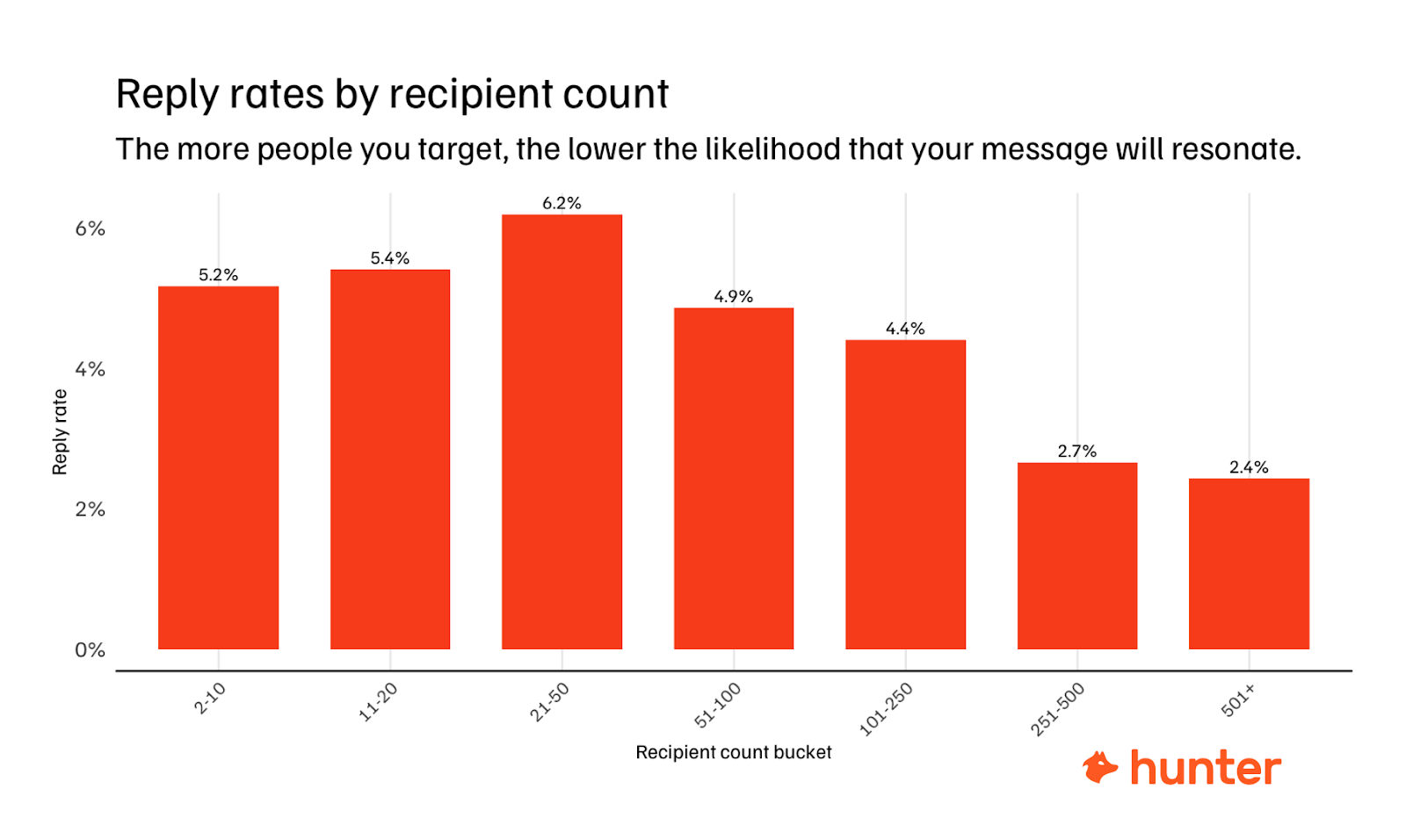
So smaller campaigns perform better. But you still need volume to learn. One inbox sending 20 emails per day means you can only reach around 400 people per month. If you're testing multiple segments or messaging angles, each one takes weeks to get enough replies to draw any conclusions. With one inbox, a single quarter buys you maybe three or four tests.
Now put sharper numbers on it. Say you have 15,000 prospects and a 4-step sequence (1 initial + 3 follow-ups). That's 60,000 total emails. At 20 emails per day from one inbox over a 20-day month, you get 400 sends per month.
60,000 ÷ 400 = 150 months.
That's 12.5 years through one inbox. Double the volume and you're still thinking in years, not weeks.
This is why outbound can feel "slow." It's not because email outreach doesn't work. It's because the infrastructure doesn't match the ambition.
Multiple inboxes fix that. Instead of running one large sequence with 400+ recipients and watching reply rates collapse, you run multiple small sequences of 21-50 recipients in parallel, each staying within the daily sending ranges that produce the best results. Every inbox behaves conservatively. Every campaign stays focused. And you still reach the volume you need to learn, in days or weeks instead of months.
Once you have multiple inboxes, the question becomes how to distribute them. A common approach is to assign each inbox to a specific sequence or segment, so one inbox handles your CFO outreach while another covers marketing leads. Some teams rotate inboxes within a single sequence so no individual sender hits the same company's mail server too often. Hunter supports this natively.
When setting up a sequence, you can assign multiple sender accounts, and Hunter will automatically rotate between them. The exact split depends on your list size and how many segments you're running, but the principle stays the same: each inbox should have a predictable, low-volume sending pattern.
Use our email outreach calculator to estimate how many inboxes you need.
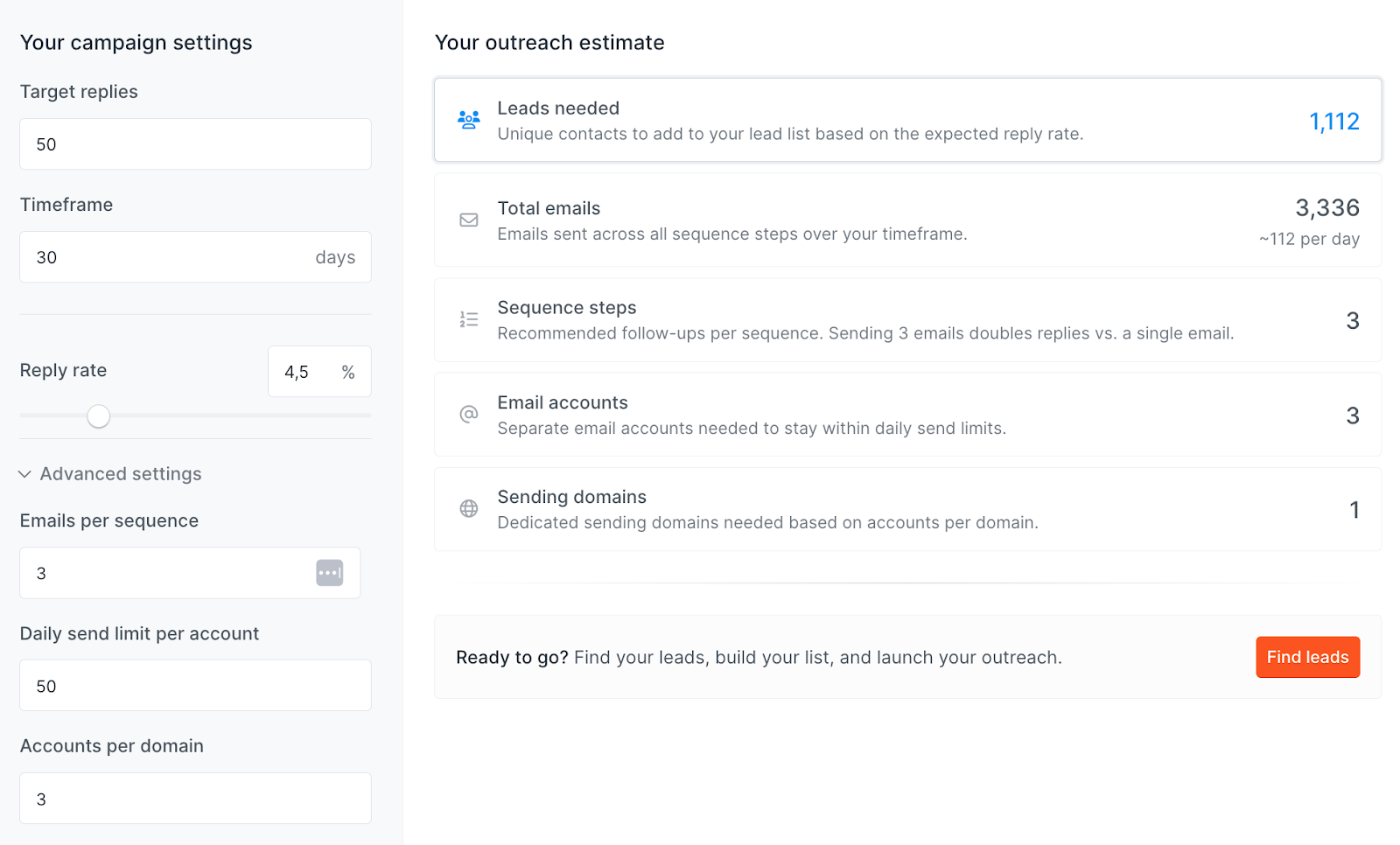
Source: https://hunter.io/outreach-calculator
What multiple inboxes actually get you (beyond “sending more”)
1) More stable deliverability, less operational risk
Instead of sending 200 emails from one inbox and seeing your email deliverability tank, you send 20 emails from ten inboxes and keep each sender's behavior predictable.
That distribution also protects you if something goes wrong. If one inbox gets flagged, throttled, or restricted, your outbound doesn't fully stop. With Hunter's email health center, you'll have visibility into any challenges before it's too late.
2) Faster coverage of your list
Multiple inboxes let you contact prospects simultaneously. That’s testing one job title vs another, or one location against another. It opens up countless ways to increase your emails.
If one inbox gives you 400 sends/month, then:
- 5 inboxes = 2,000 sends/month
- 10 inboxes = 4,000 sends/month
- 25 inboxes = 10,000 sends/month
3) Cleaner diagnostics
When volume is distributed, performance issues become easier to attribute:
- If one inbox drops, it’s sender-level
- If all inboxes drop, it’s likely copy, targeting, domain reputation, or deeper deliverability issues
That saves weeks of guessing.
4) Safer experimentation
You can test the new copy or new segments more quickly before rolling it out.
That’s how you avoid “one change ruined everything.”
How to create multiple email accounts
Option A: Manual setup (works, but becomes a burden quickly)
When I worked on diversifying our email infrastructure, I had to do this at a slightly larger scale.
We ran multiple domains, each with its own Google Workspace setup, all of which required correct DNS records.
Every inbox needed a profile photo, a signature, forwarding rules, and a proper warm-up.
On top of that, I still had to audit authentication settings to make sure nothing was misconfigured or quietly failing in the background.
Setting up 25 inboxes took almost a full working day.
Not because any single step was hard, but because there were so many small steps and each one had to be done correctly.
By the end, I wasn’t thinking about outreach strategy anymore. I was debugging DNS records and tracking inboxes in a spreadsheet.
The manual route usually looks like this:
- Buy and configure additional domains
- Choose and set up an email service provider (Google Workspace / Microsoft)
- Configure DNS properly (SPF, DKIM, DMARC)
- Create inboxes + profiles + signatures
- Warm each inbox gradually
- Monitor health and deliverability over time
This gives you full control, but requires good knowledge of the technical elements of email outreach that many don’t have when they’ve been used to email marketing tools like Mailchimp, and it all quickly becomes an administrative nightmare.
- DNS setup is easy to get wrong and annoying to debug
- Inbox creation doesn’t scale
- Warm-up requires an extra tool
- Monitoring becomes a spreadsheet problem fast
- A small setup's overlooked details compound into deliverability issues later
It works for a handful of accounts. Beyond that, you’re maintaining infrastructure instead of running outreach.
Realistically, if you’re creating 20-30 inboxes, manual setup isn't “free.” You pay in time, errors, and ongoing overhead.
Option B: Automate the setup
If outbound email is core to your growth, you want consistency more than DIY control.
The point of automation isn’t just speed, it’s repeatability:
- All inboxes are created the same way
- DNS checks are standardized
- Ongoing monitoring happens in one place
That consistency matters because deliverability failures usually come from small gaps: a missing record, a misconfigured redirect, uneven warm-up, or inconsistent sender profiles.
DIY vs. Done-For-Your Email Accounts
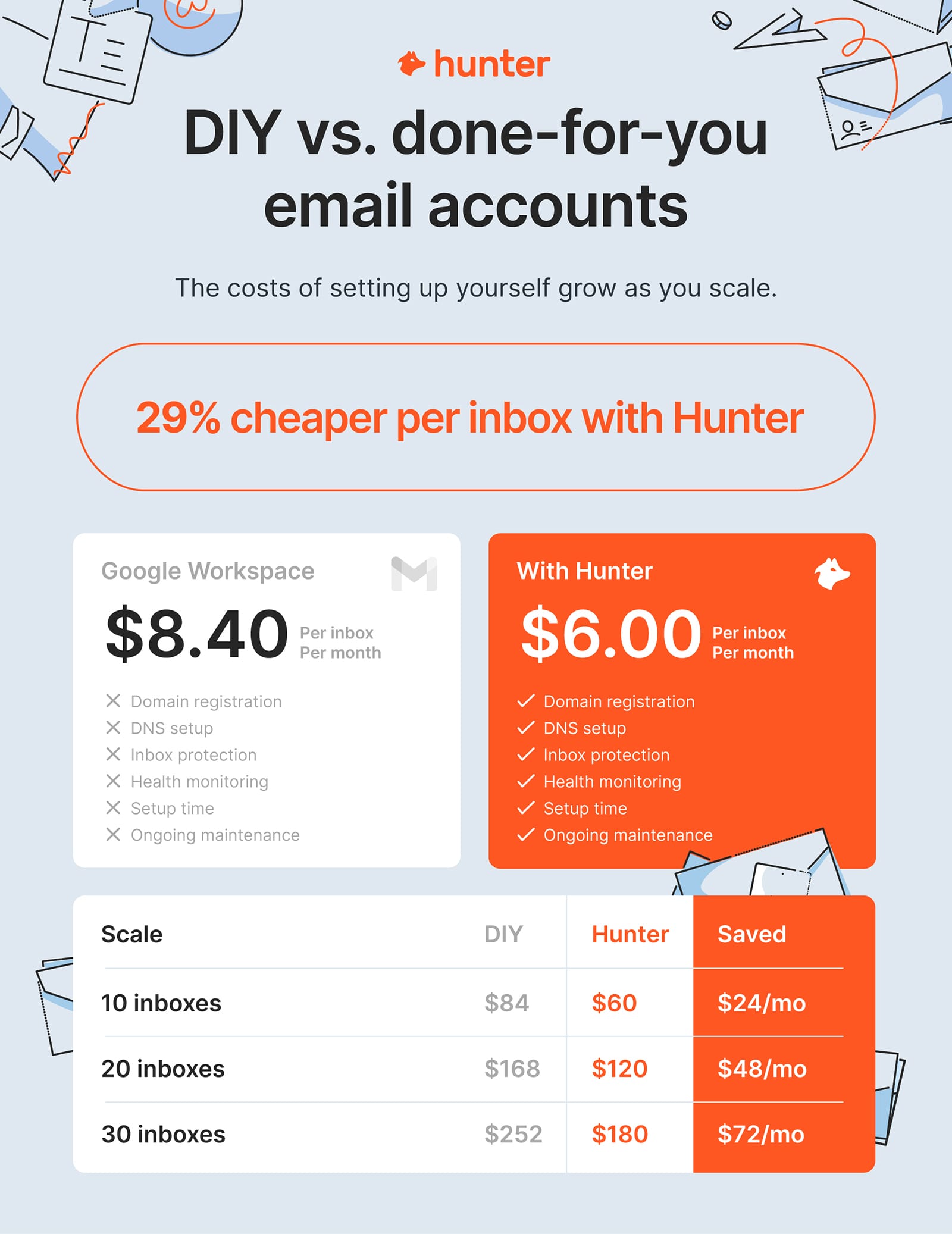
The cost difference between DIY and done-for-you starts to matter much sooner than most people expect.
DIY
If you’re using Google Workspace, a Business Starter license costs $8.40 per inbox if billed monthly, or $7 if billed annually.
Inbox costs add up quickly. 10 inboxes costs $84/month. 20 inboxes is $168/month. 30 inboxes push past $250/month, before you’ve sent a single email. That’s just inbox licenses, not counting domains, warm-up tools, or the time spent setting everything up and maintaining it.
Done-For-You With Hunter
With Hunter, the cost per Google Workspace inbox is $6 per month, or $4.50 per month on an annual plan. At ten inboxes, that’s already a noticeable difference. At twenty or thirty inboxes, the gap compounds quickly. What used to require good technical knowledge and hours of setup now happens in minutes in Hunter.
This matters because outbound rarely stays small. You’ll often start with “just a few inboxes” and then scale to 10, 20, or more once you realize how quickly single-inbox limits become a bottleneck. When that happens, both the recurring cost and the operational overhead show up fast.
How to create multiple email accounts with Hunter
Setting up multiple inboxes in Hunter is easy. You don’t need to jump between tools or manually configure anything outside the platform.
If you’re on a paid plan, you’ll find this under Sequences → Email Account Center. This is where all sender email accounts live.
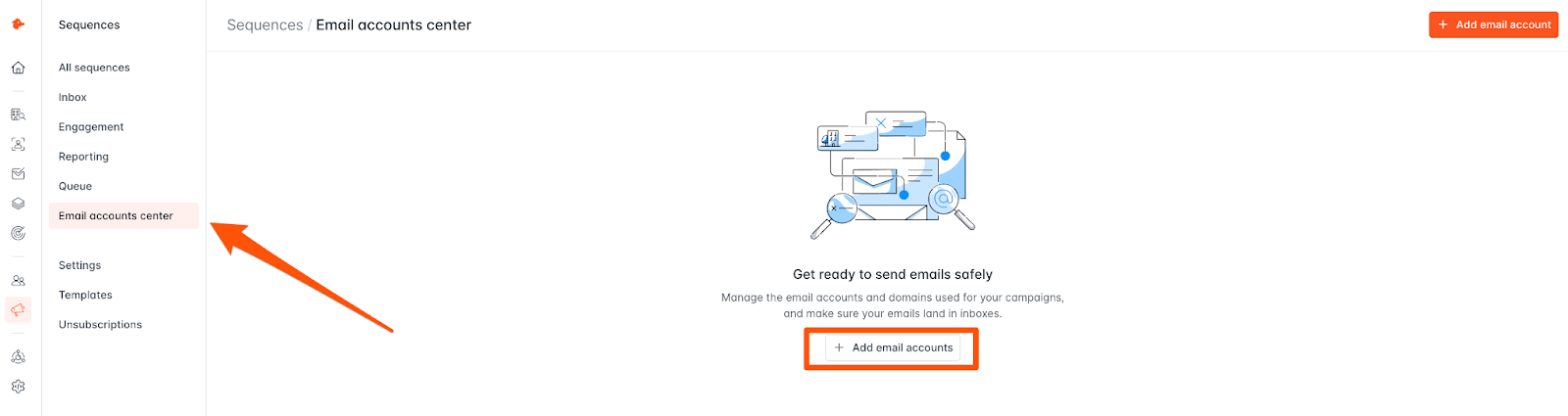
From there, click “Add email accounts.” You’ll be given two options: create new email accounts directly with Hunter, or connect inboxes you already have.
If you’re starting from scratch or planning to scale, letting Hunter manage the setup is the better option. Domain configuration and inbox creation are handled for you, but more importantly, each inbox comes with smart sending limits, ongoing health checks, and deliverability monitoring from day one.
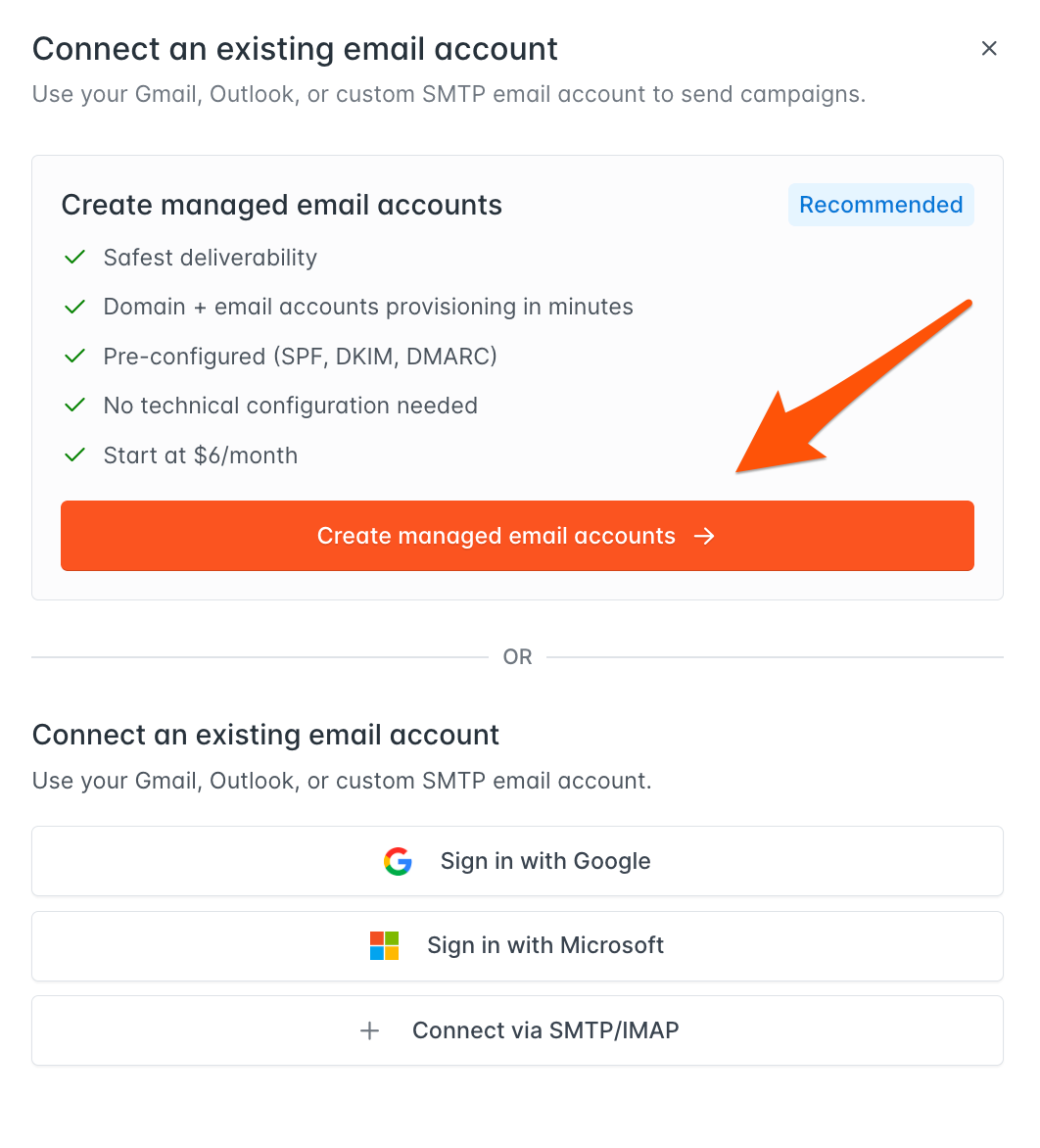
Instead of manually guessing safe limits or checking whether an inbox is quietly degrading, Hunter keeps each sender within conservative thresholds and flags issues early. The result is fewer setup mistakes, more consistent inbox health, and a system that scales without you having to babysit it.
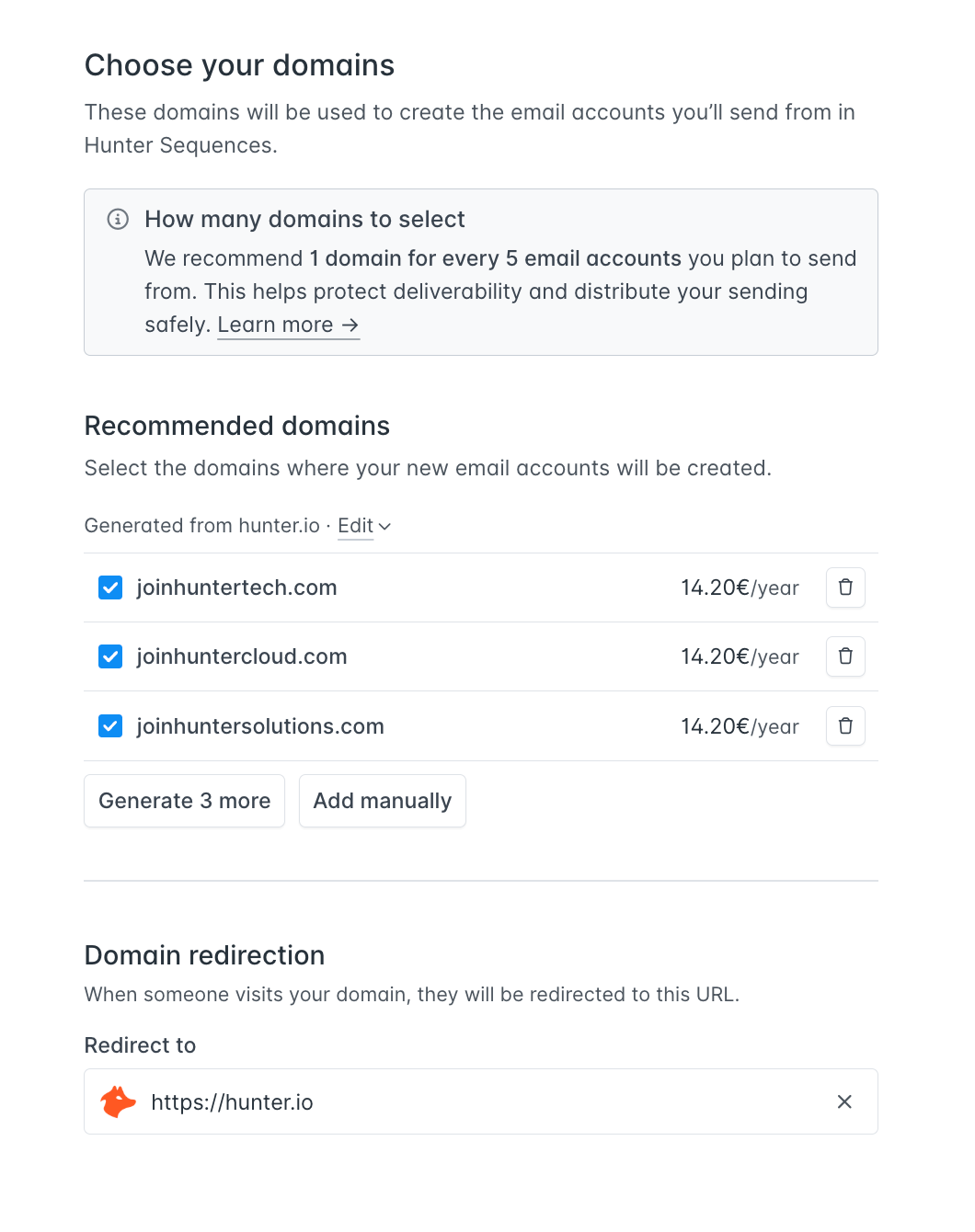
1) Choose your new domains
To start, you need to choose a domain to buy emails for. You can use your existing business domain or create domain variations in line with best practices. Hunter will suggest options, but you can edit or replace them if you prefer a specific name.
Next, ensure you redirect your new outreach domains to your main business website. That way, if a lead checks the domain, they go straight to your site. It’s a small, but important trust signal that will help your emails land.
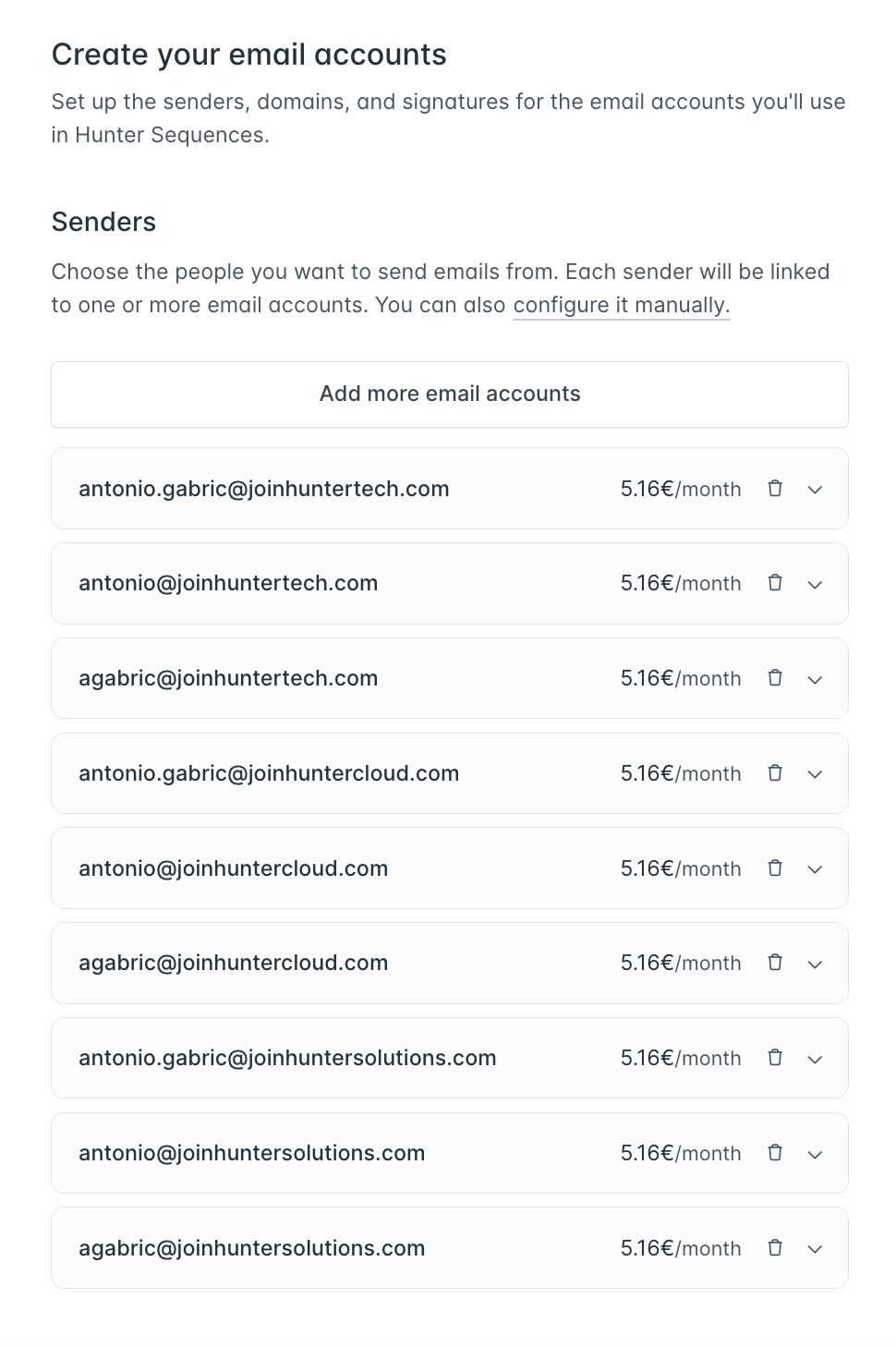
2) Create your email accounts (inboxes)
Here, you choose how many inboxes to create. At this stage, you can also generate email signatures so everything is consistent from day one.
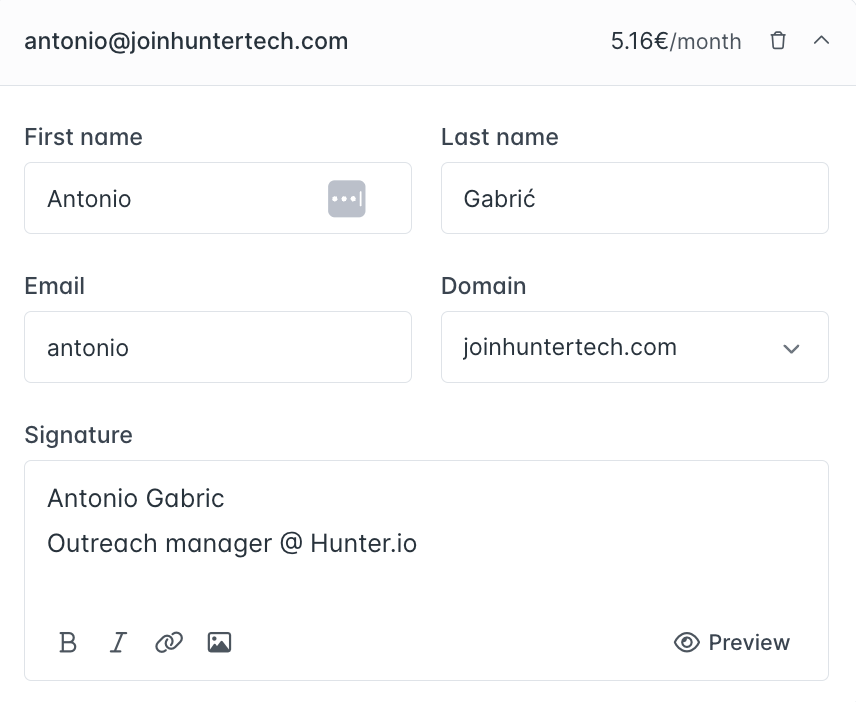
Before finalizing, you can review each inbox individually. If you want to tweak details for a specific account, you can expand it and make changes right there.
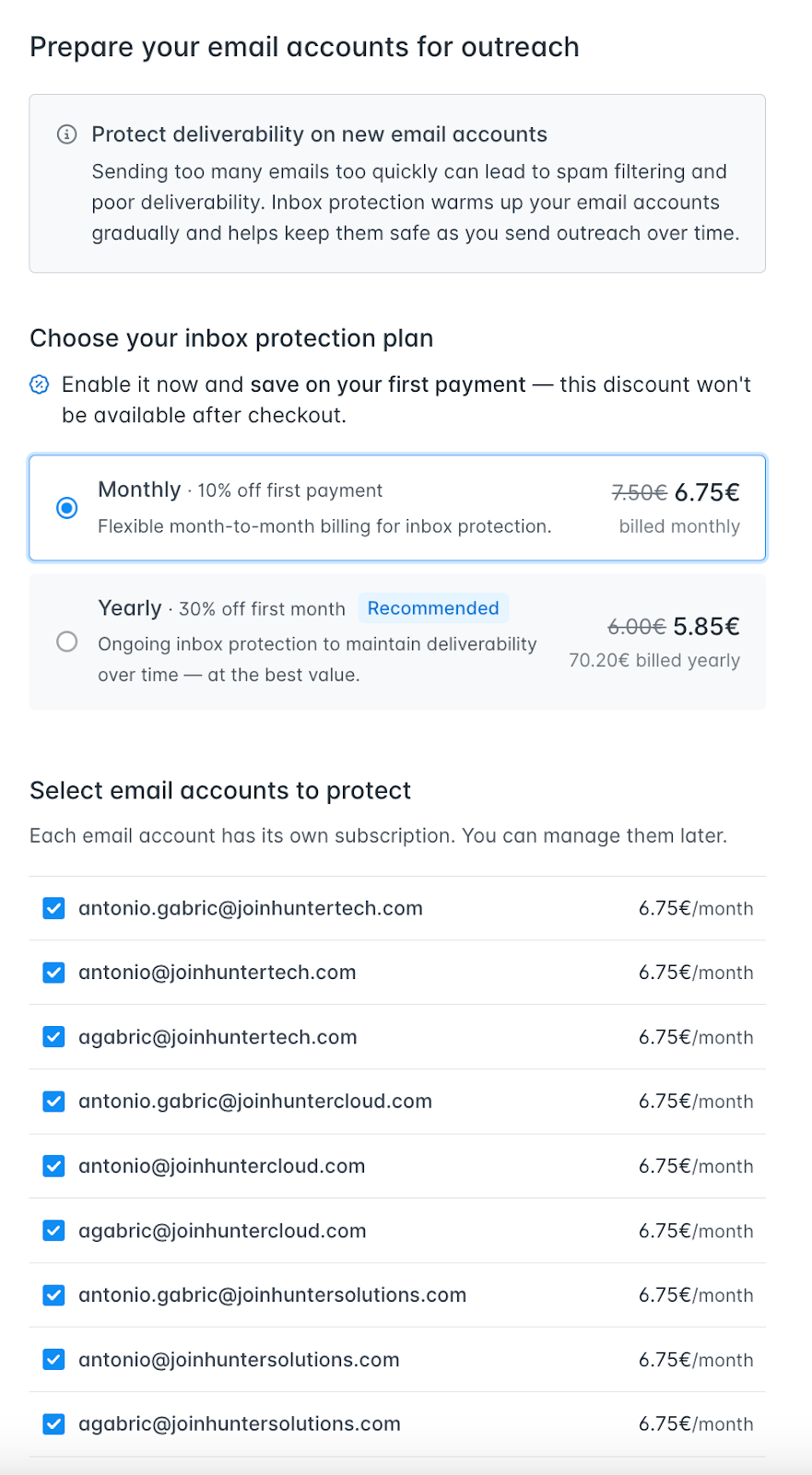
3) Enable inbox protection
Before checkout, Hunter will prompt you to enable inbox protection on your new accounts. This warms up each inbox gradually, so you're not sending emails from a brand-new account with zero reputation.
You can choose between monthly and yearly billing. Each email account has its own subscription, and you can manage them individually later if you want to add or remove protection from specific inboxes.
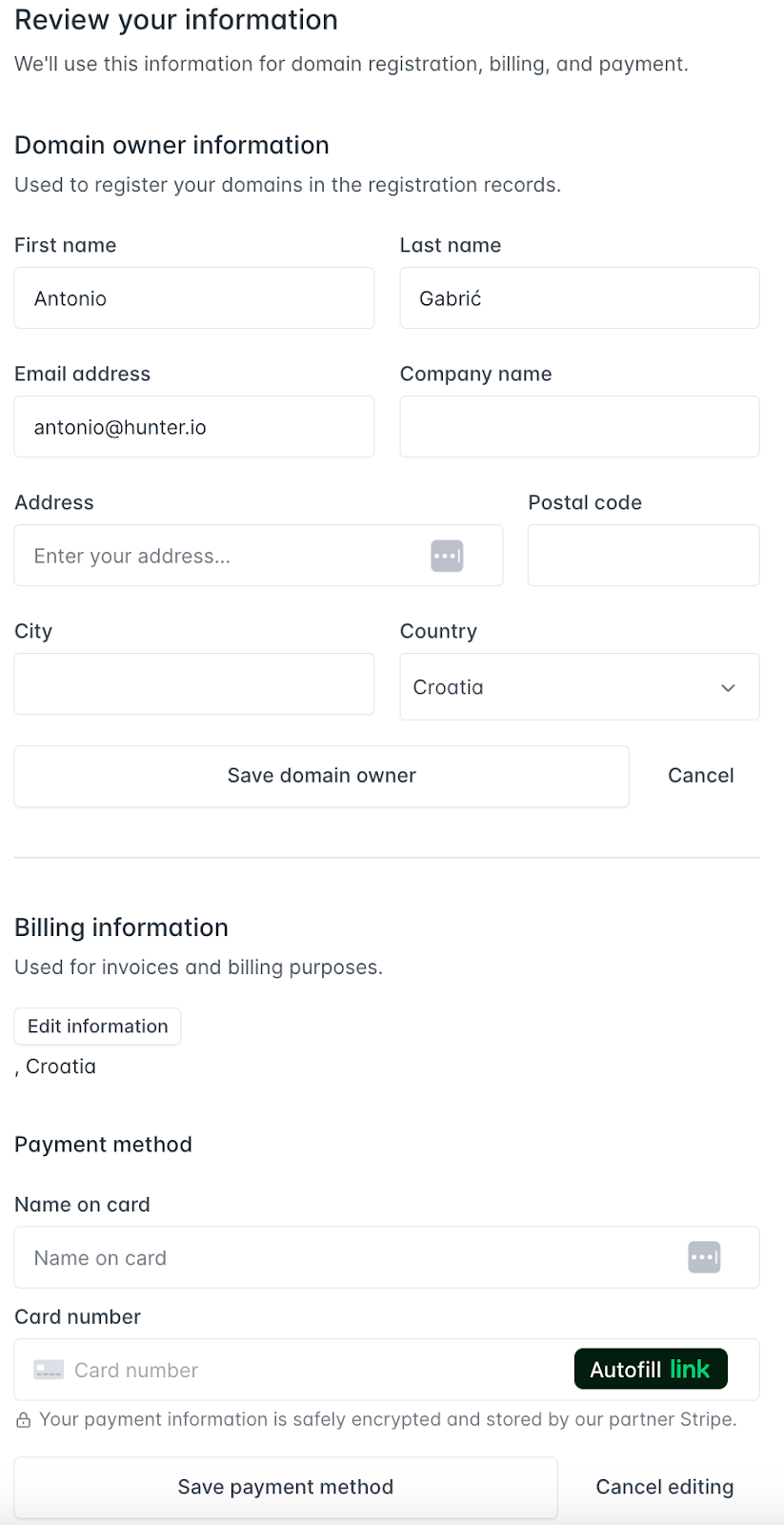
4) Add billing information and checkout
Lastly, add the domain owner's information and billing details. After checkout, the inboxes are usually ready within about 30 minutes.
At that point, you have fully configured email addresses ready to use without spending hours manually setting them up.
Monitor inbox performance and deliverability from a single dashboard
Once your email accounts are created, Hunter provides a centralized dashboard that lets you track each inbox's performance in real time.
You can see sending activity, daily limits, scheduled emails, and inbox health scores at a glance, without jumping between tools or spreadsheets.
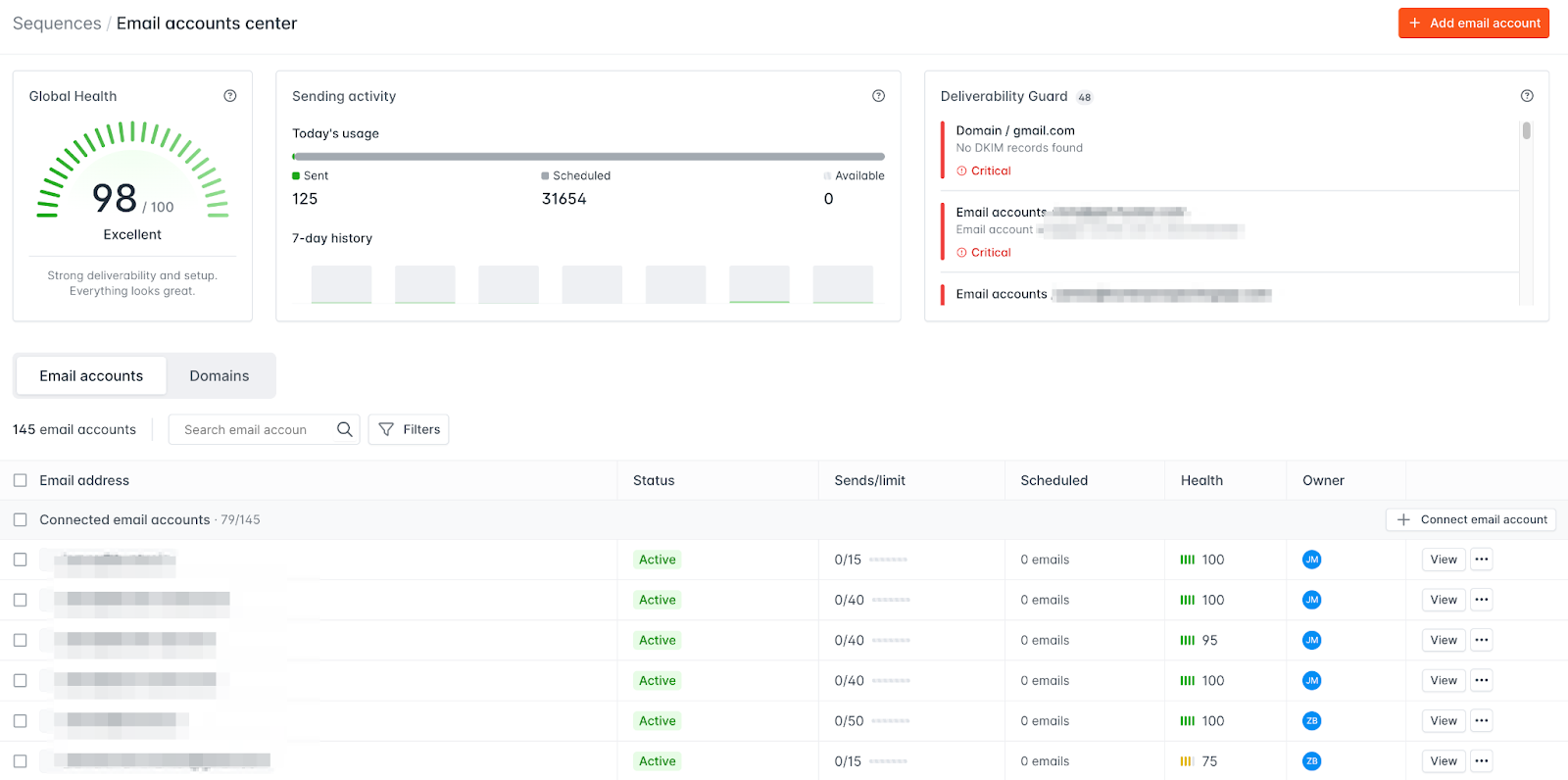
The dashboard also highlights deliverability issues as they appear.
If a domain is missing DNS records, an inbox starts showing degraded health, or sending limits are being approached, it is surfaced directly in the interface.
That makes it easier to catch problems early and fix them before they impact campaign performance or deliverability.
As you scale to dozens of inboxes, this visibility becomes critical. Instead of guessing which sender is underperforming or manually auditing setups, you get a clear, shared view of inbox health and deliverability across your entire outbound operation.
Final thoughts
Multiple email accounts aren’t a trick or a workaround. They’re infrastructure.
If outbound matters to your business, this layer has to be designed deliberately. Otherwise, you pay for it later in burned domains, misleading metrics, deliverability swings you can’t explain, and a pipeline that stalls just when it should be compounding.
The teams that scale outbound successfully distribute risk, keep each inbox predictable, and build systems that can grow without collapsing under their own weight.
Remember: one inbox sending 20 emails a day needs 12.5 years to work through 15,000 prospects. Ten inboxes do it in 15 months. Thirty do it in five.
The math doesn't change. Your infrastructure can.


 Send cold emails with Hunter