
If you’re a salesperson or a founder and you want to use email outreach for sales, this guide will get you from zero to competent. It covers everything from finding prospects to writing and sending sales emails that get positive replies.
Whether you've just landed your first sales job, starting to look for more customers as a founder, or you're an experienced salesperson looking for a second opinion on your sequence, this guide is for you.
At the start, the most important thing to remember is that most sales emails are not having a good time.
- The average reply rate for sales outreach is 3%.
- 28% of decision-makers say they never, ever receive valuable sales emails.
- Their top complaints: too sales-focused (65%), irrelevant to their role (61%), generic (48%).
Here’s an example of how sales emails go wrong.
Imagine you’re a VP of Sales at a scaling SaaS company. You’ve been sending sales emails and managing salespeople for the last 15 years. You open your inbox and find this:
Hi Jordan,
I’m reaching out from Revo, an AI-powered sales coaching platform. We help sales teams improve performance by recording calls and providing automated feedback using our proprietary machine learning models.
Our platform integrates with all major CRMs and has been shown to reduce ramp time by up to 40%. We work with over 200 B2B companies and were recently named a G2 Leader in Sales Coaching.
Would you have 15 minutes this week for a quick demo?
Would Jordan, the VP of Sales, reply?
Every sentence describes the product—what it does, how it works, who uses it, and what award it won. There’s nothing about the recipient. Nothing about their team’s specific challenge. Nothing that couldn’t have been sent to 10,000 other people. Jordan closes it in two seconds.
Now imagine the same product, but the sender read this guide before sending:
Hi Jordan,
We’ve been studying how sales teams at Series B SaaS companies handle coaching as they scale, and a pattern keeps showing up: managers can realistically listen to 3–5 calls per rep per week. With a team of 30, that means 80%+ of coachable moments go unaddressed.
The result is predictable—new reps take 6+ months to ramp, and the ones who struggle early often never catch up because the feedback comes too late.
Is this something your team is running into, or have you already found a way around it?
This email is about Jordan. It describes a problem specific to their stage and team size, quantifies it, and asks whether it resonates—without mentioning a product. And whether or not Jordan has the problem, the budget, or the time—this email is far more likely to generate a reply and start the conversation.
The difference isn’t writing talent. It’s that the second sender understood the core problem of sending email outreach:
When a prospect opens their inbox and sees a sales email, they don’t care about your product and your offer. The questions on their mind are:
- Why are you emailing me?
- Why should I do anything?
- Why you?
- Why now?
Sending a sales email that answers these questions means you’ve made deliberate choices on who you’re contacting and what you should tell them.
That’s what this guide builds: the strategy behind the second email.
What this guide covers
The guide follows the full workflow from setup to sending:
- Strategy — your Value Proposition Canvas, your offer, and your buyer persona. These three things are the foundation for every decision that follows.
- Prospecting — finding the right companies, segmenting them, and reading timing signals to separate warm prospects from cold ones.
- Email finding and verification — getting verified contact details for the people you’ve identified.
- The four whys — three sections that build your messaging arguments: why they should act, why you’re the right choice, and why now is the right time.
- Writing and sequencing — putting all four whys into actual emails, with personalization at scale.
- Sending and optimization — metrics, A/B testing, and iteration.
Each section builds on the last. Start at the beginning.
Foundations
There are two areas every salesperson should be familiar with before ever sending an email sequence:
- Deliverability.
Getting your technical setup right is important for deliverability before you even find a single prospect. Poor sending infrastructure means your emails land in spam regardless of how good the copy is.
For more on the technical side of email outreach, read Hunter's guide to email deliverability. - Legal compliance.
Email outreach is legal in most jurisdictions, but it’s regulated. The rules vary by where your recipient is located—not just where you are—so if you’re emailing across borders, the strictest applicable law applies. Enforcement can also vary, depending on who your recipients are.
Always consult your lawyers, but for a quick breakdown of best practices, see Hunter’s guide to email outreach legal compliance.
The four whys framework
When your prospect sees your email in their inbox, they aren't thinking about your company and your offer. For them, the main question is, why?
Every sales email needs to answer the four whys the prospect is asking themselves:
- Why are you emailing me? — answered by sharp targeting and relevance.
- Why should I do anything? — answered by making inaction feel costly.
- Why you? — answered by specificity and proof.
- Why now? — answered by connecting to something current in their world.
Most of this guide is about creating a prospecting and messaging strategy that helps you answer these four questions without skipping a beat.
We're not reinventing the wheel here. These questions are commonly taught to salespeople. But they're rarely discussed in the context of the practical reality of sending email outreach every day.
The examples throughout the guide use a fictional SaaS company (Revo), but the framework applies to any B2B sale—agencies, consultancies, manufacturing, professional services.
STEP 1: Build an email outreach strategy for sales
Before you find prospects, write emails, or open a database, you need three things:
- a clear understanding of what value you deliver (your value),
- a specific deliverable that gives the prospect a reason to engage (your offer),
- and a detailed picture of who you’re trying to reach (your ICP and buyer persona).
These three things are equally foundational.
- Your value tells you what to say.
- Your offer tells them what they get.
- Your persona tells you who to say it to and how.
Map your value
As a salesperson, you need to know what pain you’re solving and for whom. The Value Proposition Canvas gives you this. Subject lines come from your prospect’s pains. Opening lines come from their frustrations. Your pitch comes from how you relieve those pains and create the outcomes they want.
With it, you talk about the prospect.
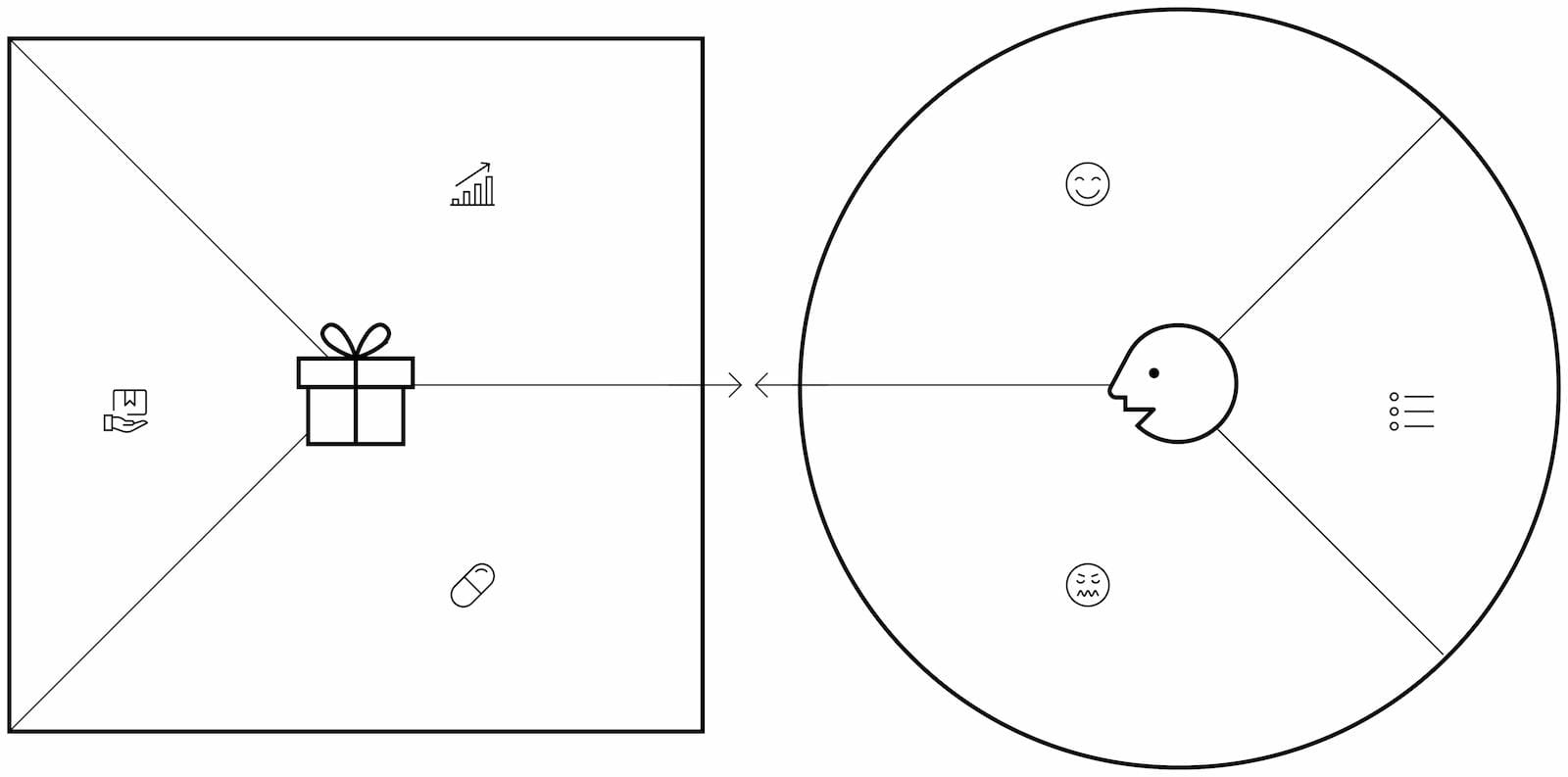
The canvas has two sides.
The right side is the Customer Profile: what your prospect is trying to accomplish, what gets in the way, and what success looks like.
- Jobs to be done—functional (hit quarterly revenue target), social (be seen as a strong leader), or emotional (stop dreading the Monday pipeline review). Social and emotional jobs are often what actually drive decisions.
- Pains—what frustrates them, what costs too much, what takes too long, what risks do they worry about?
- Gains—the positive outcome they’d describe to their boss. Not just the absence of pain.
The left side is your Value Map: how your product responds to each element of the customer profile.
- Products and services—the things a customer would point to and say “that’s what I bought.”
- Pain relievers—how specifically you eliminate or reduce each pain.
- Gain creators—how you create the outcomes they want.
The power of this exercise is in drawing explicit lines between what you do and what they need.
When every pain has a reliever and every gain has a creator, you have fit.
It’s harder than it looks—expect to revise it as you learn from real conversations. But it's worth it. Your first version will have gaps, that’s expected and it's okay. Start with what you know and treat it as a living document.
We’ll walk through the rest of this guide with a running example: Revo, a fictional AI sales coaching platform that records sales calls and gives reps automated feedback.
Revo’s canvas for one segment—Heads of Sales at mid-market SaaS companies:
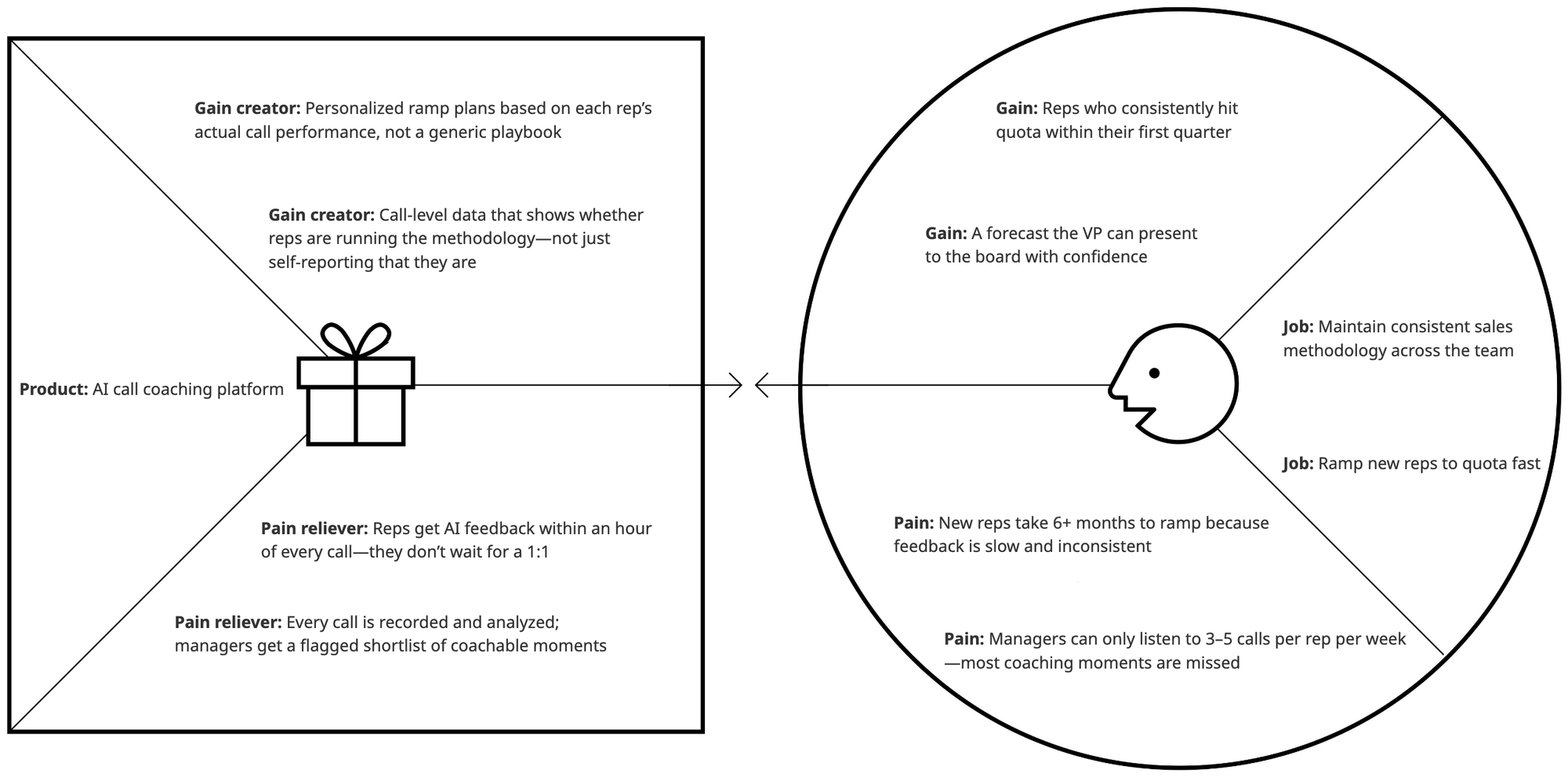
This canvas is now a menu for every email you’ll write. The pains become problem statements. The gains become outcomes you can promise. The pain relievers and gain creators are the proof.
Even better, alternative pain relievers and gain creators can be used across different emails so you always come with additional value instead of empty nudges.
STEP 2: Build your offer
Your value proposition is the problem you solve.
Your offer is what the prospect gets TODAY if they engage with you.
The gap between these two is where most outreach emails fail.
A VP of Sales is unlikely to reply to “we help sales teams ramp reps faster." They reply to “I can show you exactly where your new reps’ calls go off-track, based on a 10-call sample.” The first is about you. The second is about them, it’s concrete, and it’s something they can evaluate without committing to buy.
The offer is what makes email outreach work as a channel. Unlike inbound where the prospect has already raised their hand, outreach emails interrupt. The offer is the thing that justifies the interruption. It needs to deliver value on its own, before any sale happens.
This is why the offer is so important.
You can have perfect product-market fit on paper and still fail at outreach if your offer doesn’t give prospects a reason to engage.
You must give someone a reason to reply, and if the reason is good, related to a problem they have, and you don’t sound like everyone else… people will reply. But to do so requires you to have something to offer them that’s not a chance to buy your product.
It’s easy to confuse your offer with your process—and most outreach emails make this mistake. They say “let’s hop on a call” or “I’d like to show you a demo.”
That’s your next step, not their reason to say yes.
A strong offer describes what the prospect will learn or see, not what you’ll show them.
Can the prospect see exactly what they get and why it matters, in one sentence?
Compare:
- Weak: “I’d love to show you a demo of our SEO platform.”
- Strong: “I can show you which of your competitors are outranking you on your top 10 keywords—and what they’re doing differently.”
- Weak: “Let’s hop on a call to discuss how we can help with your outbound.”
- Strong: “I put together a breakdown of three companies in your space that doubled their reply rates in a quarter—happy to share it along with what we think would work for your team.”
The strong offers work because they’re about the prospect. They promise something specific. They pass the test.
Types of strong offers
Strong offers in sales emails tend to follow a few patterns. Each of these gives the prospect something useful even if they never buy—that’s what separates a strong offer from “book a demo.”
Audit or diagnostic. Analyze something specific about their business and share findings. “I reviewed your team’s hiring pattern and put together a projection of what ramp capacity looks like by Q3.” The prospect gets data about their own business they didn’t have before.
Competitive analysis. Show them something about their market they can’t easily see themselves. “I put together a comparison of how three SaaS teams your size standardized coaching quality.” This is valuable context for their decision-making regardless of whether they buy from you.
Benchmark or data point. Share specific data relevant to their situation. “Companies your size typically see X — here’s where you likely sit and why.” A benchmark gives them a reference point to evaluate their own performance.
Sample or proof of concept. A small demonstration of your product’s output using their data. “Based on a 10-call sample, here’s where your reps’ conversations are going off-track.” The prospect sees exactly what they’d get from working with you.
Framework or playbook. A useful resource they can apply regardless of whether they buy. “I built a ramp timeline template based on what we see working at your stage.” This is often in the form of a one-pager, spreadsheet, or Notion doc.
The common thread: each of these gives the prospect something valuable they can evaluate, understand, and act on. That justifies the interruption.
If you’re not sure which resonates most, pick the one your existing customers mention first—or the one you can prove with a case study. For most teams starting out, that’s a benchmark or a framework—they’re reusable across prospects and don’t require access to the prospect’s data.
Revo’s offer (the canvas pain is slow ramp time):
“I can show you exactly where your new reps’ calls are going off-track and how long it’s taking them to self-correct—based on a 10-call sample.”
STEP 3: Find and segment your target accounts
Your ICP is a hypothesis about which companies feel the pain on your canvas most acutely, and which companies are likely to be interested in your offer. This section covers how to define it, test it against a database, and segment the results.
Define your ICP
To define an ICP, you need to come up with a set of criteria that make a company likely to be a great customer for your business.
If you already have customers, look at your best ones—shortest sales cycles, highest contract values, lowest churn. What do they have in common? That’s your ICP.
If you don’t have customers yet, derive it directly from the canvas. Look at the pains on your canvas and ask: what kind of company feels this most? The answer is your starting ICP—a hypothesis about which companies to target.
Revo’s hypothesis, derived from the canvas: The pains—slow ramp times, inconsistent coaching, managers who can’t review enough calls—are worst at companies actively scaling a sales team. A 5-person team with a player-coach manager doesn’t feel this yet. A 50-person team with 10 new hires per quarter feels it acutely.
- Industry: B2B SaaS, sales-led motion (industry doesn't matter as much for Revo, but B2B SaaS is likely to want to adopt this novel product)
- Company size: 200–500 employees, (likely means that the sales team is large enough to feel the pain)
- Geography: US and UK
- Growth stage: If they're externally funded, series B or later—scaling go-to-market—but it's not a required attribute
- Technology: Uses Salesforce or HubSpot CRM (a technical requirement that makes implementation much easier: Revo integrates with both)
- Org signal/necessary buyer persona: Has a dedicated sales enablement or RevOps function—not obligatory but helpful
There are more potential segmentation variables to use here, and the key is to make them practical—which you'll test in the next step.
Test it against a database
Open a B2B database and start filtering. Filter by the attributes you hypothesized. Play around with other filters to see if the surfaced companies look like good prospects. If it's available, use the "Companies similar to" filter to reverse-engineer existing customers. The results will tell you whether your hypothesis is viable.
Too many results? Your filters aren’t specific enough. Every company looks the same, which means your emails will too. Add constraints—narrower industry keywords, a specific tech stack, a funding stage.
Too few? You’ve over-constrained. Loosen a filter or two. Maybe geography doesn’t matter as much as you thought, or your headcount range is too tight.
Where to search:
- Hunter Discover — filter by industry, headcount, headquarters, technologies used, and AI-generated website keywords. Purpose-built for this kind of filtering. And free to use.
- Crunchbase — can be stronger on funding data, M&A history, revenue, and investor profiles. Best when growth stage is a key ICP dimension.
- LinkedIn Sales Navigator — dominant for person-level data (title, seniority, tenure), useful for finding the buyer once you’ve identified the company (and you should probably use LinkedIn outreach next to email anyway!)
- Google Maps via Apify — for small or local businesses that don’t appear in B2B databases.
Segment your market
Look at your results. They’re probably not uniform. Revo’s ICP covers both 100-person startups scaling from 20 to 50 reps and 400-person companies with established teams of 80+. The sales cycle, the buyer, the objections, and the email that works are completely different for each.
Each group that needs a different email is a segment. Split them.
One generic sequence sent to your entire list will underperform three or four targeted sequences. Hunter’s State of Outreach data backs this up: sequences sent to 21–50 recipients average a 6.2% reply rate, while sequences sent to 500+ recipients average 2.4%—a 158% difference. Smaller, more targeted batches win. If you only have bandwidth for one sequence right now, pick your highest-value segment and start there.
Revo’s first two segments:
Each segment pulls from the same canvas but emphasizes different pains. This means different emails.
Check for timing signals
Not every prospect on your list has the same urgency. Some are feeling the pain acutely. Others might never feel it, or might feel it years from now. Before you move on, check which companies on your list are warmer than others.
Look for timing signals—evidence that the pain is live right now:
Job postings. A company hiring 3+ SDRs or AEs in the same month signals that ramp time is about to become a bottleneck. Five SDR roles in a month signals a scaling push. A posting for the first Head of RevOps or Sales Enablement signals they’re formalizing the sales function—coaching infrastructure is next.
Where to find job postings: Hunter Signals indexes postings by keyword and seniority. You can set alerts for “SDR” or “account executive” at companies in your ICP. LinkedIn job posts work too, though they require more manual scanning.
Funding rounds. A company that just closed a Series B is about to hire, buy tools, and scale processes. They’re in “build” mode. The urgency is high because they’ve just raised capital and need to deploy it.
Where to find them: Hunter Signals and Crunchbase both surface funding announcements. Set an alert for Series B or C funding rounds in your industry.
Technology changes. A new tool adopted or a competitor’s tool dropped—visible on their website or in job postings mentioning specific tech. When someone posts for a “Gong Administrator,” they’ve just brought in Gong. When a tool disappears from the tech stack, they’re evaluating replacements.
Where to find them: Hunter Discover has a technology filter that shows what tools a company uses. BuiltWith and Nerdydata analyze website code for technology signals. Job postings are especially useful—they often mention specific tools before they show up in a formal tech stack.
Job changes. When someone who bought from you at Company A moves to Company B, that’s one of the highest-conversion signals in sales. A new buyer, a new opportunity. When a VP of Sales is hired externally, they’re evaluating the entire tool stack—existing tools are on the table.
Where to find them: Sales Navigator flags job changes within 90 days. Champify and UserGems track these specifically. LinkedIn alerts work too if you’re monitoring specific people.
Company news. Acquisitions, partnerships, product launches, leadership changes. These events usually trigger tool evaluations and process changes.
Where to find them: Owler aggregates company news feeds. Google News alerts work for public companies.
Warm or cold?
Depending on how you find prospects, your list may be cold or warm. This is important to figure out your messaging.
Warm prospects are showing evidence that the pain is live right now. They need to get a different email sequence. You can lead with the signal (“I noticed you’re hiring for a new VP of Sales”) and move straight to “why you”—they already know they have the problem. The signal does the heavy lifting for urgency.
Cold prospects don’t have a signal. They match your ICP, but you don’t know whether the pain is top of mind. You lead with “why do anything” and spend more space making the problem visible. Urgency is something you have to argue, not something the signal carries.
STEP 4: Define your buyer persona
Pick a segment. Now ask: who at these companies would you actually email?
A useful buyer persona answers six questions:
- What does their actual day look like? Strategic (setting direction) or operational (in the tools every day)?
- What are they measured on? Whatever they’re measured on is what they’ll pay attention to in your email. Everything else is noise.
- What frustrates them most? Pull from the “Pains” column of your canvas, but make it role-specific.
- How do they buy? Decision maker, or do they sell internally? If they need buy-in from above, your email needs to give them ammunition for their boss.
- Where do they spend time? LinkedIn? Industry newsletters? Conferences? This tells you which channels to layer on top of email.
- What will they object to? Knowing objections in advance means you can preempt them in your sequence rather than hearing them for the first time on a call.
All this helps you justify reaching out and deliver a message that resonates.
One of Revo's viable personas: the VP of Sales.
Building good personas takes real research—interviews with existing customers, conversations with your support team, reading reviews of competing products—not guessing from your desk.
Keep in mind that the specific job title of your buyer persona may not matter as much as what they do day-to-day. As you work with a given market, you'll figure out multiple equivalent job titles that you can reach out to.
STEP 5: Find and verify prospect email addresses
You have companies, segments, personas, and a warm/cold split. Now you need verified email addresses for the specific people you’ve identified.
Hunter Discover makes it easy to turn your previous company search into a list of verified decision makers. If you identified people elsewhere and you already have a list of names and company names, then Email Finder is your best bet.
Verify before you send
Never send to an unverified list. High bounce rates damage your domain reputation—the same reputation you spent weeks warming up.
If you find your email addresses inside Hunter, they're already verified. But if you find them elsewhere, you need to verify first.
STEP 6: Have a messaging strategy
Every step so far has been building toward this one.
- Your canvas mapped the value.
- Your offer gave prospects a reason to engage.
- Your segments and personas told you who to reach.
- Your verified list tells you where to reach them.
Now it's time to write the emails.
Remember the four whys from the start of this guide?
They're the backbone of every email you'll write.
- Why are you emailing me — answered by sharp targeting and relevance.
- Why should I do anything — answered by making inaction feel costly.
- Why you — answered by specificity and proof.
- Why now — answered by connecting to something current in their world.
This section is about assembling those four arguments into a multi-email sales sequence and then turning that sequence into emails people actually read and reply to.
The first half covers messaging: what each email argues, in what order, and how the structure adapts by prospect type. The second half covers copywriting: subject lines, tone, formatting, personalization, and complete examples.
Every email makes the full case
A common instinct is to spread the four whys across emails — one per email, or two per email. This doesn't work. A prospect who only reads Email 2 shouldn't get half an argument. Every email in your sequence should address all four whys:
Why are you emailing me? Answered by who you're contacting and how you found them. For prospects without signals, this is often the relevance of the targeting: "We've been studying how sales teams at Series B SaaS companies handle X." For warm prospects, this is the signal: "I noticed you're hiring three SDRs."
Why should I do anything? Answered by making the problem or opportunity visible and quantifying the stakes. "Managers can realistically listen to 3–5 calls per rep per week. With a team of 30, that means 80%+ of coachable moments go unaddressed." This makes inaction costly by making the consequence explicit.
Why you? Answered by demonstrating specificity, depth, or proof. A case study works. A detailed understanding of their exact bottleneck works. An insight they couldn't have found elsewhere works. What doesn't work: generic credibility claims. "We're the #1 platform" doesn't tell them why you specifically understand their situation.
Why now? Answered by connecting the problem to something in their current context. A hiring spree creates urgency. A funding round creates urgency. A competitive move creates urgency. If the email doesn't tie the problem to something they're dealing with right now, it lands in "someday."
Weight the four whys by awareness
The split between warm prospects (found through signals) and prospects without signals (found through ICP filters) determines how you distribute emphasis across the four whys.
Prospects without signals don't recognize the problem or don't consider it urgent. Spend most of the email on "why should I do anything" — concrete data, specific examples, quantified consequences. "Your reps are spending 15 hours per week on manual CRM entry — that's $180K per year in lost selling time for a 10-person team" does more work than "streamline your sales workflow." The "why you" and "why now" are present but briefer — a sentence or two each.
Warm prospects already feel the pain. The signal handles "why now" implicitly, and the problem is known. Lead with "why you" — differentiation and proof. The problem framing is a sentence of context, not the main argument. Here's what I noticed, here's how we solve it, here's what happened when a company like yours tried it.
Design a three-email sequence
A single outreach email rarely generates a reply. Hunter's State of Outreach data shows that a one-email "sequence" averages a 2.9% reply rate. A three-email sequence averages 6.8% — more than double. Returns diminish sharply after the third email, so three is the number to aim for.
The key principle: each email makes the full case — all four whys — but from a different angle and with a different ask. If the prospect didn't respond to your argument in Email 1, saying it louder in Email 2 rarely helps. Say something different. Your Value Proposition Canvas mapped multiple pains, gains, pain relievers, and gain creators. Each email should lead with a different one.
Email 1: Lead value angle + direct CTA. Open with the strongest pain or gain from your canvas, prove you're credible, connect to urgency. For prospects without signals, you can either assert the problem (lead with a specific, quantified cost of the status quo) or sniff for it (hypothesize the pain and invite confirmation). Assertions command attention; questions invite dialogue. If your segment is tight and the pain is well-validated, assert. If you're casting wider, sniff first. For warm prospects, open with the signal and go straight to differentiation. End with a direct ask — a question or a low-commitment meeting.
A warning on warm openings: the "I saw…" pattern is one of the most misused in email outreach. It works when the signal genuinely connects to the pain you solve — a hiring spree, a funding round, a technology change. It fails when salespeople use it on prospects without signals with a superficial observation: "I saw your company is growing." The prospect can tell the difference instantly. If the signal doesn't meaningfully change what you'd say, it's a template variable dressed up as research.
Email 2: Different value angle + referral CTA. Lead with a completely different pain or gain from your canvas. If Email 1 focused on a pain reliever (removing something bad), Email 2 shifts to a gain creator (adding something good) — or vice versa. These appeal to different motivations, and a prospect who shrugged at one may lean forward at the other. End with a referral ask: "If this isn't your area, who on your team would be the right person to talk to?" This gives the prospect an easy out that still moves the conversation forward — and if you're emailing the wrong person, you find out here instead of wasting Email 3.
Email 3: Third angle + simple question CTA. Lead with yet another value angle the prospect may not have considered — a strategic benefit, a downstream effect, something they haven't been thinking about. End with the lowest-friction ask possible: "Curious — how are you handling X today?" or "Is this something your team is dealing with?" This is the easiest thing to reply to, and the reply itself tells you exactly how to follow up.
When you have a validated ICP but no signal
Some prospects sit between cold and warm — they closely resemble your best customers, but you don't have a signal that they're thinking about the problem right now. Lead with the pattern: "We work with a lot of companies structured like yours — sales-led, 150–300 employees, recently promoted their first VP of Sales — and there's a pattern we keep seeing…" This establishes relevance the way a signal does, and lets you move faster through the four whys.
Notes of sales follow-up emails
Your sequence structure already handles follow-ups — Email 2 and Email 3 are follow-ups by definition. But it's worth naming the principles explicitly.
A follow-up is not a reminder. "Just bumping this to the top of your inbox" tells the prospect you have nothing new to say. It's a waste of everyone's time. Every follow-up must present a different value angle from your canvas. A different pain, a different gain, a different proof point. If you can't think of a new angle, you don't have a follow-up problem. You have a strategy problem.
Change the angle, not the volume. The three-email structure works because each email makes a different argument. Email 2 isn't a louder version of Email 1. It's a completely different reason to care. If the prospect didn't respond to a pain reliever argument, try a gain creator. If they ignored a cost-of-inaction case, try a competitive angle.
Know when to stop. Three emails is the right default. If Email 3 gets no response, the prospect either doesn't have the pain, doesn't have it badly enough, or isn't the right contact. Move on to the next account. You can re-engage in 3–6 months if a new signal appears — but don't add a fourth email just because you haven't heard back.
Alternative sequence tactics
The structure above — different value angle per email, varying CTA types — is a strong default. But it's not the only approach. Here are variations worth testing, especially once you have reply data and know what's working.
Problem-sniffing sequence. Every email asks a question instead of asserting a pain. "We keep hearing from teams your size that… — does that match what you're seeing?" This works when you're prospecting into a segment you're still learning about, or when you're targeting senior buyers who bristle at being told what their problems are. The downside is lower urgency — questions invite reflection, not action. Use this when you're not yet confident in your ICP's pain points.
Value-first sequence. Lead every email with something genuinely useful — a benchmark, an industry data point, a relevant analysis — before making any ask. Email 1 gives. Email 2 gives again. Email 3 gives and asks. This builds reciprocity and positions you as a resource rather than a seller. The risk: if your "value" is generic or self-serving ("I wrote a blog post about…"), it backfires. The insight needs to be specific enough that the prospect couldn't have found it on their own.
Multi-thread sequence. Instead of three emails to one person, email two or three people at the same company — typically the end user and the budget holder. They get different messages tailored to their role, and each message references the other. "I also reached out to [VP name] about the strategic side of this — wanted to get your perspective on the day-to-day." This works for deals with multiple stakeholders, but keep it to 1–2 contacts per company. More than that and you look like you're carpet-bombing the org chart.
Breakup sequence. Email 3 explicitly offers to close the loop: "I've reached out a couple of times about X. If it's not relevant, no worries — happy to stop. But if the timing is just off, let me know and I'll circle back in a few months." This works because it's low pressure and gives the prospect permission to say "not now" instead of ignoring you. Some people only reply when they feel the thread is closing.
Re-engagement sequence. For prospects who replied once and went silent, or who opened your emails but never responded. Different from cold outreach — you have context. Reference what they previously engaged with and add something new: a fresh case study, a relevant signal that emerged since your last message, or a different value angle. Keep it short — they've already seen the setup.
These aren't mutually exclusive with the default structure. A problem-sniffing Email 1 can still use a referral CTA in Email 2. A value-first sequence can still vary its angles across emails. Think of them as lenses you can apply to the same framework.
Timing, spacing, and threading
The advice here represents the best practices, but take it all with a grain of salt. It's a starting point, but you should experiment to find the right sending approach for your specific use case.
Spacing
Space emails 3–5 business days apart. Shorter than three days feels pushy — the prospect barely had time to see your first email. Longer than seven and you lose the thread; they've forgotten who you are. For warm prospects with an active signal (a funding round, a job posting), lean toward the shorter end — the signal has a shelf life. For prospects without signals, the longer end gives each email time to land.
Send timing
Send on Tuesday through Thursday. Monday inboxes are flooded with weekend backlog. Friday afternoons are mentally checked out. Mid-week, mid-morning (9–11 AM in the prospect's time zone) consistently performs best. This isn't a hard rule (some industries and roles break the pattern—for example, emailing founders and C-level employees on the weekend may work) but it's a strong default when you don't have data of your own yet.
Threading
Default to sending every email as a reply in the same thread. The prospect sees a conversation, not three interruptions. Break the thread only when you're changing the angle so completely that threading would feel disjointed.
Each email needs to work standalone. A prospect who only reads Email 3 should understand what you're offering and why it matters. Restate enough context that the email is self-contained, but briefly enough that someone who read Emails 1 and 2 doesn't feel like they're hearing the same pitch again.
Longer sequences
Three emails is a solid default but not a universal rule. Enterprise deals with six-month sales cycles, or prospects in industries where trust builds slowly, sometimes warrant four or five touches.
The test is whether each additional email says something genuinely new: a different value angle, a new piece of proof, a timely signal that emerged since your last message. If you're adding an email because "more touches = more chances," you're just training the prospect to ignore you. An email that repeats a previous argument in softer language — "just wanted to bump this to the top of your inbox" — does negative work. It tells the prospect you've run out of things to say.
You now have a sequence plan: which arguments each email makes, how the asks escalate, and how the structure adapts to warm and cold prospects. The rest of this section covers how to turn that plan into actual emails.
STEP 7: Write your actual sales emails
Every email you send has five components, and each one has a job:
1. Subject line — earns two seconds of attention. Its only job is to get the email opened. Its job is to get the prospect's interest without being deceptive (because that tends to backfire).
2. Opening line — establishes why you're emailing this person. For warm prospects, reference the signal. For prospects without signals, reference a pattern or a specific insight about their situation. This is where personalization is typically used, but it's not really about personalization—it's about signaling relevance from the start.
3. Body — makes the argument. This is where you present the value angle from your canvas: the problem, the cost of inaction, the proof that it's solvable. One value angle per email. Assertion → evidence → connection to their situation.
4. CTA — one clear ask. Match the ask to the email's position in the sequence: a question for Email 1, a referral ask for Email 2, a simple question for Email 3. One CTA per email, never more.
5. Signature — name, title, company. Not a banner ad with six social links. Keep it clean.
Subject lines
The subject line decides whether your email gets opened. Everything else you've written is irrelevant if the prospect never reads past it.
The job of a subject line is to captivate — not to explain. You're not summarizing the email. You're earning two seconds of attention so the prospect reads the first sentence. Think of it as a headline, not an abstract.
Principles
- Keep it short. Five to six words is the sweet spot for reply rates. The ideal length varies — focus on evoking interest and showing research, and the length takes care of itself.
- Write it from the prospect's perspective, not yours. "Your SDR team's ramp time" is about them. "Introducing Acme's new outbound platform" is about you (and looks like marketing). The same principle that governs your email body — lead with their situation — applies to the subject line. One common template to avoid: "Quick question" — despite its popularity, it actually underperforms other subject lines on both open rate and reply rate.
- Match the subject to the email's job. For an Email 1 that's asserting a problem: reference the pain. For a problem-sniffing Email 1: frame it as a question. For a warm Email 1 referencing a signal: name it. The subject should prime the prospect for what the email is actually doing, not misdirect them.
- Set expectations the email delivers on. A subject line that promises something the email doesn't deliver creates cognitive dissonance — the prospect feels tricked, and you've eroded trust before the conversation started. The transition from subject line to opening sentence should feel seamless, not jarring.
- Avoid spam triggers. All caps, exclamation marks, words like "free," "guaranteed," "act now" — these are filtered aggressively. So are overly clever or misleading subject lines.
- For threaded follow-ups, the subject line is set by the first email — another reason to get it right. If you break the thread for a new angle, you get a fresh subject line. Use it to signal a genuinely different topic, not a rehash.
Tactics
Not every subject line works the same way. Here are five approaches, each suited to different situations.
- Curiosity gap. Highlight something the prospect doesn't know but would want to. The subject line creates an open loop that the email body closes. This works best when you have genuinely specific information — a competitor insight, a data point about their company, a pattern you've observed. It falls flat when the "gap" is vague or the payoff in the email doesn't match.
Examples for a VP of Sales at a scaling SaaS startup:
"80% of coaching moments missed" — opens a gap the email closes with the data on manager call review capacity.
"What {{competitor}} changed about rep onboarding" — implies specific competitive intelligence the prospect would want.
"The ramp time problem no one talks about" — signals insider knowledge about a pain the persona is likely feeling. - Questioning. Ask about something the prospect cares about — their priorities, their challenges, their plans. Questions work especially well for problem-sniffing emails because the subject line and the email's job are aligned: both are asking, not telling. They also work for senior buyers who don't respond well to being told what their problems are.
Examples:
"Your plan for new rep coaching?" — directly asks about the persona's responsibility. Low-friction, invites reflection.
"Is 6 months to ramp acceptable?" — frames the question around a specific metric from the canvas. Forces the prospect to confront their own number.
"What's your coaching coverage?" — assumes the prospect tracks this (many don't), which itself creates a gap. - Provocation. Present a viewpoint that challenges the prospect's assumptions or contradicts conventional wisdom in their space. Think of this as high-risk, high-reward.
Examples:
"Manager ride-alongs don't scale" — challenges the default coaching approach. The email body needs to back this up with data or a case study.
"Your best reps are getting worse" — counterintuitive claim that the email can support if top performers receive less coaching attention as the team grows. - Signal reference. Name the specific event, hire, or change you noticed. This is the default for warm prospects. It works because it's obviously not a template — you couldn't have written it without looking at their company specifically.
Examples:
"Your 3 new SDR roles" — names the specific signal. Obvious that it's not a template.
"Your RevOps hire" — same principle, different signal. - Incomplete thought. A fragment that reads like it was written by a person mid-thought rather than a marketing team. These stand out because they break the pattern of polished subject lines in a crowded inbox. Use sparingly — they're effective the first time and gimmicky the third.
Examples:
"Saw something about your sales team" — reads like a person writing casually, not a campaign. The ambiguity is intentional.
"This might not apply, but" — sets a low-pressure frame. Works for problem-sniffing emails.
A few things to notice: the curiosity gap and questioning tactics align naturally with outreach to new prospects (where the email's job is to make the problem visible). Signal reference is the default for warm outreach (where the signal does the heavy lifting). Provocation can work for either, but requires more confidence in your claim. Incomplete thoughts are wildcards — test them in small batches before committing.
Email body
Length
There's no universal ideal length. Hunter's State of Outreach data shows two peaks: emails of 61–80 words and emails of 181–200 words both see comparatively high reply rates.
In reality, this doesn't seem to matter.
The rule is: don't waste your recipient's time. Every sentence should either establish relevance (why you're emailing them) or deliver value (an insight, a data point, a proof point they didn't have before). If a sentence doesn't do one of those two things, cut it. The right length is whatever's left after you've removed everything that doesn't earn its place.
Formatting
Keep paragraphs to 2–3 sentences so the email doesn't look like a wall of text on mobile. Use line breaks between ideas. Skip the HTML formatting — plain text emails feel more personal and avoid rendering issues across email clients. Your signature should include your name, title, and company — not a banner ad with six social links and a legal disclaimer.
Tone
Your email's tone matters as much as its argument. The goal: sound like a peer emailing a colleague, not a stranger pitching a stranger.
- Mix in contractions. "You're" not "you are." "Don't" not "do not." Formal language reads as marketing copy and triggers the prospect's mental spam filter.
- Drop industry shorthand (aka shibboleths) where it signals insider knowledge. Saying "your SDR team" instead of "your sales development representatives" shows you live in their world. Basic example, I know.
- Use tentative language to invite dialogue. "If I'm seeing this right..." or "Perhaps there's an opportunity..." reduces defensiveness. Tentativeness is counterintuitively persuasive — it signals confidence (you don't need to oversell) and respects the prospect's judgment.
Structure each argument as a paragraph
A persuasive email paragraph follows a natural rhythm: state what you believe, explain why it's true, prove it, then connect it to the prospect's situation.
Here's the structure applied to Revo:
"Managers can realistically listen to 3–5 calls per rep per week — with a team of 30, that means 80% of coachable moments go unaddressed. CloudMetrics saw ramp time drop from 6 months to under 4 after giving every rep AI-generated feedback within an hour of each call. For your team hiring 5 reps this quarter, that's the difference between Q3 quota attainment and six months of underperformance."
One paragraph. Breaking it down:
- Assertion: "Managers can realistically listen to 3–5 calls per rep per week" — you're making a claim about a constraint.
- Evidence: "CloudMetrics saw ramp time drop from 6 months to under 4" — you're proving the claim is solvable.
- Connection: "For your team hiring 5 reps this quarter, that's the difference between Q3 quota attainment and six months of underperformance" — you're connecting the generic insight to their specific situation.
If you strip any of those three, the paragraph loses its force. An assertion without evidence is just a claim. Evidence without connection is a case study about someone else. A connection without an assertion is flattery. All three together are what make an argument land.
This structure works for every value angle you present — whether you're talking about ramp time, manager time savings, forecast accuracy, or anything else from your canvas. Assertion, evidence, connection.
Preempt the top objection
Your persona has 1–2 predictable objections — you mapped them in your buyer persona. Address the most likely one inside the email, not on a future call. One objection per email, woven into the argument, not bolted on as a disclaimer.
Revo's VP of Sales persona objects "we're too early for this — I still coach reps myself." So the email preempts: "Most teams think they need to wait until the team is bigger — but early habits stick, and retraining costs 3x what training does." The preemption works because it's embedded in the argument, not a separate rebuttal. It's part of the reason to act, not a defense against why not to.
Calls to action
Every email needs to end with a clear, specific ask. The CTA is where the prospect decides whether to engage or move on — and the size of your ask determines how many do.
Match the CTA to the email's role in the sequence. Email 1, especially for prospects without signals, shouldn't ask for a 30-minute demo. The prospect doesn't know you, doesn't trust you, and hasn't agreed they have a problem. A question works better: "Is this something your team is dealing with?" or "Worth a quick conversation to see if this applies?" For problem-sniffing emails, the CTA is built in — the question is the ask.
Escalate gradually. Email 1 might ask a question. Email 2 might propose a specific, low-commitment meeting: "Would 15 minutes on Thursday be worth it to see how [similar company] solved this?" Email 3 might make a direct offer: "I can send over a breakdown of what this would look like for your team — interested?" Each step asks slightly more, but only after the previous emails have built context.
Be specific about format and time. "Let's chat" is vague and easy to defer. "Would 15 minutes on Tuesday or Wednesday work?" gives the prospect something concrete to say yes or no to. Specific asks get more replies than open-ended ones because they reduce the decision from "should I engage with this person" to "am I free Tuesday."
One CTA per email. Multiple asks dilute each other. If you're asking a question and offering a meeting and sharing a resource, the prospect doesn't know which one to respond to — so they respond to none.
STEP 8: Personalize at scale
Personalization means injecting prospect-specific information into your emails so each one reads differently. It's not the same thing as good targeting. When you write a template tailored to "VPs of Sales at Series B SaaS companies," that's segment-specific copy — it applies to every prospect in the segment equally. Personalization is the layer on top: the detail that makes one VP of Sales's email different from the next.
Both matter, and they work together. A well-targeted template with no personalization can still perform. A personalized email sent to the wrong person won't. But when you combine sharp targeting (from your ICP, segments, and personas) with genuine personalization, reply rates climb.
Personalization also improves deliverability. Emails that differ slightly from each other look less like spam to email providers. When every email in a batch is identical, that's a pattern spam filters are built to catch.
The personalization-privacy paradox
Before getting into tactics, it's worth understanding a tension that governs all of this: people want personalized messages, but they react negatively when personalization feels invasive.
Research on this paradox surfaces a few patterns worth internalizing:
- People value personalization when it benefits them. An outreach email that references their specific challenge and offers something relevant feels like a favor. One that references their vacation photos feels like surveillance. The test: does this personalization make the email more useful to the recipient, or does it just prove I did research?
- Relevance is the filter. Personalization is welcomed when it's contextually relevant to what you're offering. Mentioning that a prospect's company uses Salesforce is relevant if your product integrates with Salesforce. Mentioning it apropos of nothing is odd.
- Tech-savvy recipients are more sensitive. People who understand how data collection works — your typical B2B buyer — are more attuned to when information was gathered without their involvement. They recognize enrichment-driven personalization faster and judge it more critically.
- Invasiveness triggers backlash. Just because information is publicly available doesn't mean the prospect wants a stranger referencing it. A LinkedIn post is public. That doesn't mean opening with "I saw you posted about your daughter's soccer game" is appropriate.
Three rules follow from this:
- Always personalize. Using the prospect's first name and company name is the minimum. It reassures the recipient the message was intended for them, and it introduces enough variance to help deliverability. This is table stakes.
- Stay relevant. Don't use personalization to show how much you know about the recipient. Include only information that's contextually justified — information that makes the email more relevant to them, not just more impressive to you.
- Don't be intrusive. The line between "researched" and "creepy" is thinner than you think. When in doubt, ask: would this feel normal if I said it in the first 30 seconds of a cold call, or even when meeting someone in person?
The personalization spectrum
Level 1: Custom attributes. The baseline. You insert {{firstName}}, {{companyName}}, {{jobTitle}} into a fixed template. Every outreach tool supports this. It's better than nothing — it introduces variance for deliverability and reassures the prospect the message was intended for them. But it's table stakes. The email still reads like a template because it is one.
Level 2: AI-generated personalization. Use enrichment data to write or rewrite parts of the email dynamically.
How it works:
- Enrich the prospect. Make sure you have more than the first and last name. Otherwise, LLM personalization is a waste of time, because the LLM has nothing to work with.
- Ask the LLM to personalize your template based on the context. Hunter's AI Writing Assistant does this for you.
- Human review. This is the step most people skip, and it's the one that determines whether AI personalization builds trust or destroys it.
AI personalization works best when the enrichment data gives the model something genuinely specific to work with. A prospect who recently posted on LinkedIn about scaling their sales team, who just raised a Series B, and who's hiring five SDRs is rich context.
Where AI personalization breaks down:
When the enrichment data is thin. If all the model has is a name, title, and company, the "personalized" opener will be a rephrased version of information the prospect already knows about themselves. "As the VP of Sales at Acme, you're probably focused on growing your team..." This is worse than no personalization — it signals that you automated the process but couldn't find anything real to say.
When the output isn't reviewed. LLMs hallucinate. They'll confidently reference a blog post that doesn't exist, attribute a quote to the wrong person, or misread a job posting. A single factual error in the opening line — the line that's supposed to demonstrate you did your homework — destroys the entire email's credibility. Review every AI-generated line before it sends, at least until you've validated the workflow on 100+ prospects and understand the failure modes.
When the personalization is disconnected from the argument. This is the icebreaker failure mode at scale. A personalized opener that doesn't connect to the rest of the email is a non sequitur. "Loved your recent post about remote team culture! Anyway, we sell CRM software..." The prospect can see the seam. The opening line has to bridge naturally to your value argument... which means the AI prompt needs to know what the email is actually selling and why it matters to this specific prospect. Information scent and milkshake approaches tend to survive the AI translation better than icebreakers, because they're structurally connected to the pitch rather than bolted on before it.
A note on honesty:
69% of decision makers say they're bothered by AI-written emails that lack a human touch. The instinct in response is to make AI-generated emails look more human — better prompts, more natural language, fewer tells.
But the real lesson is different: if your personalization requires hiding how it was produced, it probably isn't good enough.
Complete sequence examples
Here are two full sequences using Revo's Segment A (scaling startups, VP of Sales persona). Every email answers all four whys, but leads with a different value angle and ends with a different CTA.
Cold sequence
This prospect was found through ICP filters — a 150-person B2B SaaS company, sales-led, Series B, hiring reps. No signal that they're actively looking to solve the coaching problem.
Email 1 — Coaching bottleneck → direct CTA
Hi Jordan,
We've been studying how sales teams at Series B SaaS companies handle coaching as they scale, and a pattern keeps showing up: managers can realistically listen to 3–5 calls per rep per week.
With a team of 30, that means 80%+ of coachable moments go unaddressed.
So reps take 6+ months to ramp.
CloudMetrics — similar stage, 35-person sales team — cut that ramp time to under four months by giving every rep AI-generated feedback within an hour of each call.
Is this something your team is running into, or have you already found a way around it?
What this does: Leads with a canvas pain (coaching bottleneck → slow ramp), quantifies it, proves it's solvable with a case study (why you), and the hiring context implies urgency (why now). All four whys in one email. CTA is a low-friction question.
Email 2 — Manager time savings → referral CTA
Different angle on the coaching bottleneck I mentioned.
One thing CloudMetrics didn't expect after automating call feedback: their managers stopped spending Friday afternoons reviewing recordings. That time went back to 1:1 coaching on the calls that actually needed attention.
With 5+ new hires per quarter, the hours your managers spend trying to listen in on calls only compound. Most teams in your position don't realize how much management time is going to review instead of coaching.
If rep coaching isn't your area, who on your team would be the right person to talk to about this?
What this does: Completely different value angle — manager time savings (a gain creator) instead of ramp time (a pain reliever). Restates urgency tied to hiring pace. The referral CTA gives the prospect an easy out that still moves the conversation forward.
Email 3 — Forecast accuracy → simple question CTA
When call data is captured automatically, forecast accuracy improves because you're seeing what reps actually do on calls, not just what they report in the CRM.
For a VP presenting pipeline to the board, that's the difference between a forecast based on data and one based on hope.
How confident is your team in the forecast numbers coming from new reps right now?
What this does: Third value angle the prospect hasn't considered — forecast accuracy from call-level data. Touches a job the persona cares about (presenting to the board). The simple question CTA is the lowest-friction ask possible — easy to reply to, and the answer tells you exactly how to follow up.
Warm sequence
Email 1 — Signal + coaching gap → direct CTA
Hi Jordan,
I noticed you're hiring a Head of RevOps and three SDRs. That usually means outbound is about to get serious.
One thing teams at your stage run into fast: the SDRs start making calls before there's any system for coaching them consistently. Managers try to listen in, but with a growing team, most calls go unreviewed.
We help sales teams like yours give every rep AI-generated coaching within an hour of each call — no manager time required. CloudMetrics (similar stage, 35-person team) cut their ramp time from six months to under four after switching.
Worth a 15-minute conversation to see if this is relevant before the new hires start?
What this does: Opens with the signal (the hires), connects to the canvas pain (coaching bottleneck), goes straight to "why you" with a case study, and the CTA is tied to their hiring timeline (why now). Full case in one email.
Email 2 — Manager time savings → referral CTA
Beyond the ramp time improvement I mentioned — CloudMetrics also saw something they didn't expect. Once every call was being analyzed automatically, their managers stopped spending Friday afternoons reviewing call recordings. That time went back to 1:1 coaching on the calls that actually needed attention, instead of random sampling.
If you're wondering about setup: most teams are live within a week, and we handle the CRM integration. No IT project required.
If this isn't your area, who on your team would be the right person to talk to?
What this does: Different angle — manager time savings. Addresses the "can I pull this off" belief with setup specifics. Referral CTA moves the conversation forward even if Jordan isn't the right contact.
Email 3 — Forecast accuracy → simple question CTA
If those SDR hires start in Q2, there's a downstream effect worth thinking about. When reps are new, their self-reported pipeline is basically fiction. Teams that capture call data from day one get much better forecast visibility — you're seeing what actually happened on the call, not just what the rep logged in the CRM.
Curious — how are you planning to handle coaching and pipeline visibility as the new team ramps?
What this does: Third value angle (forecast accuracy) tied to the signal's timeline. The simple question CTA is the easiest thing to reply to, and the answer tells you exactly what Jordan cares about.
What to notice across both sequences
Every email answers all four whys. No email is incomplete on its own.
Each email leads with a different value angle. Email 1: coaching bottleneck → slow ramp (pain reliever). Email 2: manager time savings (gain creator). Email 3: forecast accuracy (gain creator). All three come from the canvas. A prospect who shrugs at one may lean forward at another.
The CTAs vary in type, not just intensity. Email 1: direct ask (question or meeting). Email 2: referral ask (finds the right person if you're wrong). Email 3: simple question (lowest friction, highest reply probability, and the answer is intel).
The warm sequence moves faster. It mentions the product in Email 1 and leads with "why you". The cold sequence leads with "why do anything" and spends more space making the problem visible.
Arguments come directly from the canvas. The pains (managers can't review enough calls, slow ramp times) and gains (reps hit quota faster, manager time freed up, forecast confidence) are all from Revo's Value Proposition Canvas.
Wrapping up
At this point, you should have plenty of ideas to execute sales sequences of your own.
There are more things you need to know related to the actual sending of your emails and monitoring and improving your email metrics—Hunter's guides have you covered.
Sales email templates
These templates follow the four whys framework from this guide. Each one answers all four questions — why are you emailing me, why should I do anything, why you, and why now — but emphasizes a different value angle and ask. Customize the {{placeholders}} for your product and prospect.
Cold introduction — assert the problem
Best for: prospects without signals, tight segment where the pain is validated.
Hi {{firstName}},
{{Pattern observation about their segment — e.g., “We’ve been studying how sales teams at Series B SaaS companies handle X, and a pattern keeps showing up:”}}
{{Quantified cost of the problem — e.g., “Managers can realistically do Y, which means Z% of [important thing] goes unaddressed.”}}
{{Consequence — what this costs them in terms they care about.}}
{{Case study in one sentence — “{{Similar company}} solved this by doing {{approach}} and saw {{result}}.”}}
Is this something your team is running into, or have you already found a way around it?
Emphasizes: Why should I do anything (50%) and Why you (30%). The targeting answers Why are you emailing me. The case study implies Why now — others are already solving this.
Cold introduction — sniff for the problem
Best for: new segments you’re still learning about, or senior buyers who don’t respond well to being told what their problems are.
Hi {{firstName}},
{{Context that shows you understand their world — e.g., “Most {{their role}} at companies your size are juggling {{two competing priorities}}.”}}
{{Question that surfaces the pain — e.g., “How confident is your team in {{the thing your product improves}}?”}}
I ask because {{brief explanation of why you’re asking — a pattern you’ve observed, a data point, a trend in their industry}}.
Curious whether this resonates or if your team’s already ahead of it.
Emphasizes: Why are you emailing me (40%) and Why should I do anything (40%). The question invites self-discovery rather than asserting the problem.
Warm outreach — signal-based
Best for: prospects showing timing signals (hiring, funding, technology changes, job changes).
Hi {{firstName}},
I noticed {{specific signal — e.g., “you’re hiring a Head of RevOps and three SDRs”}} — that usually means {{what the signal implies for their business}}.
One thing teams at your stage run into fast: {{the problem that follows the signal}}.
We help {{their type of company}} {{what you do, in their language — not your product description}}. {{One-sentence case study — “{{Similar company}} (similar stage, {{team size}}) {{specific result}}.”}}
Worth a 15-minute conversation to see if this is relevant before {{their timeline — e.g., “the new hires start”}}?
Emphasizes: Why now (30%) and Why you (40%). The signal handles urgency. Your job is differentiation and proof.
Follow-up — different value angle
Best for: Email 2 in a sequence, after no response to Email 1.
Different angle on {{what you mentioned in Email 1}}.
{{New value angle from your canvas — a different pain or gain than Email 1. E.g., if Email 1 was about a pain reliever, this one leads with a gain creator.}}
{{Supporting evidence or case study result that backs up this new angle.}}
If {{the topic}} isn’t your area, who on your team would be the right person to talk to?
Emphasizes: Why should I do anything (new angle) and Why you (new proof). The referral CTA finds the right person if you’ve reached the wrong one.
Follow-up — final email with simple question
Best for: Email 3 in a sequence, the last touch.
{{Third value angle — something they may not have considered. A strategic benefit, a downstream effect, a competitive insight.}}
{{One sentence connecting it to their situation.}}
Curious — {{simple question about how they’re handling the problem today, e.g., “how are you planning to handle X as the team grows?”}}
Emphasizes: Why should I do anything (new angle). The simple question CTA is the lowest-friction ask — easy to reply to, and the answer tells you exactly how to follow up.
Referral request
Best for: when you’ve identified the company but aren’t sure who the right contact is.
Hi {{firstName}},
I’ve been researching {{their company or segment}} and think there may be an opportunity around {{the problem you solve, in their language}}.
I’m not sure if this falls under your remit — who on your team would be the best person to talk to about {{specific topic}}?
Emphasizes: Why are you emailing me. This template is intentionally short — its only job is to find the right person. Save the full argument for the right contact.
Re-engagement — prospect who went silent
Best for: prospects who replied once and went quiet, or who opened emails but never responded.
Hi {{firstName}},
We spoke {{timeframe}} ago about {{the topic}}. Since then, {{something new — a relevant case study, a signal at their company, a market development, new data}}.
{{One sentence connecting the new information to their situation.}}
Is this still on your radar, or has the priority shifted?
Emphasizes: Why now (new development) and Why you (new proof). Keep it short — they’ve already seen the full setup. The question gives them permission to say “timing changed” without feeling rude.
Breakup email
Best for: the final email when you want to close the loop gracefully.
I’ve reached out a couple of times about {{the problem you solve}}. If it’s not relevant, no worries — happy to stop.
But if the timing is just off, let me know and I’ll circle back in a few months.
Either way, {{optional: one final insight or resource they might find useful regardless}}.
Emphasizes: none of the four whys directly. This email’s job is to get a reply from people who only respond when the thread is closing. Low pressure, high signal — the reply tells you whether to re-engage later or move on.
For more templates organized by industry and use case, see Hunter’s sales email template library.
Sales email FAQ
How many emails should a sales email sequence have?
Three is the right default. Hunter's State of Outreach data shows a one-email sequence averages a 2.9% reply rate while a three-email sequence averages 6.8% — more than double. Returns diminish sharply after the third email. Each email should present a different value angle from your Value Proposition Canvas, not repeat the same argument louder.
What's a good reply rate for sales emails?
The average reply rate for sales outreach is around 3%. Above 5% means your targeting and messaging are working well. Below 3%, something needs to change — either your audience, your value angle, or your offer. Track positive reply rate separately: a 10% reply rate where half the replies are "remove me" is worse than 5% where most replies are engaged conversations.
How long should a sales email be?
There's no single ideal length. Hunter's data shows two reply rate peaks: emails of 61–80 words and emails of 181–200 words. Short emails work for warm prospects where a signal does the heavy lifting. Longer emails work when you need to educate — making a problem visible to a prospect who hasn't considered it takes more space. The rule: every sentence should either establish relevance or deliver value. Cut everything else.
Should I disable open tracking on sales emails?
Consider it. Emails sent without tracking pixels average a 7.4% reply rate versus 4.4% with tracking enabled. Tracking pixels are associated with mass outreach, and you want your emails to look like 1-to-1 messages. If your team uses open data for sequence triggers or deliverability monitoring, weigh the trade-off — you're paying for that data with a lower reply rate. Reply rate is a better primary metric regardless.
What's the best time to send sales emails?
Tuesday through Thursday, mid-morning (9–11 AM in the prospect's time zone) consistently performs best. Monday inboxes are flooded with weekend backlog, and Friday afternoons are mentally checked out. This isn't a hard rule — some industries break the pattern — but it's a strong default when you don't have your own data yet. Always schedule by recipient time zone.
Should I use AI to write sales emails?
AI works well for research and generating personalized opening lines when you feed it rich enrichment data — LinkedIn activity, recent funding, job postings. It breaks down when the data is thin (the output becomes generic) or when the personalized opener doesn't connect to the rest of the email. Always review AI-generated content before sending. A single hallucinated fact in the opening line destroys the email's credibility.
Is sales email outreach legal?
Yes, in most jurisdictions, but it's regulated. CAN-SPAM (US) allows email outreach with an opt-out mechanism. GDPR (EU) requires a "legitimate interest" basis. CASL (Canada) is the strictest — implied consent is limited and penalties reach $10 million per violation. Always include an unsubscribe mechanism, honor opt-outs immediately, use truthful sender information, and document your data sources. See Hunter's guide to email outreach legal compliance for a full breakdown.



 Send cold emails with Hunter