A quick technical primer: A standard one-to-one email, like the kind you’d send to a colleague, is “plain text.” There’s no code, no formatting, no tracking. Just text.
But as soon as you add:
- Links,
- Images,
- Text formatting,
- Copy from GenAI like ChatGPT (unless you remove its formatting), or
- Tracking pixel to track opens,
…your message becomes HTML. Words and sentences are wrapped in <p> tags to become HTML paragraphs, bolding is introduced using the <strong> tag, and even the invisible tracking pixel uses the <img> tag.
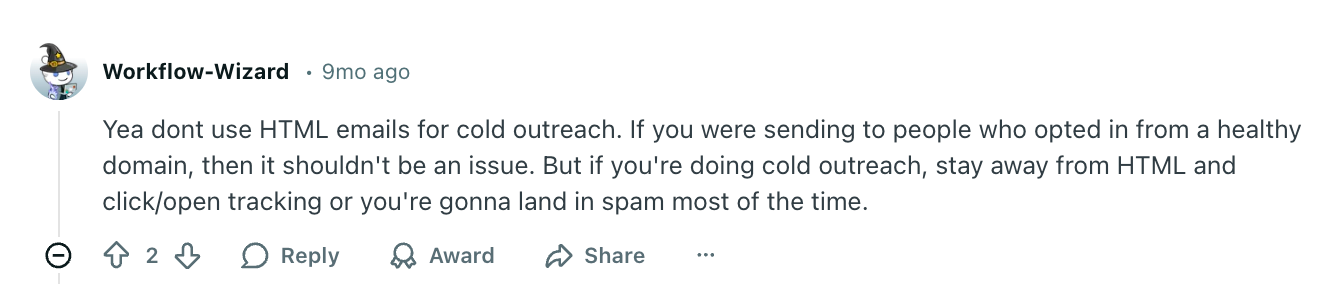
When it comes to sending cold emails, common advice is to stick to plain text for better deliverability. Just ask Reddit:

But why would this even be true, and what does the data say?
We analyzed 2.2 million emails sent by Hunter users to understand what cold emailers prefer to use, and ultimately whether plain text or HTML is the best way to build your emails. Here’s what we found.
In summary:
Our internal data shows that HTML cold emails bounce 674% more than plain text.
In cold outreach, HTML may make your message look like a bulk blast rather than one-to-one communication, which triggers stricter filtering and higher bounce rates.
If deliverability is a priority, plain text is the safest choice: no links, no formatting, no images, no tracking.
The closer your email looks to something you’d manually send to one person, the more reliably it reaches the inbox.
If you’re not getting the replies you want from your outreach, it makes sense to look at whether you’re using HTML in your emails. Run an A/B test and see which performs best.
What are plain text and HTML emails?
Before we go behind the initial data, let’s clarify what plain text and HTML emails are, and when you would use them.
A plain text email is an email that looks like a text message. These are sent in a plain format, without graphics, links, or attachments, like those you find in Gmail, Outlook, and Yahoo from your colleagues.
An HTML email is a designed email with graphics, use of bold, italics, or underlined text, links, GIFs, and videos.
Another way to look at plain text vs. HTML emails is to use the terms “cold email” and “email marketing.”
Cold emails are sent to email addresses that you have identified through tools like Hunter’s B2B leads database. While GDPR and CAN-SPAM compliant, these are people who are typically hearing from you for the first time, and are best sent through cold email tools like Hunter.
Marketing emails are sent to email addresses that have opted into communication from you. The list of email addresses you have are likely from a lead magnet with a download form, like an eBook, or someone who has signed up for a newsletter.
When you use HTML for cold emails, you increase the risk of your emails never reaching your leads.
Why HTML raises deliverability risk in cold outreach
- HTML emails may be structurally closer to marketing blasts than to personal one-to-one emails.
HTML is not inherently “bad.” Email newsletters typically use a lot of HTML code for visual appeal, and unless they go overboard, it doesn’t cause any issues.
At Hunter, we send tens of thousands to hundreds of thousands of HTML emails per month without any deliverability issues.
However, when you want to send cold emails, HTML introduces multiple risk signals that mailbox providers associate with marketing blasts rather than personal communication.
You’re cold emailing people who didn’t explicitly opt in. So every detail that makes your email look more like mass marketing rather than one-to-one communication increases the chance of spam filters flagging it.
HTML adds those signals. Tracking pixels, multiple links, embedded images, styling, and layout code all trigger stricter filtering because they’re commonly used in bulk and promotional sends.
Even small spacing or formatting choices can cause your email to look structurally identical to high-volume newsletter templates.
Add link tracking on top of that, and your message is now being evaluated using Google’s and Microsoft’s bulk-sender rulebooks rather than the more lenient logic used for normal interpersonal emails.
- The sending infrastructure is different from email marketing.
When sending cold emails using a cold email platform like Hunter, you’re essentially automating the process of sending messages from a regular mailbox.
These mailboxes aren’t built or optimized for high-volume, highly formatted sends, unlike newsletter platforms like Mailchimp.
So when a mailbox provider sees HTML-heavy code coming from an account that normally sends simple one-to-one messages, it triggers scrutiny: “Why does this personal mailbox suddenly look like a marketing automation system?”
That mismatch is what hurts deliverability—not the HTML itself.
Cold emails perform best when they mirror natural human communication. The more your message looks like an email you’d send manually to a colleague, the easier it is to land in the inbox.
What Hunter.io data shows about HTML vs plain text
To quantify the deliverability impact, we looked at bounce rates for all cold emails sent by Hunter users in 2025.
On average, the bounce rate of HTML campaigns is +652% higher compared to plain text.
Put differently, plain text campaigns experience -86.7% fewer bounces.
What you can do with this data
This isn’t a controlled A/B experiment, so confounding variables likely play a role.
We’re running deeper analysis to isolate them and will update this with the latest data.
It could be the case that those sending plain text emails are advanced users who remember to only use verified email data, for example.
However, the stark contrast in average bounce rates is a signal: if you’re using any HTML in your emails, and your deliverability isn’t where you’d want it to be, consider switching to plain text messages by removing all links, media, formatting, and tracking.
Take these steps to improve your deliverability:
- Always verify your email address data with an email checker (and do it monthly)
- Send to lists of 50-100 people per campaign
- A/B test plain text email sequences vs HTML sequences
We’re working on a feature to help you switch between plain text and HTML in the Campaigns editor—stay tuned!
Build your next email sequence in Hunter
Whether plain text or HTML, you can use Hunter.io’s email sequence tool, for free today.
With full email campaign creation that takes you from Hunter’s verified B2B email address data to writing, scheduling, and optimizing your email outreach, it’s the easiest way to send your cold emails, built into Hunter.io.



 Send cold emails with Hunter