Most people sending email outreach know that deliverability matters. Far fewer know what to actually do about it.
Email deliverability is a subject that everyone references and almost nobody fully understands, which is exactly what makes it so dangerous. Your open rates drop and you don't know why. Your emails go out but replies never come back. You followed all the advice you could find, and somehow you're still landing in junk.
In our "Why Your Emails Aren't Landing in the Inbox" webinar, we laid out the full picture: the three pillars of deliverability (technical setup, sender reputation, and email content) and what it actually takes to fix each one.
While we ran out of time to answer all your questions live, we're doing it here.
Below are the 15 questions attendees asked most. By the end, you'll have all you need to approach email deliverability with confidence, whether you're starting from scratch or trying to diagnose why something has stopped working.
Want to watch the replay on-demand? Click below.
Performance & benchmarks
1. What is a healthy response rate for 100 emails sent?
For outreach emails, a healthy reply rate is 4–6%, meaning 4 to 6 replies for every 100 emails sent.
That said, context matters significantly. Hunter's State of Email Outreach 2026 report, based on 31 million emails sent in 2025, puts the overall average at 4.5%.
That average masks wide variation by use case:
- Sales outreach averages around 3%
- Marketing-focused campaigns average 6.2%,
- Headhunting sequences average 7.5%, and
- Digital PR averages 13%, where the value exchange tends to be more explicit.
The biggest driver of above-average reply rates isn't volume; it's targeting precision.
Our data shows that sequences sent to 21–50 recipients outperform those sent to 500+ by 158%.
If you're sending 100 outreach emails and getting fewer than two replies, audit your list quality and message relevance before sending more.
2. What are the real causes of low open and reply rates? Is it just about personalization?
Low open and reply rates are commonly caused by a combination of deliverability issues and relevance problems. Personalization is important, but only helps if your emails reach the inbox.
Personalization does move the needle: our data shows emails with two personalized body attributes generate a 56% higher reply rate than non-personalized emails.
Deliverability failures happen upstream though, before personalization gets a chance to work. If your domain isn't properly authenticated, your sending volume has spiked, or your bounce rate is too high, your emails may not be reaching primary inboxes at all.
The diagnostic order matters:
- Check your deliverability health first, then
- Look at personalization and copy.
A drop in open rate that isn't explained by any change to your subject line or list is almost always a deliverability signal. A drop in reply rate with open rates holding steady points more toward messaging or relevance.
Infrastructure & domains
3. What's the difference between using emails from similar domains versus subdomains of the main brand domain?
A subdomain sits beneath your main domain (e.g., mail.hunter.io). A similar or secondary domain is a completely separate domain that resembles your brand name (e.g., gohunter.io). Both serve the same purpose for outreach: protecting your primary domain's reputation.
This came up at the end of the webinar, and it's a distinction worth making precisely. True subdomains carry the parent domain's reputation history with them. Separate similar domains are independent, meaning they start with a blank slate and need to be fully warmed up before sending.
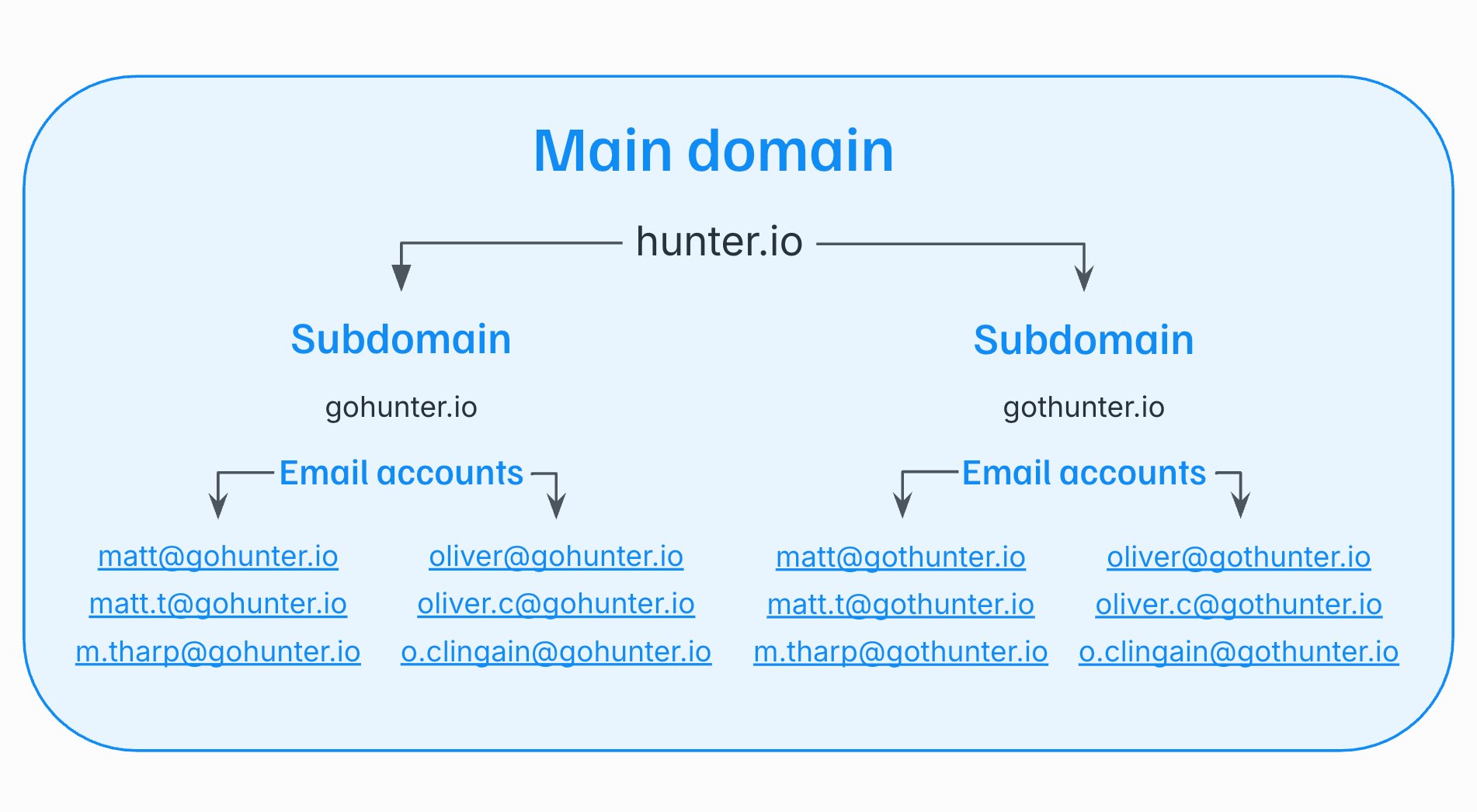
The core principle is the same in both cases: never send email outreach from your main business domain.
Whether you use a subdomain or a secondary domain, make sure it's properly authenticated (SPF, DKIM, DMARC, MX), warmed up before use, and kept separate from your primary domain so any deliverability issue stays contained.
4. Will using similar domains with a different Top Level Domain (TLD) hurt us? What about having a website URL or profile picture in the email signature?
Using a different TLD (e.g., .co instead of .com) can reduce recipient trust and attract extra scrutiny from inbox providers, particularly if the domain is recently registered. Images in your signature, including a profile photo, count as HTML and hurt deliverability in outreach emails.
On the TLD question: there's nothing inherently wrong with sending from a domain on a different TLD, but recipients who look you up may not immediately recognize it as your brand, which affects trust.
New domains of any kind need to be warmed up before outreach begins, and freshly registered domains face heightened scrutiny from inbox providers until they build a sending history.
On signatures: the advice to use plain text for outreach emails extends to your signature.
Email providers treat images as images regardless of where they appear in the message, so a profile photo in the footer is still an HTML element that pushes your email further from plain text.
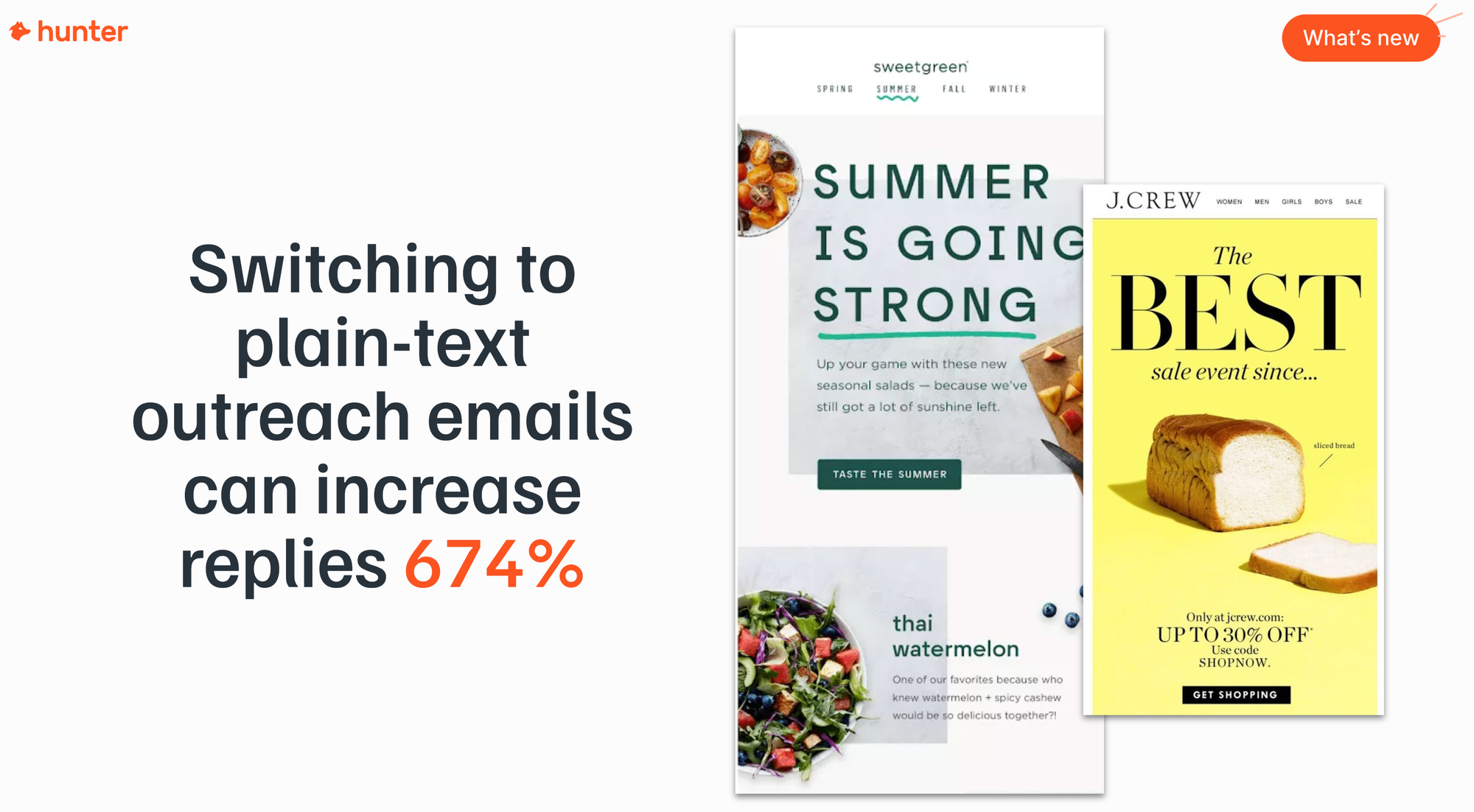
For email outreach, use a plain text signature: your name, title, company name, and phone number as text only, with no images and no links.
Once a recipient replies, the conversation moves to a warmer context and you can reintroduce your full branded signature.
5. How do you check your SPF, DKIM, DMARC, and MX records?
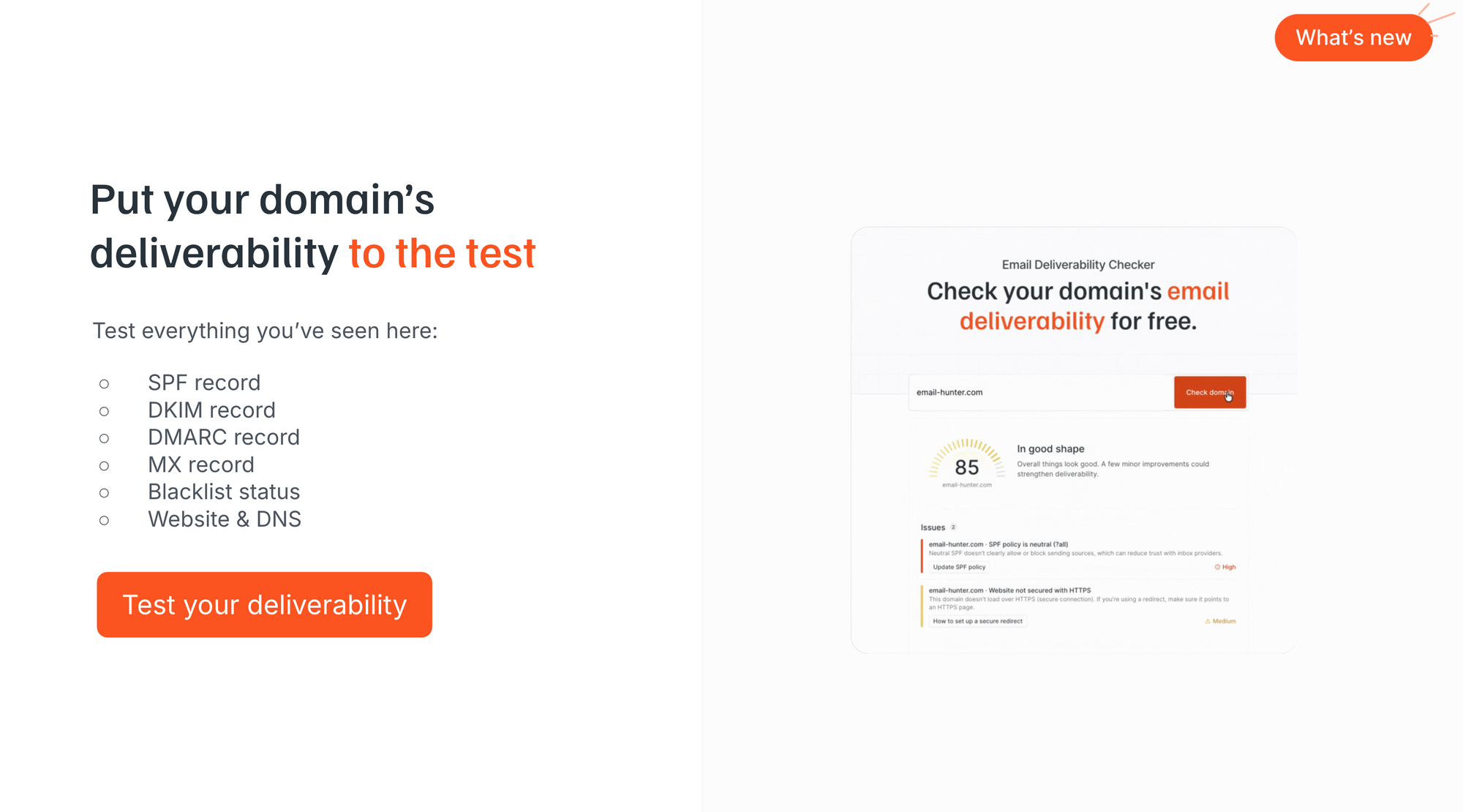
The simplest way is to use Hunter's free Email Deliverability Checker at hunter.io/email-deliverability-checker, which scans all four records plus blacklist status and DNS settings in a single pass.
You don't need to be technical to do this. Enter your sending domain or subdomain, and you'll see exactly what's configured, what's missing, and what needs fixing. Here's what each record does in plain terms:
- SPF confirms which servers are authorized to send mail on your domain's behalf. Without it, your emails can appear to come from an unauthorized source.
- DKIM adds a cryptographic signature to every message so inbox providers can verify it wasn't tampered with in transit.
- DMARC tells inbox providers what to do if SPF or DKIM checks fail (quarantine or reject). Without it, your domain can be impersonated.
- MX records route incoming mail. Even if you're only sending outbound, MX records must be configured, otherwise replies won't reach you.
If you're already using Hunter Sequences, the Email Accounts Center gives you a running health check on all your sending domains and accounts, with specific guidance on how to fix anything it flags.
6. What steps do you need to take to warm up a new domain before sending campaigns? How long does it take?
Warming up a new sending domain takes 4–6 weeks and involves gradually increasing your daily sending volume from around 15 emails per day up to a ceiling of 50 per account, to mimic the natural sending behavior of a real person.
Inbox providers expect sending behavior to look human. A brand new account that immediately starts sending 50+ emails a day looks like a spam operation rather than a legitimate sender, and it will be treated accordingly.
The process, step by step:
- Start at 15 emails per day per account.
- Increase gradually, roughly five emails per day per week, over the 4–6 week period.
- Keep your content clean and personalized during warm-up: plain text, no links, genuine value.
- Use a dedicated warm-up tool or rotate through real inboxes to generate positive engagement signals.
Most warm-up tools automate this by exchanging real emails between pools of accounts to build positive engagement history.
Whether you warm up manually or with a tool, the 4–6 week timeline is a realistic minimum before you run any real outreach volume through a new domain.
7. Is your domain reputation the same as your website's domain reputation if they share the same domain?
Yes. If you're sending email from the same domain as your website, they share the same reputation. This is exactly why sending outreach emails from your main business domain is such a significant risk.
Your domain reputation is a cumulative score built by inbox providers over time, based on how recipients interact with emails from that domain.
If your outreach triggers a blacklisting, a spam complaint spike, or a high bounce rate, that damage applies to the domain as a whole, including how your team's day-to-day email is treated.
This is the core reason for using subdomains or secondary domains for outreach. Keeping them separate means any deliverability problem stays contained: if a sending subdomain gets flagged, your primary domain and every email account your business runs on it remains insulated.
Volume & sending behavior
8. Does sending outreach emails to multiple people at the same company in a short period create a spam flag?
Yes. Sending similar emails to multiple contacts at the same organization in a short window is a known deliverability risk, and it can also damage your credibility with the very people you're trying to reach.
Inbox providers watch for multiple similar emails arriving at the same domain from the same sender. If any recipient marks the message as spam, that signal carries more weight because it comes from the same destination domain.
From a human perspective, if someone forwards your email to a colleague who already received the same message, the trust you were trying to build is gone immediately.
The smarter approach is to segment contacts at the same company by their role in the buying process.
Leadership, management, and practitioners all experience the same problem differently, so write genuinely different messages for each group, stagger the sends across different time periods, and start at the top of the hierarchy.
Hunter's data shows that emailing one or two people per company yields a 46% higher reply rate than emailing three or more.
9. If we have a list of 50,000 emails, are we saying we can only send 50 per day?
The 50-per-day limit applies per email account, not to your entire program. The solution for reaching a large list is to send through multiple email accounts across multiple sending subdomains.
With two subdomains and three email accounts on each, you have six sending accounts, giving you a healthy daily ceiling of around 250–300 sends while keeping every individual account within safe limits.
Build out more accounts and subdomains as you scale.
The principle behind the limit matters: inbox providers expect sending volumes that reflect what a real person could reasonably send in a working day.
Going above 50 per account signals mass sending behavior and increases the probability of getting flagged.
A list of 50,000 should be segmented, verified, and routed through a properly structured multi-account, multi-subdomain infrastructure rather than blasted from a single account.
10. Does sending newsletters or bulk (Electronic Direct Mails) EDMs to opted-in contacts follow the same rules?
No. Newsletters and marketing emails sent to opted-in lists are a completely different category from email outreach and should use dedicated email marketing platforms, not outreach tools.
This is one of the most common points of confusion. Everything covered in the session, including subdomains, account warming, sending limits, and plain text content, applies specifically to outbound email: one-to-one style emails sent to contacts who haven't opted in to hear from you.
If you're sending a monthly newsletter or EDM to people who signed up through an event, an application form, or a download on your site, you should be using a tool like Mailchimp, Campaign Monitor, or a similar platform.
These tools are built for bulk HTML sends to opted-in audiences, and their deliverability infrastructure, IP pools, and relationship with inbox providers are fundamentally different from the setup used for outreach.
The separation matters in both directions: don't apply newsletter logic to outreach emails, and don't run email outreach through your newsletter platform.
Content & format
11. You said no images and plain text only, but my signature has a brand image and links. Should I use a plain text signature for outreach?
Yes. For outreach emails, use a plain text signature with no images and no links.
Inbox providers treat images as images wherever they appear in the message, body or signature. A branded logo in your footer is still an HTML element, and it still contributes to the HTML-to-text ratio that spam filters evaluate.
Hunter's data shows HTML outreach emails bounce 674% more than plain text ones, so anything that pushes your email toward HTML moves it in the wrong direction.
The practical recommendation: name, title, company name, phone number, all as plain text.
Once a recipient has replied and you're in a two-way conversation, you can reintroduce your full branded signature in follow-ups without the same risk.
12. Our subject line format starts with the same three words every time: "(Newsletter Name): (Topic)." Is that a problem?
For newsletters sent to opted-in subscribers, a consistent subject line prefix builds recognition and is a legitimate strategy. For outreach emails, repeating the same opening phrase across many emails creates a pattern-matching risk that spam filters are specifically designed to catch.
The answer depends entirely on what you're sending and to whom.
For your newsletter, a consistent format trains engaged subscribers to recognize your emails in a crowded inbox.
The consistency works because your audience already knows you.
For outbound email it's a different story.
Spam filters look for near-identical content across sends from the same account, and a fixed prefix means the first several words of every subject line are identical, which is exactly the pattern that gets flagged.
More fundamentally, a subject line that leads with a brand name assumes the recipient already knows who you are.
Outreach subject lines need to earn attention from someone encountering you for the first time. They should be specific to the recipient and speak directly to the problem you're addressing.
Monitoring
13. How do you track open rate, bounce rate, spam complaint rate, and inbox placement rate?
Bounce rates and reply rates are trackable directly through your sending tool. Spam complaint rate and inbox placement rate require additional tools to monitor accurately.
Here's how to approach each metric:
- Bounce rate: Tracked automatically in tools like Hunter Sequences. Keep this below 2% by verifying all email addresses before sending. Above 2% and you're actively damaging your sender reputation with every campaign.
- Open rate: Requires enabling open tracking, which inserts a tracking pixel and converts your email to HTML. The tradeoff is covered in full in the next question.
- Spam complaint rate: Not directly visible in most outreach tools. Monitor it via Google Postmaster Tools (for Gmail recipients) and Microsoft SNDS (for Outlook). A sudden drop in open or reply rates is often an early signal that complaint rates have risen.
- Inbox placement rate: The percentage of emails landing in the primary inbox rather than spam. The best proxy is running Hunter's free Email Deliverability Checker, which surfaces the domain authentication issues most likely to be hurting your placement rate.
Hunter's Email Accounts Center inside Sequences consolidates domain health, per-account sending limits, and deliverability warnings in one view, which makes it a useful ongoing monitoring tool if you're running multiple sending accounts.
14. How does turning on open tracking hurt deliverability?
Open tracking inserts a tiny invisible image, known as a tracking pixel, into every email. That pixel converts your email to HTML, and HTML outreach emails face significantly more scrutiny from spam filters than plain text ones.
When a recipient opens a tracked email, the pixel loads and your tool records the open.
The problem is the mechanism: inserting that pixel adds code to your message that plain text emails don't contain.
Your email is no longer plain text and, as covered above, HTML outreach emails bounce 674% more on average than plain text ones.
Hunter's State of Email Outreach 2026 data shows sequences without open tracking generate a 68% higher reply rate than those with tracking enabled, 7.4% versus 4.4%.
That's a significant performance gap for a feature many senders treat as a default.
So track replies, not opens.
Replies are a direct signal of engagement, require no tracking infrastructure to measure, and are the metric that actually predicts outreach success.
If you need to test subject line performance, enable open tracking for a limited A/B test and then turn it off for all production sends.
Two tools worth using before your next send
Whether you're setting up a new sending domain or auditing infrastructure that's already in place, these two tools will tell you exactly where you stand:
- Hunter's free Email Deliverability Checker scans your SPF, DKIM, DMARC, MX records, blacklist status, and DNS configuration in a single pass. Enter your sending domain and you'll have a health score in under a minute.
- Hunter's Email Accounts Center, built into Hunter Sequences, shows domain health, per-account sending limits, and any active deliverability warnings across all your sending accounts, with in-tool guidance on how to fix whatever it flags.
Watch the replay
There's plenty more to uncover about email deliverability, check out the full recording below to keep up to date.




 Send cold emails with Hunter