
Google just announced that Gmail is entering the "Gemini Era."
For the "spray and pray" crowd - those sending 5,000 generic messages based on pre-built templates every day - this is an important announcement.
But for you? For the anti-cold emailers using Hunter to send targeted, research-backed outreach? This is the competitive advantage you need to get ready to grab with both hands before it's rolled out.
Google’s new AI updates are designed to protect 3 billion users from noise, and they will affect leads who are not only using Google Workspace-based email accounts. Outlook users likely won’t be far behind, as Microsoft launches its own version of this functionality with Copilot.
That means the inbox will no longer be passive; it will become an active gatekeeper.
If you send noise, Gemini will prevent you from getting through. If you are sending value, Gemini will highlight you.
Here are four takeaways from the new Gmail update and how you can prepare your email sequences to win.
1. Thread Summaries Signal End of "Just Bumping This" Follow-Up
The update: When a user opens an email thread with multiple replies, Gemini will synthesize the conversation into a concise summary.
What this will mean: Imagine a prospect opening your thread after you’ve sent four emails:
- The spammer’s summary: "The sender asked for a meeting on Tuesday. Then they asked if you saw the last email. Then they asked if you were the right person. Then they asked for a meeting again."
- Your ideal summary: "The sender shared a calculator for hiring costs. Later, they provided research on Q3 salary trends. Recently, they invited you to a webinar on remote leadership."
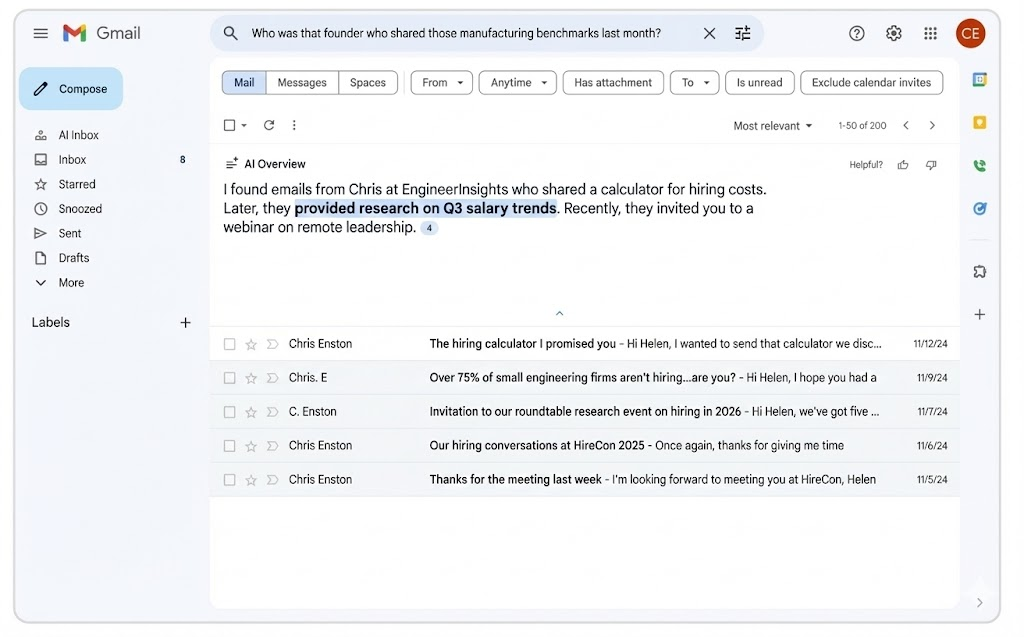
Gemini will limit the success of sequences that lack value. If your follow-ups are just "nudges," the AI summary will signal to your prospect that you have nothing to add. You can’t hide from the AI.
The solution: Every single email in your sequence must stand alone as a piece of value. Send the calculator. Send the research. Make the AI summary read like a list of gifts, not a list of demands.
Watch our webinar on the impact of this AI Gmail rollout:
2. The "Power Searcher" Means You Need To Truly Add Value
The update: Google’s AI will allow users to query their inbox with natural language. Instead of hunting for keywords, a lead can ask, "Who was the plumber that gave me a quote last year?" and get an instant answer.
What this will mean: Your goal is no longer just to get a click; it is to own a specific "search intent" in your prospect's mind.
If you send generic "checking in" emails, you will become invisible to this search function. But if you send research, data, and tangible assets, you become the answer to a question.
- Don't: Send a generic pitch about "marketing services."
- Do: Send a specific asset, like "Q3 Manufacturing Benchmarks."
- The Goal: You want your prospect to eventually ask their inbox: "Who was that founder who shared those manufacturing benchmarks last month?"
If your content is specific and valuable, Gemini retrieves you.
One example of how to do this is in our recent episode of the Outfoxed podcast:
Here’s an example of how you can start an email sequence that achieves this.
3. The VIP Filter Means You Must Earn "Relationship Status"
The update: The new AI Inbox will act as a "personalized briefing," filtering out clutter and highlighting VIPs. It decides who is a VIP based on signals: who you email frequently, who is in your contacts, and relationships inferred from message content.
What this will mean: You cannot "hack" your way into the VIP section. You have to earn it by generating engagement signals that Gemini respects.
- Permission first: This is why we don't pitch in the first email. We ask for permission to start a conversation. A reply (even a simple "sure") is a massive signal to Gemini that you are a known entity.
- Multichannel context: Use LinkedIn to connect and chat before or during your email sequence. If you reference a LinkedIn conversation in your email ("Great chatting on LinkedIn yesterday..."), Gemini’s context-aware AI is more likely to classify the relationship as genuine.
- Consistency: Sending from multiple accounts to smaller lists ensures you don't trigger "mass sender" penalties, keeping your relationship signals clean.
Here are 10 different ways to generate engagement from your leads.
4. Clutter Filter Means You Must Zig When The Rest Zag
The update: Google will clearly state: "The new AI Inbox filters out the clutter so you can focus on what’s most important."
What this will mean: "Clutter" is a pattern.
It looks like the same subject lines, the same "I hope this finds you well" openers, and the same HTML-heavy templates that everyone else is using.
To pass the filter, you need to appear to be a human sending a one-to-one message.
It’s what successful cold emails have always been based on, but it's become even more important with the Gemini Gmail update.
- No links initially: Links are often a proxy for mass marketing email. Ask for permission to share the asset instead.
- Plain text: Strip away the tracking pixels and HTML buttons.
- Hyper-relevance: If your email mentions a specific industry shift or a hiring trigger that actually matters to the recipient, Gemini is more likely to categorize it as "Important" rather than "Promotion."
Here’s what we found on the use of HTML vs. plain text emails.
Reward Leads For Engaging With Your Emails
The "Gemini Era" is essentially an enforcement mechanism for good behavior.
Google is building an inbox that rewards the exact behaviors we champion: relevance, patience, and value.
AI will become the gatekeeper, trained to let relationships through while blocking pitches.
Use this checklist to prepare for the Gemini Era:
- Stop "nudging": Ensure every follow-up adds data or insight.
- Optimize for "search": Be the specific answer to a specific problem.
- Signal trust: Use LinkedIn and permission-based CTAs to get that first reply.
- Stay small: Use Hunter to find verified emails for small, highly targeted lists —because mass-blasting is now a one-way ticket to the "Clutter" folder, and the data shows you can double your reply rate.
It’s now up to you to put in place the processes that will help you stand out.
Watch our webinar to learn what you can do about the AI Gmail updates:



 Send cold emails with Hunter