1-minute summary
- AI lead generation means using natural language within an AI assistant or agent that's connected to live data to find leads, verify their contact information, and reach out to them.
- AI handles manual steps: list building, lead enrichment and scoring, sequence drafting, and analysis. It can't know a verified email address on its own, because models were never trained on verified contact data and never will be, for privacy reasons.
- A model with no data connection invents email addresses rather than admitting it has none. Our research shows models that aren't connected to live data got 76% of them wrong.
- There's no single AI lead generation tool. There are six layers: data and enrichment, verification, intent and signals, orchestration, execution and deliverability, and a system of record.
- What AI doesn't replace is judgment: which market to enter, whether a reply deserves a follow-up call, and when to walk away.
What is AI lead generation?
AI lead generation means using natural language within an AI assistant or agent that's connected to live data to find leads, verify their contact information, and reach out to them.
In B2B AI lead generation, the model handles the research, enrichment and drafting, while a verified database supplies the facts it can't know.
You describe who you want to reach and why, and the AI executes the steps that used to be manual.
You give examples of sequences that worked before and AI scales them to other industries in minutes.
You say that you want to find low-hanging fruit in your lead list and AI, informed by your strategy, finds leads to contact next week.
Using AI for lead generation doesn't replace your judgment or act autonomously on the critical parts of the process. It's just a tool in the same way your CRM is a tool, except this one you can interact with via natural language.
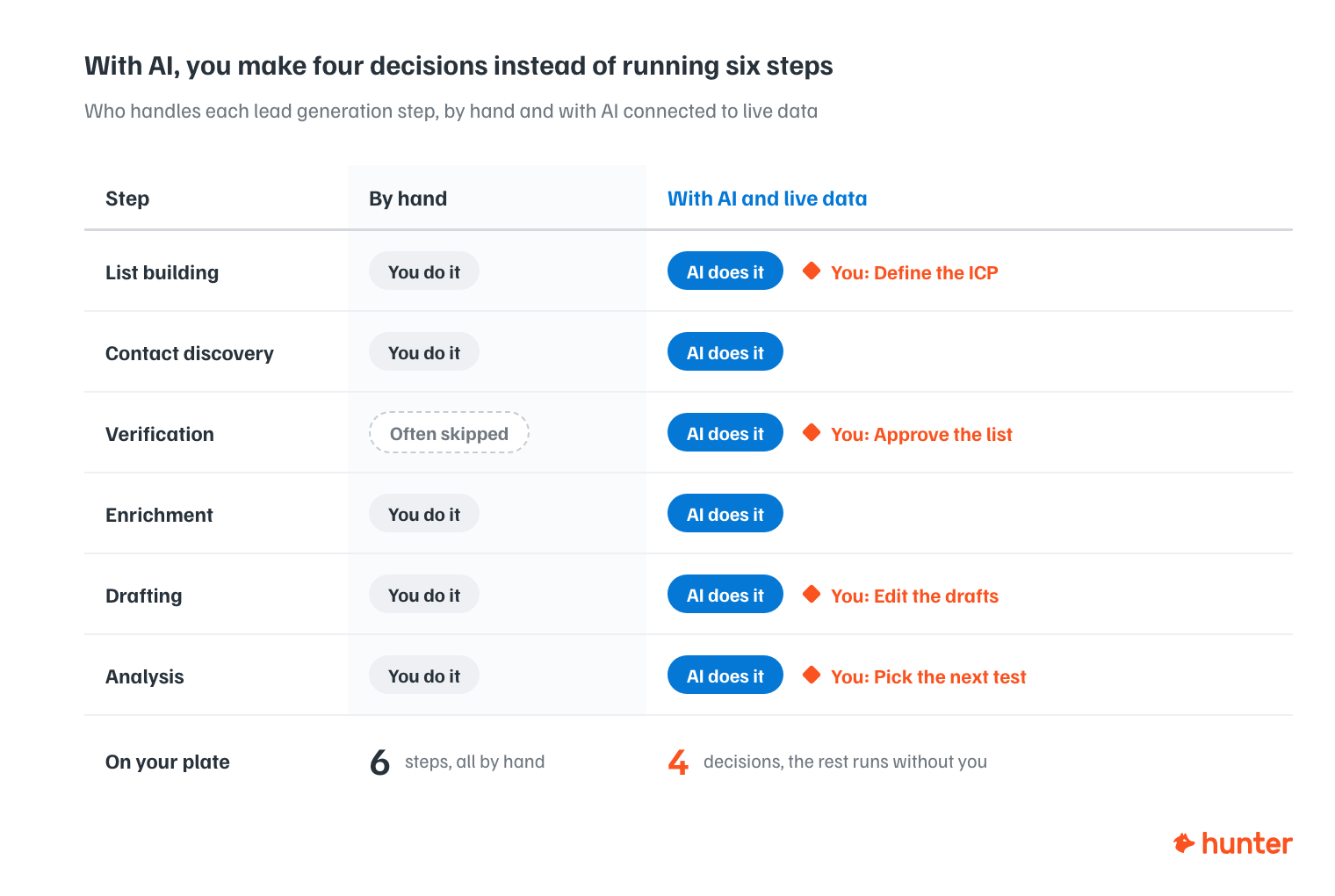
AI lead generation covers most of the lead generation workload:
- List building: Describe your ideal customer and get a target list of matching companies.
- Contact discovery: Identify the right people inside those companies.
- Verification: Confirm the email addresses exist before anything goes out.
- Enrichment: Add role, seniority, company and technology context next to each person.
- Drafting: Write personalized sequences from that context.
- Analysis: Review what worked and decide what to test next.
If all you have at this point is doubt about whether this can really work at all, consider two things:
1) Context
You can point an LLM at your website, messaging, case studies, or past campaigns, and it will work from this context as opposed to a browser search. It can even learn from your other unrelated chats. If you're a founder working with AI on all the other parts of the business, it already knows your value gap and who you're building for.
2) Data
LLMs don't know anyone's email address. They were never trained on verified contact data, and they never will be for privacy reasons. Connect it to a source that does know and the model's reasoning has facts to use.
How AI lead generation differs from traditional prospecting
Traditional outbound has always been capped by human capacity, because every step was somebody's hour. Want more pipeline? Hire more SDRs, buy more tools, define more processes. Worse, everything stops when the workday ends.
AI doesn't hold the limiting beliefs about who you should be contacting and what's possible with email. While it won't outsmart you about your business, it can act like a consultant, providing alternative perspectives about anything from markets to prioritize to what your follow-ups should say.
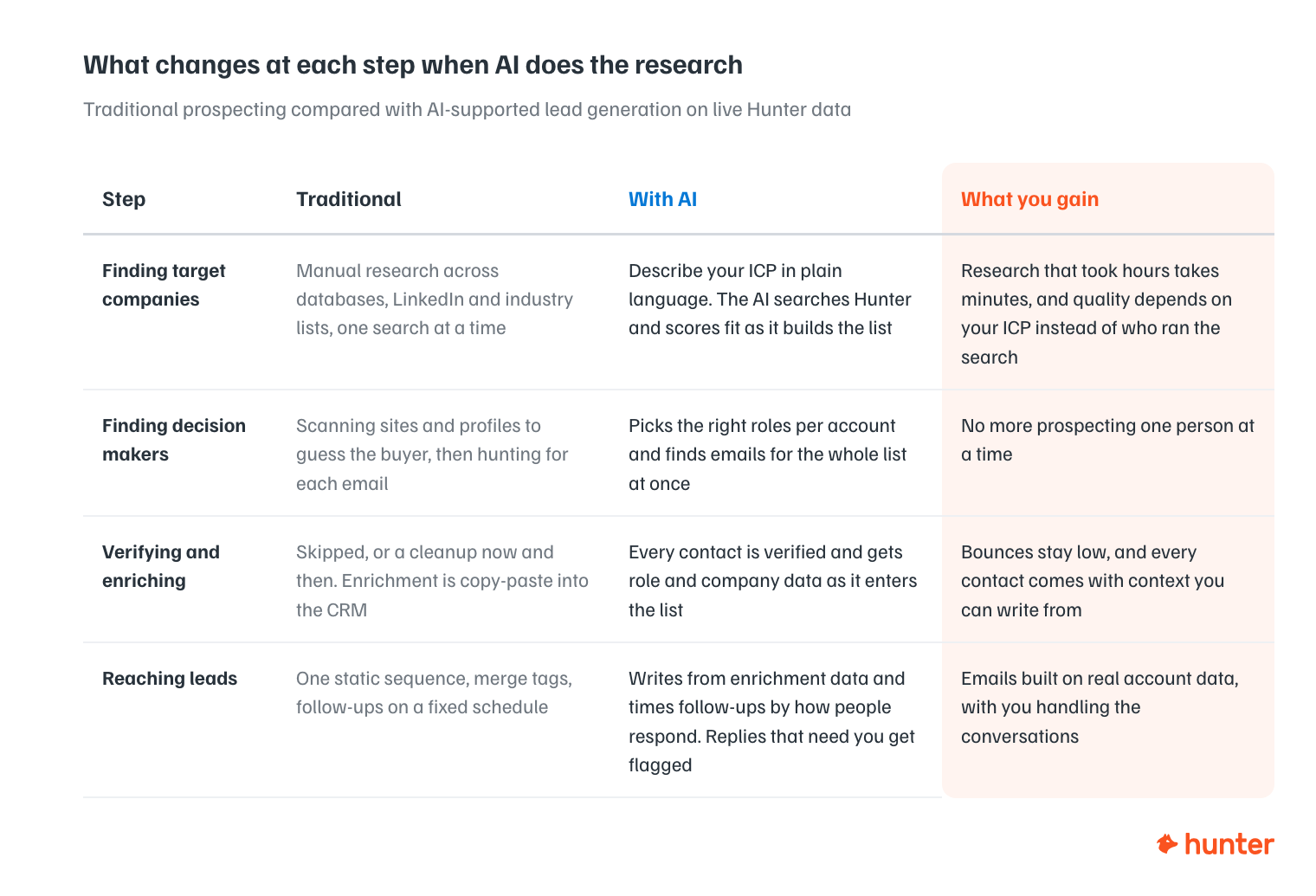
With AI-based lead generation, the steps are the same ones sales teams have always run. What changes is that one rep can now do more, and the parts that don't require judgment no longer wait for you to be at your desk.
The benefits of AI lead generation
Better leads
Speed is obvious, but quality cannot be overlooked.
Every email address gets verified before it enters a list, because verification is now part of the routine. It used to be a manual monthly cleanup when bounce rates risked your sender reputation (everything above 2%).
AI prioritizes the who and how of your lead generation by analyzing engagement from past campaigns and companies that look like your best customers, instead of whoever happened to look promising that morning.
Lastly, every email starts from enrichment data about the actual company. A first-name merge tag can't do that.
The math works at any scale
If you're paying an agency or considering an SDR, the comparison is short.
- An agency retainer runs into thousands per month, and the cost per lead is hard to sustain unless your contract values are high.
- An SDR costs more again once you count ramp time.
- A Hunter plan plus an LLM subscription is a fraction of that cost.
The math also works against doing it by hand. Even at 30 emails a month, research, verification, and enrichment eat most of the hours, which is where AI is great. You maintain control with your judgment and by having conversations with interested leads.
There's a smaller benefit too: when an agency relationship ends, everything it learned about your market walks out the door. Not with AI solutions, because your skills, prompts, and context files stay yours.
You prospect where you're working
Hunter works wherever you work, and the remote MCP is how Hunter brings AI into your favorite tools.
In the app, you have to know Hunter to use Hunter: which feature does what, in which order.
In a conversation with your AI, you describe the outcome like: "50 marketing directors at US SaaS companies under 100 people, verified emails only" and the LLM translates.
Your strategy docs, your ICP, your past conversations about what worked are all context it carries into execution.
How AI lead generation works: the 8-step workflow
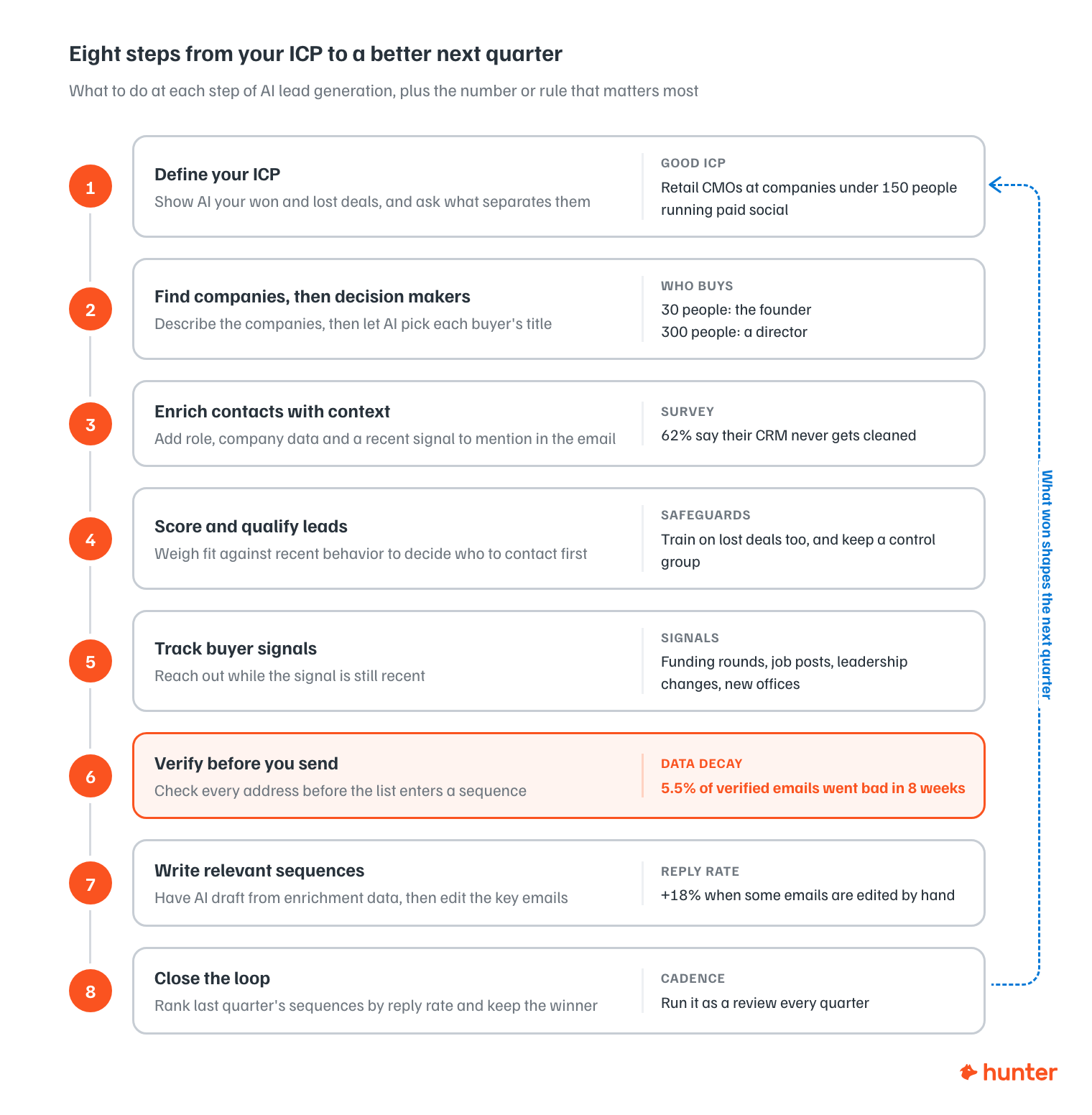
Define your ideal customer profile (ICP)
If this step breaks then everything downstream does too, so you must get it right.
Traditionally, this is created in a workshop with a whiteboard, a group of sales reps, marketers, and leaders (or by yourself if you're working solo). The profile you leave with describes the customers you happen to have rather than the ones worth having.
Give AI your closed-won and closed-lost records together, ask what separates them, and you'll find a company profile you can run with.
A poorly created profile is a person in a company like "CMOs at retail companies".
The best profiles combine the person and the company they're in: "Retail CMOs at companies under 150 people running paid social who've posted an SEO role in the last quarter".
Find companies, then decision makers
Step one: Finding the companies
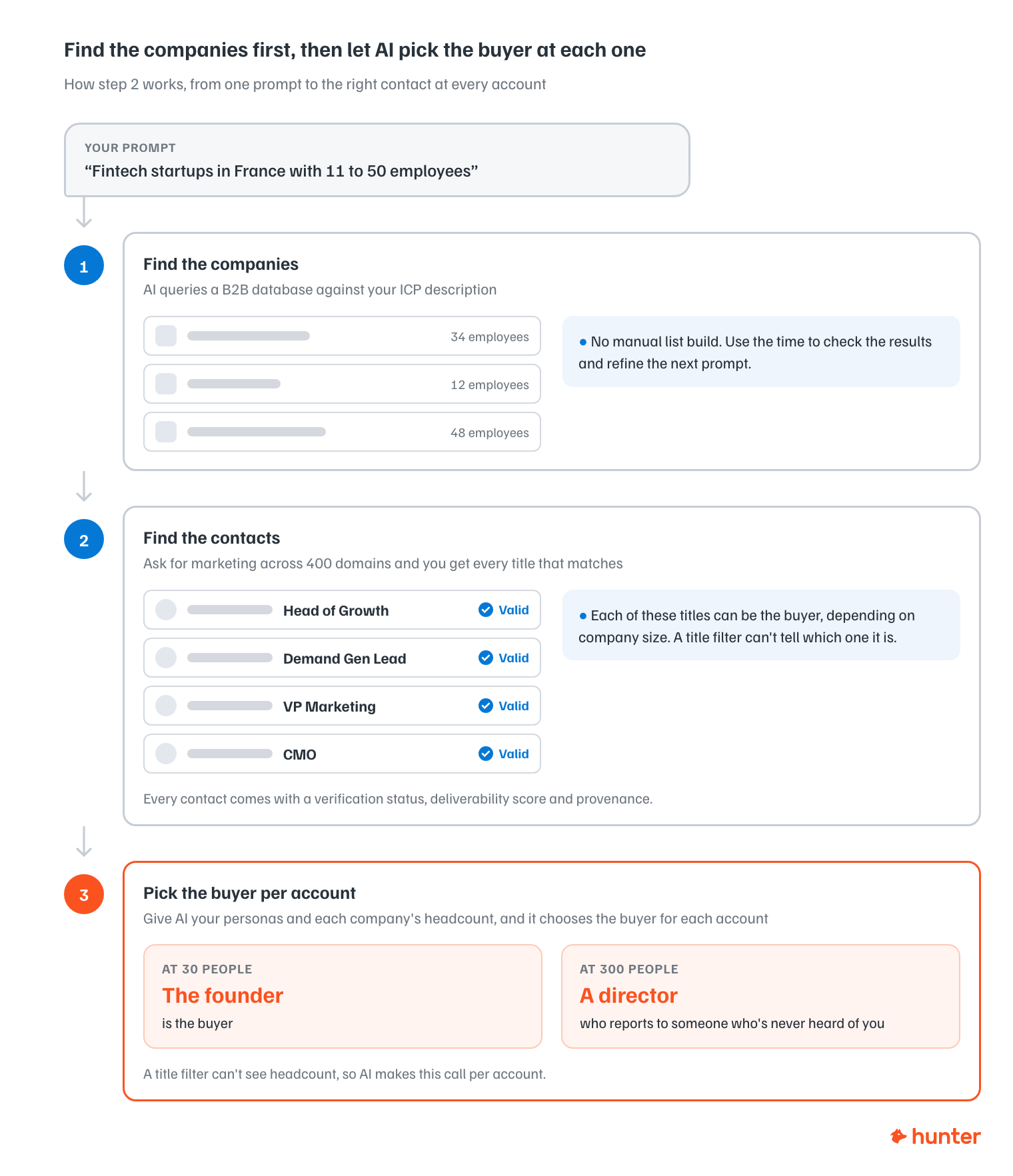
This is where AI sales prospecting starts. Describe the companies in your ICP and AI queries a B2B database against that description.
"Fintech startups in France with 11 to 50 employees" provides you a list, cutting out the manual list build, and giving you back time to eyeball the results. This additional time means you can now think critically about whether these results are what you expect, and then guide the agent to improve the results on the next prompt.
Step two: Finding the contacts
You need people inside those companies who influence decisions, and an email address to reach them.
Point the AI at each company and it returns the addresses known for it, each with a name, job title, verification status, deliverability score, and provenance data.
Filtering by department means you can ask for marketing across 400 domains without pulling every address at each one.
Titles are where the AI shines. "Head of Growth," "Demand Gen Lead," "VP Marketing" and "CMO" can each be the buyer depending on company size, and filters don't know this.
Give your AI your personas plus the company's headcount and let it choose per account. At 30 people the founder is the buyer. At 300 it's a director who reports to someone who's never heard of you.
Enrich contacts with context
Lead enrichment turns an email address into a person you can write to.
From an email address you get role, seniority, company size, industry, technologies in use, funding history, and social profiles.
Because a first name in a subject line is par for the course today, you need to find signals and weave them into your copy, like the company posting three sales engineer roles last month, and what they're trying to fix by hiring them.
Run enrichment as contacts enter the list, not as a quarterly cleanup. When we surveyed people before running our data decay study, 62% said their CRM never gets cleaned at all.
Contact data goes stale in two ways:
- The context goes stale as people change roles and companies change shape or direction, and
- The email address itself stops being safe to send to, which is the faster of the two problems by a long way.
Score and qualify leads
AI lead scoring helps you determine who to contact first.
AI does it by weighing fit vs. behavior: does this company look like the accounts that closed, and has anyone there done something recently that suggests timing.
A model fed only your closed-won deals will reproduce your existing customer base and present it back to you as insight. It learns "mid-market SaaS, 200 to 500 people" because that's who buys from you, and filters out the adjacent segment you've never tested.
Those adjacent segments are where the opportunities lie.
Two safeguards:
- Include the losses: Feed it lost deals and disqualified leads, not just wins.
- Leave a control group: Let a deliberate slice of prospects bypass scoring entirely, so you can see what the model would have thrown away.
Time your outreach with intent data
Lead scoring tells you who to contact, and buyer signals tell you when.
The signals to track have a short shelf life:
- Funding rounds
- Relevant job postings
- Leadership changes
- New offices
Verify before you send
You need to find real leads, not chase ghosts. You achieve this by verifying the email data.
An unverified list produces hard bounces, and hard bounces put your sending domain in trouble. Invalid addresses signal poor list quality to mailbox providers.
You find out when a campaign underperforms, and by then every message leaving that domain struggles with deliverability, including the ones going to contacts who were a perfect fit.

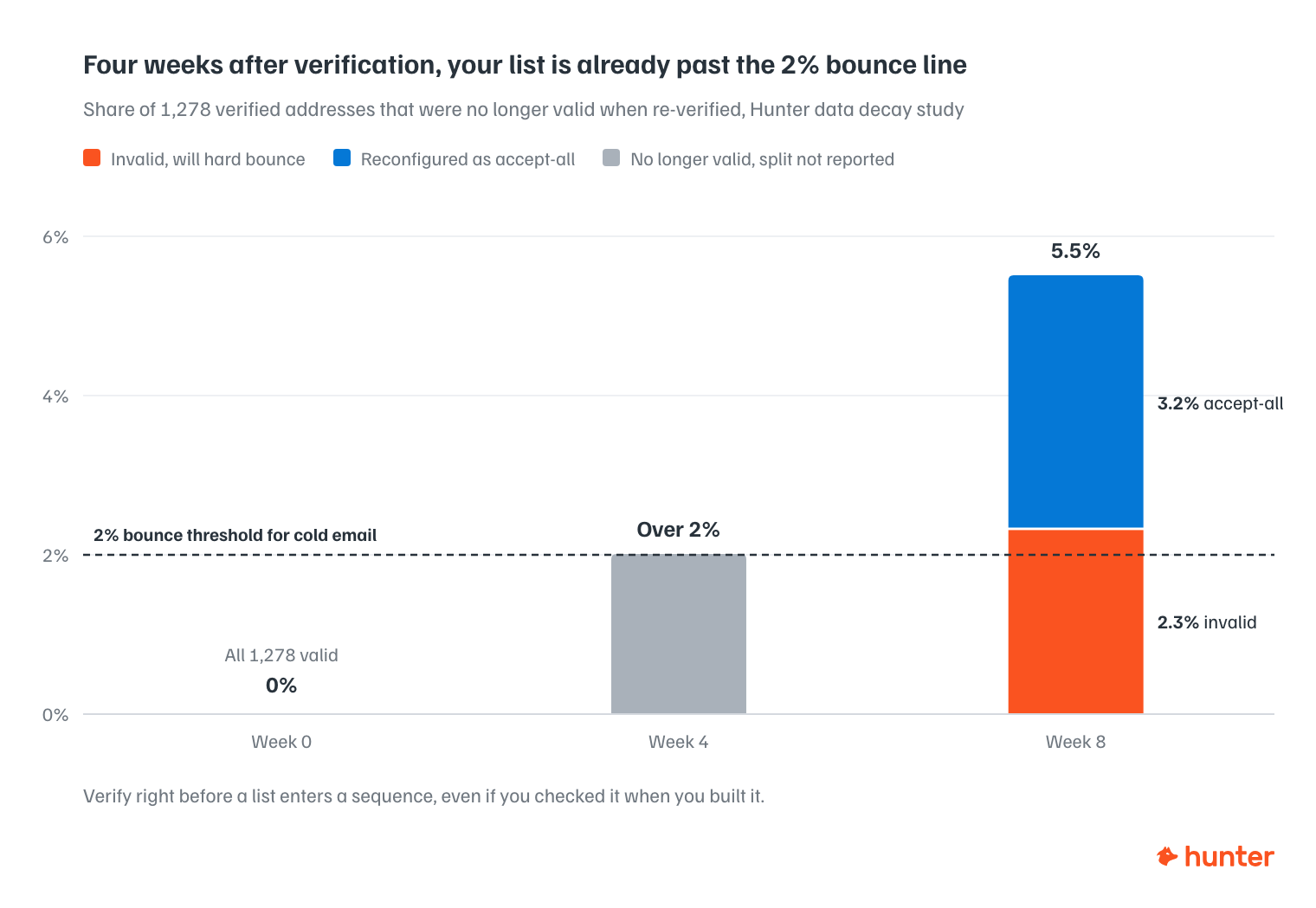
What the data says: We took 1,278 addresses Hunter had verified as valid, then re-verified the whole sample every week for eight weeks. By the end, 5.5% were no longer valid: 2.3% had gone invalid outright, and 3.2% had been reconfigured as accept-all.
The four-week mark is the number that should change your workflow.
Over 2% of the list was already invalid by then, and 2% is the bounce rate at which you pull a cold campaign back and troubleshoot deliverability. Launching on top of it makes the problem worse.
But what's worse is when AI cannot suggest contacts based on real lead data. When an LLM is disconnected from a verified data source, your request for an email address is a guess of something plausible, correctly formatted, at the right domain.
It flags no uncertainty, because from the model's side there isn't any, and that's exactly what the 76% figure is measuring.
Hunter's Email Verifier returns a deliverability status and a confidence score for every email address, and flags accept-all servers as accept-all instead of passing them as valid.
Rule of thumb: verify before the list enters a sequence.
Write relevant sequences
For AI email lead generation, the model drafts well from enrichment data and badly from nothing.
Provide account context and you get a great first draft. Give it a name and a company and you get the same email everyone else is sending this week.
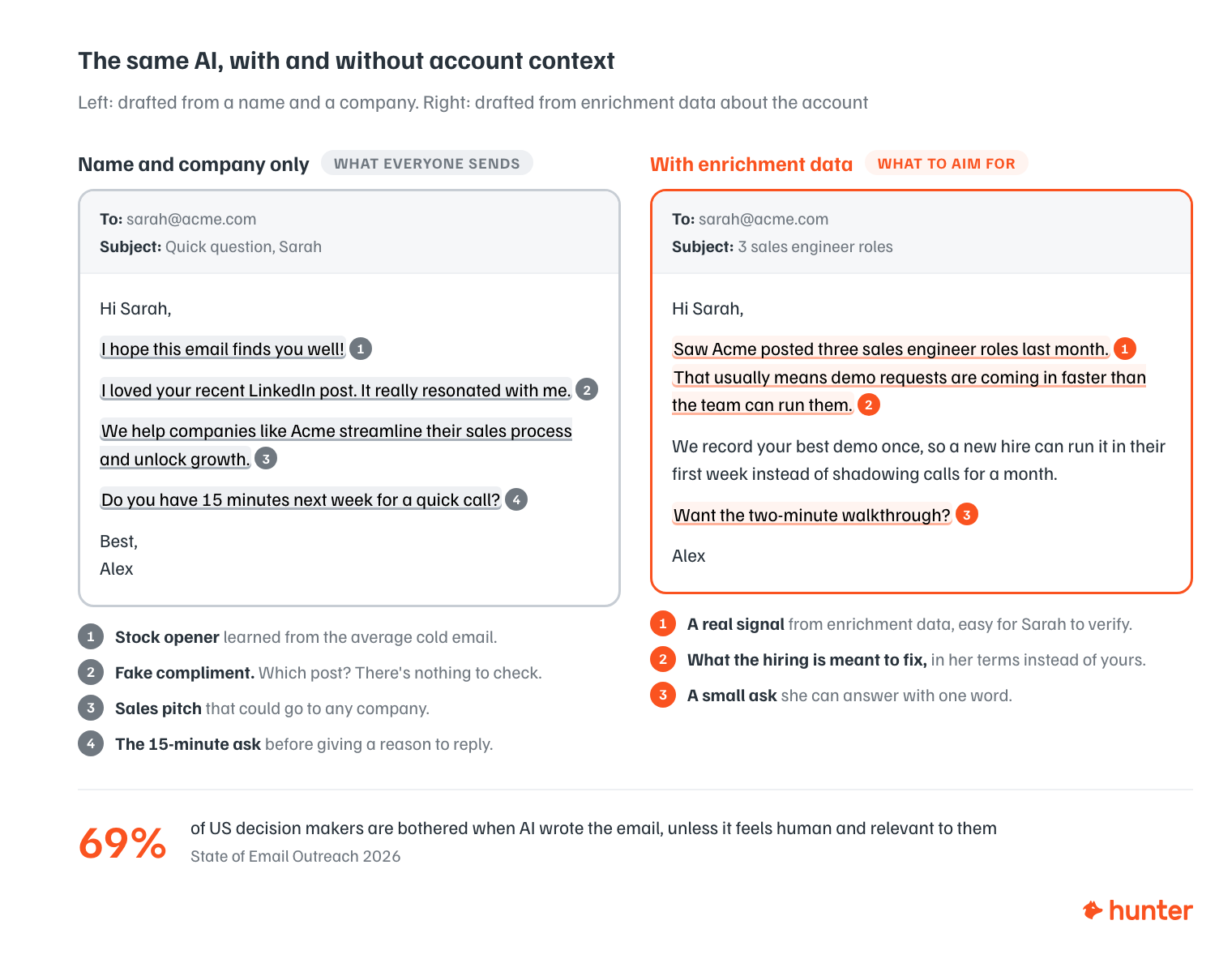
The bigger risk is tone, because models learned email copywriting from the average cold email. Left unshaped, your AI reproduces what they learned: the opener about hoping this finds you well, the dreaded fake compliment about a LinkedIn post, or the close asking for fifteen minutes.
It used to be safe to say recipients didn't mind AI as long as the message was good, and our 2025 report found most decision makers genuinely didn't care.
In the State of Email Outreach 2026 report, 69% of US decision makers told us it bothers them if AI was used to write the email, unless the output feels genuinely human and relevant to them. We flagged it as AI fatigue, because it's a straight reversal of what the same question returned a year earlier.
It isn't the only thing they've lost patience with.
65% now say cold emails fail because they feel too sales-focused, which overtook irrelevance as the top complaint this year. 61% still cite irrelevance. 48% call out generic, impersonal messaging by name.
But the same 31 million emails show what does work, and it isn't less AI. It's more editing:
- 67% of decision makers say personalization using publicly available information makes them more likely to reply.
- Emails with two custom attributes get a +56% higher reply rate than non-personalized ones (5.6% vs 3.6%).
- Sequences where the sender manually edited some emails before sending beat fully automated ones by +18% (5.2% vs 4.4%).
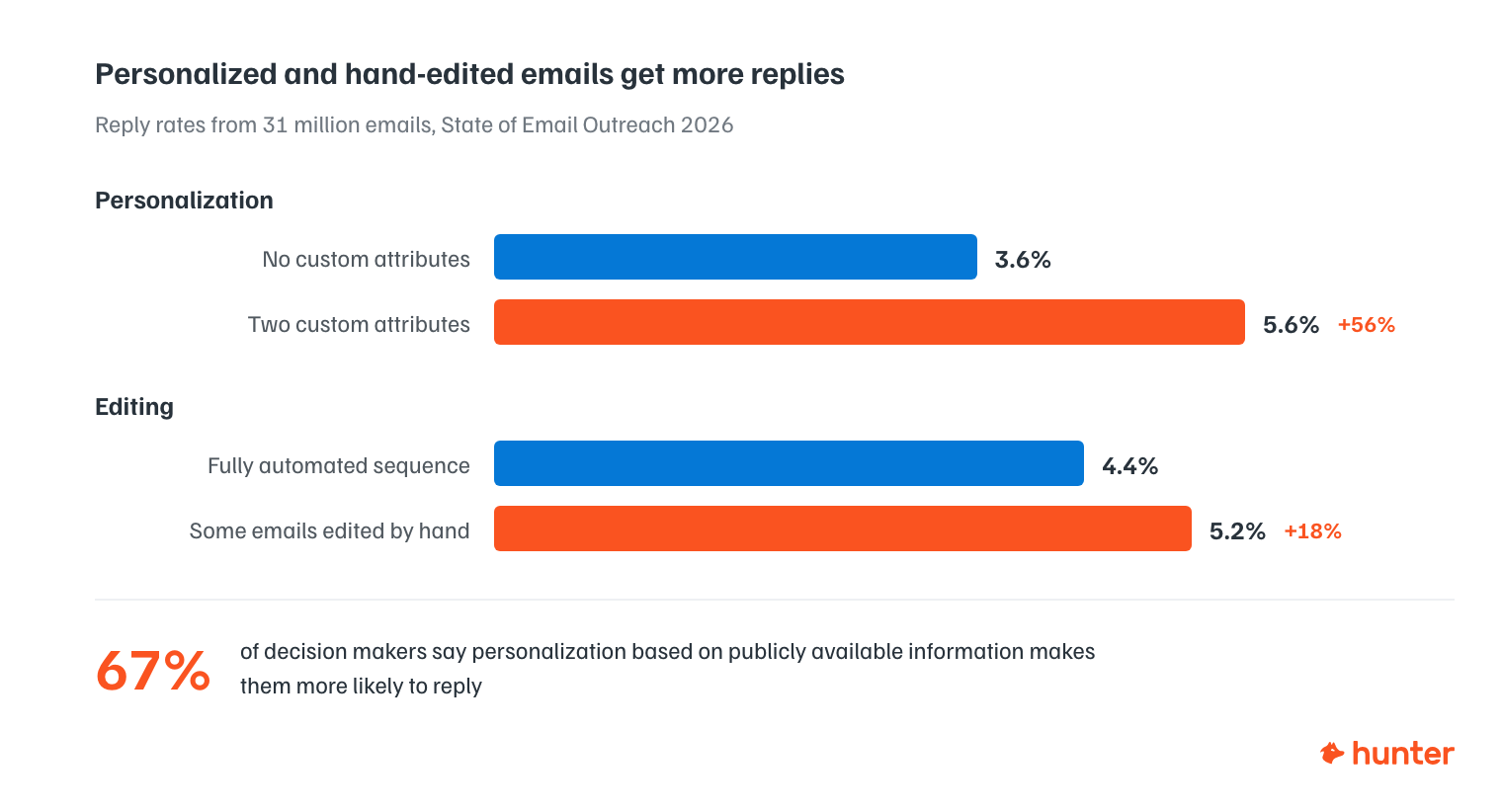
So, let AI do the research and the first draft, then edit the copy before it goes out.
Before sending your sequences make sure to:
- Give it a target: Feed it samples of writing that actually got replies, so it has something better than the internet average to aim at.
- Check every draft automatically: Run each one against a cliché list before a human ever sees it.
- Edit the ones that matter by hand: You don't have to touch all of them. The 18% lift comes from editing some.
Close the loop
Pull the stats from your last quarter of sequences, rank them by reply rate, and work out what separated the best from the worst.
Small wins matter here, so make this a recurring task.
Prompt
"Pull the stats for every sequence I sent this quarter and rank them by reply rate, since opens say more about the subject line than the message. Name the winner and the loser, and tell me what separated them: the audience, the angle, or the timing. Then write up the winning subject line and opener so they become my defaults for next quarter."
The AI lead generation stack
There's no single AI lead generation platform. There are six layers to a lead generation stack.
| Layer | What it does | Common tools |
|---|---|---|
| Data and enrichment | Finds companies and contacts, fills in firmographic and technographic detail | Hunter, Apollo, ZoomInfo, Clay |
| Verification | Verifies email addresses are real before launching campaigns | Hunter, ZeroBounce, NeverBounce |
| Intent and signals | Says who's worth contacting now | 6sense, Leadfeeder, Hunter Signals |
| Orchestration | Moves data between tools and applies logic | Clay, Zapier, n8n |
| Execution and deliverability | Scales sending and protects sender reputation | Hunter Sequences, Instantly, Smartlead, lemlist |
| System of record | Tracks what happened after outreach | HubSpot, Pipedrive |
Every tool above has an MCP connector, so you can use several of them from a single conversation with your AI assistant.
Disclaimer: Hunter appears in three layers and it's our product. The comparisons below hold competitors to the same standard and we try to be as objective as possible.
Data and enrichment
Hunter finds and verifies professional email addresses from a domain or a name, then enriches them. A domain call returns headcount, revenue estimate, location and founded year, plus the full technology stack by category, and funding rounds with dates and amounts. Person enrichment accepts an email address and returns role, seniority, department and social profiles. The data is publicly sourced, and when there is no match the API returns a 404 instead of a guess, which is what you want in an AI stack, because a guess gets treated as fact. It is a single source, though, so raw contact coverage is narrower than Apollo's or a stacked Clay workflow's.
Apollo is a contact database with sequencing, a dialer and CRM sync bundled in a product, and that bundling is usually what makes it the first tool for sales teams. Published database figures range between 210 and 275 million contacts depending on who's counting, and accuracy varies more than the headline suggests, particularly outside North America. Treat what comes out of it as a starting list.
ZoomInfo is the enterprise end of the same category. It changed its Nasdaq ticker to GTM in 2025 and now positions itself as a Go-To-Market Intelligence Platform rather than a data provider, with its Copilot assistant packaged across several tiers. Pricing is quote-only and typically starts around $15,000 a year on an annual contract.
Clay doesn't primarily own data, it queries other providers' data. It consolidates over 150 providers into one workflow platform with waterfall enrichment, which pushes coverage well past what any single source reaches. The tradeoff is a learning curve, and stacked waterfalls burn credits fast when the early providers miss.
Verification
Hunter's Email Verifier returns a deliverability status and a confidence score for every address, and flags accept-all servers explicitly. That distinction does more work than it sounds like: an accept-all domain accepts everything at the SMTP layer, so any tool reporting those as valid is handing you a potential bounce with a green tick on it.
ZeroBounce and NeverBounce sit at opposite ends of the same category. ZeroBounce is the broader deliverability platform, adding blacklist monitoring, warmup and catch-all scoring on top of plain verification, and it's the less strict of the two about what it'll call valid. NeverBounce is verification-only, faster, and more conservative. It labels fewer addresses as safe and produces fewer bounces as a result. NeverBounce is owned by ZoomInfo, so if you already have a ZoomInfo contract, ask about bundling before you buy separately.
Intent and signals
6sense is the enterprise ABM standard, built on a first-party intent network it calls Signalverse plus predictive account scoring. It's repositioned around agentic GTM, with Revvy AI agents and MCP as a delivery channel into other tools. Enterprise contracts run into six figures, but a free Community plan exists, so you can see the shape of the data.
Leadfeeder, formerly branded Dealfront and unified back under the Leadfeeder name in March 2026, combines website-visitor identification with a European company database, hosted and built in the EU. That makes it the natural pick when GDPR compliance and European coverage are your binding constraints rather than raw database size.
Hunter Signals tracks the short-shelf-life events described earlier: hiring, funding, new email addresses found. The framing is deliberately narrower than the platforms above.
Orchestration
Clay: Alongside enrichment, Clay is where many teams build the actual logic of the pipeline. If the company has over 50 employees, enrich; if the address verifies, send it on. As of September 2026 it also ships a native Sequencer. It's the most capable option in this row and the one most likely to become a system exactly one person on your team understands.
Zapier has repositioned as an AI orchestration platform. Its MCP server exposes over 30,000 ready-made actions to outside AI tools and handles the logins and rate limits, with each AI-initiated action billing as 2 tasks rather than 1. For simple branchless flows it's ten minutes of work. Per-task pricing is what makes it expensive once the logic branches and volume climbs.
n8n is the self-hosted alternative, with native AI agent nodes and a Community Edition that runs free with no execution cap. Two caveats before you commit: the fair-code licence isn't OSI-approved open source, and running automations for paying clients on your own instance requires a commercial licence. Free also assumes you already have someone who keeps a server up.
Execution and deliverability
Hunter Sequences keeps finding, verifying, and sending in one platform, which removes the export-import step where lists usually go stale. Email addresses get re-verified as part of the flow. Additionally, Inbox Protection and done-for-you email infrastructure give you a proper sending setup and catch deliverability issues before they erode your sender reputation.
Instantly and Smartlead both target high-volume cold outbound across many inboxes, with warming and rotation built in. Instantly is the easier of the two to set up and has added its own contact database. Smartlead gives finer per-inbox control and reporting, and agencies running large mailbox pools tend to prefer it for that. Both make it very easy to do damage at scale, so everything in the verification section applies double here.
lemlist is the personalization-first option, with multichannel sequences and stronger creative tooling. It raised prices in early 2026, and reviewers have flagged deliverability as its weaker axis relative to the other two. Whether the creative tooling is worth it depends entirely on whether your messages deserve the extra effort.
System of record
HubSpot is where most small and mid-sized B2B teams land, because the CRM is usable without an admin. Its AI layer was rebranded in July 2026: Breeze Agents moved into Agent Hub and Breeze Studio became Agent Builder, with agent usage metered in credits on top of seats. Budget for both axes.
Pipedrive is deliberately simpler, positioned as a sales pipeline first and everything else second, with AI folded into the seat price rather than metered separately. For a small outbound team that mainly needs to know what happened after the send, that's often enough, and simpler usually means the data actually stays current.
Do you need an AI SDR?
AI SDR is an emerging term, and we left it out of the stack above because it's a category rather than a layer. But, realistically, if you are running outbound lead generation, you don't need a standalone AI SDR.
Use one for inbound triage if you want, but don't put one of the new AI agents for lead generation in front of people who've never heard of you.
An AI SDR, sometimes sold as an AI lead generation agent, runs outreach autonomously: it researches accounts, writes the emails, sends them, handles the replies. AI-assisted lead generation runs those same steps with you approving the ones that spend money or reach a human.
Autonomous outbound works well for inbound triage, where somebody already raised their hand. For outbound, it fails because the model has no way of knowing that the message it just sent was slightly wrong in the way that costs you long-term.
We compared the most popular AI SDRs, and a fully autonomous AI SDR at this point is fantasy.
How to use AI for lead generation in your business
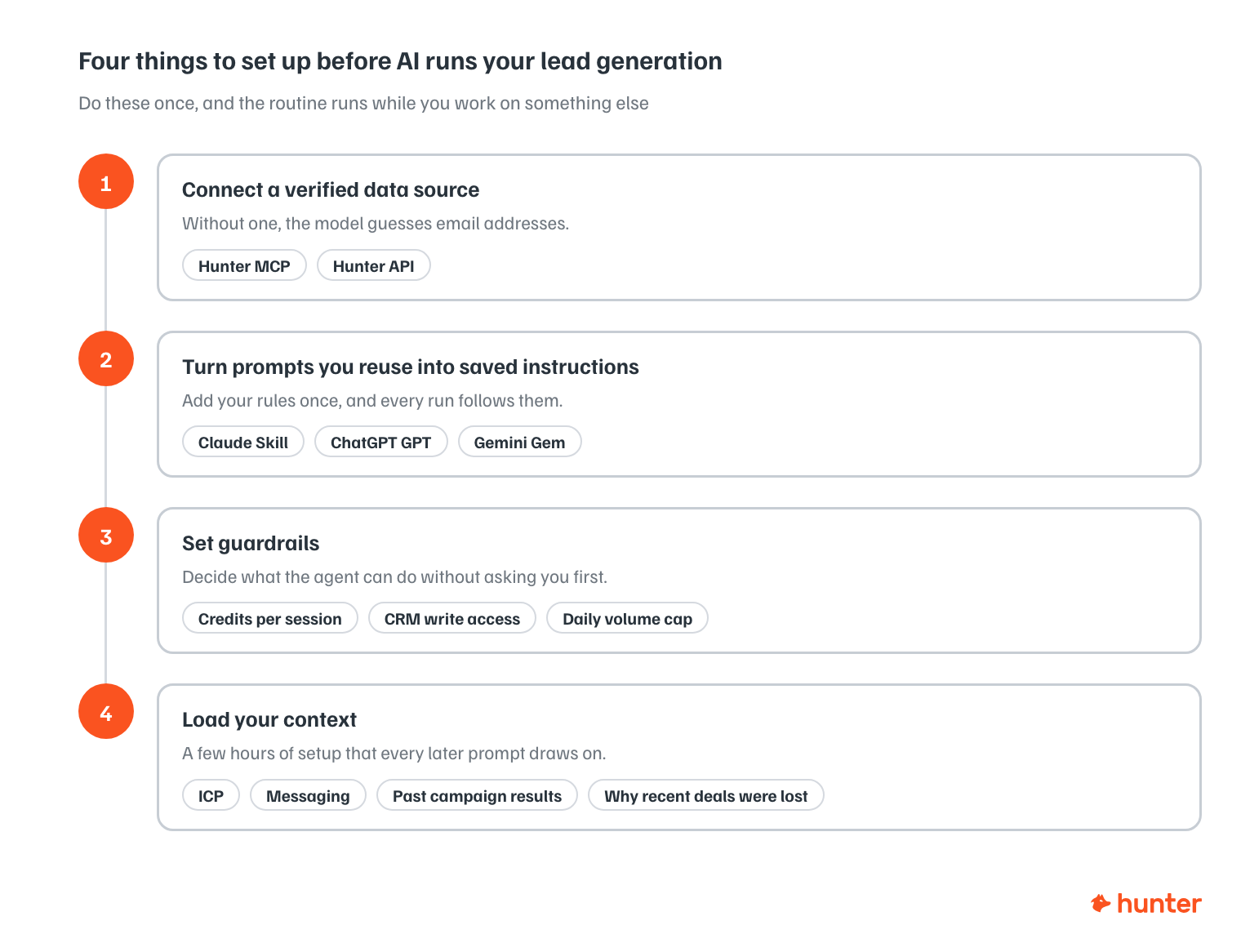
Connect a verified data source
The model supplies the reasoning, so something else must supply the facts. Whether that's Hunter through an MCP connection, a direct API integration, or another provider, you need to give your AI real lead data to work from.
Turn what works into prompts
When a prompt is repeatedly used, turn it into a Skill, a GPT or a Gem with your rules added.
We built a Prompt library to collect the best prompts we tested on every stage of the AI lead generation process.
Set your guardrails first
Decide what the agent can do without asking:
- How many credits it can spend in a session
- Whether it can write to your CRM, and
- What volume cap applies per day (an agent with no ceiling on spend will find the ceiling for you)
Give the AI assistant your context
Before running AI-powered workflows, invest a few hours to load your context: ICP, messaging, past campaign results, and the reasons your last few deals were lost. After that the routine runs while you work on something else, and pings you when a decision needs a person.
The limits of AI lead generation
You're still needed
In a chat, you're present for every step by definition. An agent reduces that, but it doesn't remove it. It should stop and ask before consuming credits, before modifying your lists, and before sending anything. An agent that emails people without your explicit yes is a liability, not a productivity gain.
So budget real time for review.
The verified data layer isn't optional
An LLM's context window is its working memory, and it's finite.
Long lead gen conversations outgrow it, older details fall away, and when the model is missing a fact, it fills the gap rather than saying "I don't know."
In lead generation that's fatal, and the number at the top of this guide is what it looks like at scale.
AI slop
Models are trained on averages, and the email outreach average is terrible.
Left unshaped, AI reproduces the clichés it learned from: "I hope this email finds you well," fake personalization, the pitch that sounds like every other pitch in the inbox.
Recipients only care when your copy reads like AI. Feed it examples of your actual writing, and use a Skill that checks every draft against a cliché list before you ever see it.
Lastly, recipients who recognize a generated email will mark it as spam more readily than one they merely find irrelevant, and that hurts your email's deliverability.
Models change under you
Providers update models constantly, and output quality shifts with them, usually for the better and sometimes just differently in ways that show up in your campaigns. A prompt that produced good emails six months ago can produce competent, characterless ones today.
Frequently asked questions
What is AI lead generation?
Using AI models, connected to live business data, to find potential customers, verify their contact details and run outreach. The model handles the research and the sequence drafting. A verified data source supplies the facts it can't know on its own.
Will AI replace lead generation?
No. It's replaced most of the manual work, including list building, research, enrichment, first drafts, and follow-up scheduling. Deciding who to target, what to say and which conversations to chase still needs a person, because those decisions depend on knowing your business rather than operating a tool.
Can ChatGPT generate leads?
Only if you connect it to real contact data. On its own it'll produce email addresses that look correct and don't exist (we measured that at 76%). Connected to a data source through an app or an MCP connection, it can search and verify against real records, then enrich what it finds.
Which AI is best for lead generation?
The model matters less than the underlying data it's connected to. Claude, ChatGPT, Gemini and Perplexity are all capable enough. The differences that actually move your results are the quality of your data source, how sharply you've defined your ICP, and whether verification runs before you send.
AI outbound glossary
A quick reference to the terms used throughout this guide.
Show all 27 terms
- Agent (AI agent)
- An AI that completes multi-step tasks on its own. It plans the steps, uses tools like Hunter or your browser, checks its own results, and comes back to you when it needs a decision. A chat answers questions; an agent does jobs.
- Agentic AI
- The shift from AI you prompt line by line to AI that works semi-autonomously. In lead generation, that means handing an agent the whole process, from finding companies through to sending sequences, instead of prompting each step yourself.
- AI SDR
- An agent doing the job of a sales development rep: researching accounts, finding contacts, writing outreach, and booking meetings. The best-known examples work inbound leads; outbound AI SDRs exist too, and need closer supervision.
- AI slop
- Generic, low-effort AI output that shows up as recycled phrases in cold email ("I hope this finds you well"), fake personalization, and copy that sounds like everyone else's. Recipients rarely object to AI itself, only to email that reads like it.
- API (application programming interface)
- The way software talks to other software. Hunter's API lets an agent search, verify, and enrich data directly, with no one clicking through the app.
- Connector
- A pre-built link between your AI and another tool, such as Hunter, your CRM, or Google Drive. Once connected, the AI can read from and act in that tool during a conversation or an agent run.
- Context window
- An LLM's working memory, meaning everything it can see in the current conversation, including your prompts, your files, and its own replies. Once a conversation outgrows the window, older detail falls away, which is why long lead-gen chats can lose the plot.
- Deliverability
- Whether your emails reach the inbox rather than the spam folder. Bounces from unverified addresses damage your sender reputation, which is why you verify before you send.
- Enrichment
- Adding useful data to a bare contact or company record: role, headcount, industry, technologies used, funding, and so on. Agents rely on enriched data to write emails that reference something real about the recipient.
- Firmographics
- The company equivalent of demographics, so industry, size, location, revenue, and structure. These are the filters you'd use to describe your ICP to an agent.
- Frontier LLM
- The most capable class of AI models available at any given time. Claude, ChatGPT, Gemini, Perplexity, and Grok all qualify today. The frontier moves quickly, so this year's leading model becomes next year's baseline.
- Gemini Gems
- Google's answer to Claude Skills and ChatGPT GPTs: a saved version of Gemini with your own instructions and files attached, so it behaves the same way every time you run a task. Useful for repeatable outbound jobs like list checks or email reviews.
- GTM (go-to-market)
- Everything involved in getting your product to customers: positioning, marketing, sales, and pricing. "AI in GTM" can cover any of it; this guide focuses on the lead generation slice.
- Guardrails
- The limits you set on what an agent can do without you. For example: verify every address before saving it, never send an email without approval, or cap daily sending volume. Good guardrails are what make semi-autonomous outreach safe.
- Hallucination
- When an LLM states something false with complete confidence, including invented email addresses and contact details. This is why lead generation needs a real data source behind the AI: the model does the reasoning while a database like Hunter's supplies the facts.
- Human-in-the-loop
- A setup where the agent does the work and a person approves the moments that matter, usually list quality and the final send. It's the practical middle ground between manual prospecting and full autopilot.
- ICP (ideal customer profile)
- A definition of the companies most likely to buy from you, usually written in firmographics plus context like growth stage or tech stack. The sharper your ICP, the better an agent can prospect on your behalf.
- Intent signals (buying signals)
- Evidence that a company may be ready to buy: hiring for relevant roles, raising funding, or recently incorporating. Hunter's Signals tracks these so you can decide who to contact first.
- LLM (large language model)
- The type of AI model behind Claude, ChatGPT, and the rest. Trained on enormous amounts of text to understand and generate language, which is what lets you run lead generation through plain conversation.
- .md file (Markdown file)
- A file you upload to your AI assistant to give it direct, explicit instructions for how you want a task done.
- MCP (Model Context Protocol)
- An open standard that lets an AI connect to outside tools and data. Installing Hunter's MCP gives your AI direct access to Hunter's search, verification, and enrichment, whether you're chatting or an agent is running on its own.
- Prompt
- The instruction you give an AI. A good lead-gen prompt covers the role you want it to play, the goal, the context to use, and the task itself. Vague prompt in, generic leads out.
- RAG (retrieval-augmented generation)
- A technique where the AI looks information up from an approved source before answering, rather than relying on memory. It reduces hallucinations but takes technical setup. Most founders get a similar benefit by connecting a verified data source like Hunter instead.
- Skills (Claude) / GPTs (ChatGPT)
- Saved, reusable instructions your AI follows every time it runs a certain task. One example from this guide: a skill that checks every drafted cold email against a list of AI clichés before you ever see it.
- Token
- The unit LLMs use to process text, roughly three-quarters of a word. Usage and pricing are measured in tokens, and every conversation has a token budget tied to the context window.
- Training data / knowledge cutoff
- The text a model learned from, which stops at a fixed date. Training data doesn't contain current, verified contact details, and it never will. That gap is exactly what live data connections exist to fill.
- Verification (email verification)
- Checking that an email address exists and accepts mail before you send to it. Statuses like valid, accept-all, and undeliverable tell you which contacts are safe to reach.